Compact PC builds have less room for airflow mistakes, so the right fan can make a noticeable difference in temperatures, noise, and component longevity. This roundup covers slim case fans, small-format coolers, laptop pads, and cabinet ventilation options for space-constrained setups.
Below, you’ll find options for upgrading intake and exhaust airflow, replacing restrictive stock fans, or adding targeted cooling where a standard 120mm model will not fit.
Best 10 Computer Cooling Fans for Compact Builds Picks for 2026
Best Value ARGB Trio
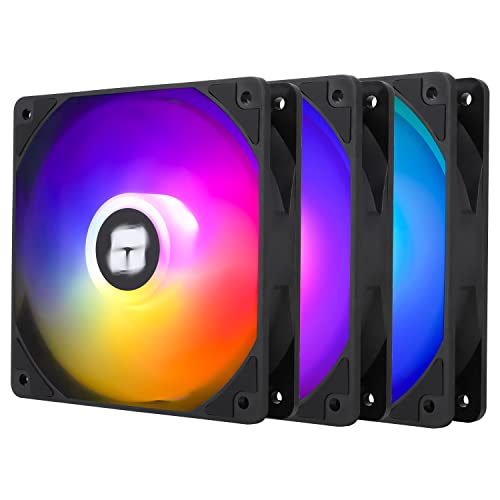
- Three 120mm fans for flexible placement
- 4-pin PWM speed control
- ARGB lighting with motherboard sync
Best For: Affordable multi-fan desktop builds with standard 120mm clearance
Quiet Small-Form-Factor Pick
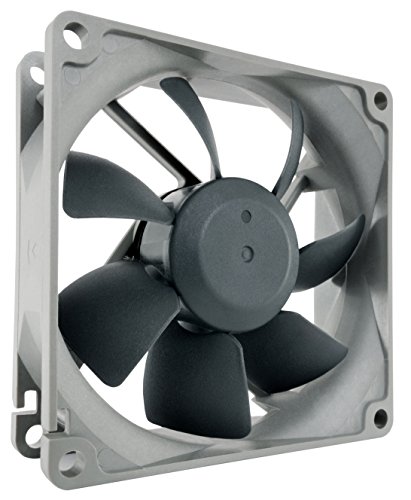
- 80mm size for compact fan mounts
- Quiet 17.1dB(A) operation
- 1800RPM 3-pin design
Best For: Quiet ventilation in compact cases, NAS systems, and replacement applications
Best Laptop Cooling Stand
Kootek 5-Fan Laptop Cooling Pad

- Five USB-powered cooling fans
- Fits 12–17-inch laptops
- Six height settings and two USB hubs
Best For: Laptop cooling and ergonomic desk positioning
Pressure-Optimized Pick

- 120mm x 25mm pressure-optimized design
- 1700 RPM with 4-pin PWM control
- Suitable for coolers, radiators, or cases
Best For: Standard-clearance compact desktops needing versatile 120mm cooling
Slim ARGB Pick
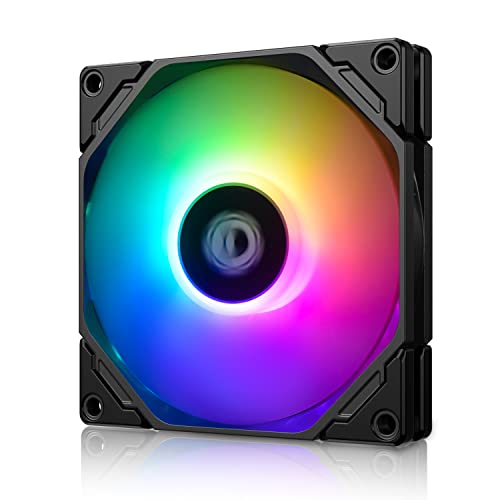
- Slim 92mm x 15mm form factor
- 800–2,500 RPM PWM speed range
- 5V 3-pin motherboard-synced ARGB
Best For: ITX and HTPC systems with limited fan clearance
Three-Fan Value Pack
120mm White LED Cooling Fans 3-Pack
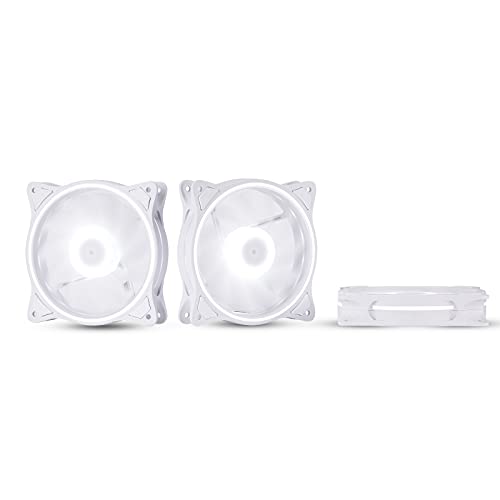
- Three standard 120mm x 25mm fans
- 36 CFM airflow at 16 dBA
- White LED lighting and anti-vibration pads
Best For: Compact cases with three standard 120mm mounting positions
Quiet Cabinet Cooling Pick

- 17 dBA operation with 26 CFM airflow
- Multi-speed controller for noise and airflow tuning
- USB or wall-outlet power; Turbo Adapter included
Best For: Quiet AV cabinets and compact enclosures
Slim High-Airflow Pick

- Slim 15mm profile for restricted clearance
- Up to 42.58 CFM at 2700 RPM
- 4-pin PWM control with vibration-damping pads
Best For: Compact 92mm mounts and slim cooling layouts
Best Value ARGB Trio – Thermalright TL-C12C-S X3
For builders looking for computer cooling fans for compact builds, this three-pack offers a practical way to add airflow across a case or pair fans with a CPU cooler. Its 120mm size, PWM control, and ARGB lighting make it a flexible choice when you have room for standard-thickness fans.
Best For: Budget-conscious desktop builders who want multiple 120mm fans with PWM and ARGB support.
Pros:
- Three 120mm fans provide flexible case or CPU-cooler placement.
- 4-pin PWM control adjusts speed according to system temperature.
- ARGB lighting supports up to 17 effects and motherboard synchronization.
- S-FDB bearings and rated noise up to 25.6dBA support quieter operation.
Cons:
- Standard 25mm thickness may not fit especially space-restricted builds.
- Uses a 4-pin PWM connector and 5V ARGB connection, so motherboard headers must be available.
With 66.17CFM airflow and a 1550RPM maximum speed, this kit balances useful cooling performance with lighting and expansion flexibility. Confirm your case clearance and motherboard connectors before buying.
Quiet Small-Form-Factor Pick – Noctua NF-R8 redux-1800
The Noctua NF-R8 redux-1800 is a focused option for computer cooling fans for compact builds that use 80mm mounts. Its slim 25mm profile and low 17.1dB(A) rating suit chassis ventilation, NAS cooling, and replacement duties where quiet operation matters.
Best For: Compact cases, NAS enclosures, and other systems with 80mm fan mounts.
Pros:
- Compact 80 x 80 x 25mm format fits smaller fan locations.
- Low-noise design is rated at 17.1dB(A).
- 1800RPM speed offers a practical balance of airflow and quietness.
- Rated for more than 150,000 hours MTTF.
Cons:
- 3-pin connector does not provide the same PWM control as a 4-pin fan.
- 80mm airflow capacity is suited to smaller mounts rather than standard 120mm positions.
- Lighting features are not included.
This is a sensible replacement or ventilation fan when your compact system has 80mm compatibility and quietness is a priority. Optional low-noise adapters or voltage reduction can further limit speed.
Best Slim 120mm Fan – ID-COOLING NO-12015-XT-ARGB
When clearance is the main challenge, this 15mm-thick model is a strong choice among computer cooling fans for compact builds. It keeps the standard 120mm footprint while reducing depth for low-profile CPU coolers, radiators, HTPCs, and ITX cases.
Best For: Space-restricted 120mm mounts that need PWM control and addressable RGB lighting.
Pros:
- 15mm thickness saves space compared with conventional 120mm fans.
- PWM range from 500 to 2000RPM supports quiet or higher-airflow operation.
- Provides up to 54.6CFM airflow.
- 5V 3-pin ARGB connector supports motherboard synchronization.
Cons:
- Maximum noise is listed at 31.2dB(A), higher than its minimum rating.
- Only one fan is included.
- Requires compatible 4-pin PWM and 5V 3-pin ARGB headers for full control and lighting.
The slim profile is the defining advantage here: it preserves 120mm compatibility while helping avoid interference around compact components. Check the mounting depth and connector layout before installation.
Best Laptop Cooling Stand – Kootek 5-Fan Laptop Cooling Pad
For portable systems rather than desktop cases, this Kootek stand takes a different approach to computer cooling fans for compact builds: five USB-powered fans cool the underside of a laptop while the stand improves positioning. It supports 12- to 17-inch laptops and adds adjustable height settings and two USB hub ports.
Best For: Laptop users who want adjustable stand ergonomics, broad underside airflow, and extra USB connectivity.
Pros:
- Five fans provide coverage for compatible 12- to 17-inch laptops.
- Six adjustable height settings support more comfortable viewing angles.
- Two USB hub ports add peripheral connectivity.
- Fan and blue LED controls offer selectable operation modes.
Cons:
- It is a laptop stand, not an internal desktop case fan.
- Best performance requires connection to a 5V 1A adapter; otherwise fans may run slowly or fail to spin.
- Its 1.38-inch height and 1.16kg weight may reduce portability.
This cooling pad is most useful when laptop ventilation and desk comfort are both priorities. The front stoppers help secure supported laptops, while the separate fan controls let you choose between partial and full cooling coverage.
Pressure-Optimized Pick – Noctua NF-P12 redux-1700 PWM
For computer cooling fans for compact builds, the Noctua NF-P12 redux-1700 PWM is a strong 120mm option when you need substantial airflow in a standard 25mm frame. Its pressure-optimized design suits CPU coolers, radiators, and chassis ventilation, while PWM control helps balance cooling and noise.
Best For: Compact desktops that can accommodate a standard 120mm fan and need versatile, PWM-controlled cooling.
Pros:
- Pressure-optimized design for CPU coolers, radiators, and case ventilation
- 1700 RPM maximum speed with 120.2 m³/h airflow capacity
- 4-pin PWM control and a stated 25.1 dB(A) maximum noise level
- Six-year manufacturer’s warranty
Cons:
- At 120 x 120 x 25mm, it is not suited to builds requiring a slim fan
- Single-fan package with no listed lighting
This is a practical choice when your compact build has standard 120mm clearance and prioritizes cooling flexibility, established build quality, and automatic speed control over lighting or ultra-slim dimensions.
Slim ARGB Pick – ID-COOLING TF-9215 ARGB
The ID-COOLING TF-9215 ARGB is designed for computer cooling fans for compact builds where a full-thickness fan will not fit. Its 92 x 92 x 15mm profile works well in ITX systems, HTPCs, and other space-restricted configurations, while PWM control and addressable RGB add flexibility.
Best For: ITX, HTPC, and low-profile builds needing a slim 92mm fan with motherboard-synced ARGB lighting.
Pros:
- 15mm-thick slim profile helps preserve clearance
- PWM speed range from 800 to 2,500 RPM
- Up to 44.3 CFM airflow with a listed 14–33.4 dB(A) noise range
- 5V 3-pin addressable RGB connector for motherboard synchronization
Cons:
- 92mm size provides less physical coverage than a standard 120mm fan
- ARGB requires a compatible 5V 3-pin motherboard connection
Its slim format is the main advantage for tight builds. Choose it when 15mm thickness solves a clearance issue and you also want adjustable speed and synchronized lighting.
Three-Fan Value Pack – 120mm White LED Cooling Fans 3-Pack
This three-pack offers a straightforward way to add computer cooling fans for compact builds that have room for standard 120mm fan mounts. Each 25mm-thick fan provides 36 CFM airflow at up to 1200 RPM, with white LED lighting and anti-vibration corner pads.
Best For: Builders needing three standard 120mm fans for quiet case ventilation and a bright white-lit setup.
Pros:
- Three-fan package for outfitting multiple case positions
- 36 CFM airflow at a listed 16 dBA noise level
- White LED triple-loop lighting creates a uniform glow
- Supports 3-pin and 4-pin Molex connections, with rubber anti-vibration pads
Cons:
- Standard 120 x 25mm thickness may not fit especially slim compact cases
- 1200 RPM maximum speed offers less speed range than the PWM models here
- Listed connectors do not specify motherboard PWM control
This pack makes sense when your case supports three standard 120mm fans and you want quiet airflow plus integrated white lighting. Verify mounting space and connector availability before buying.
Quiet Cabinet Cooling Pick – AIRPLATE S1
For computer cooling fans for compact builds that prioritize low noise, the AC Infinity AIRPLATE S1 offers a compact 4-inch fan system with a speed controller. Its 26 CFM airflow, 17 dBA rating, and USB or wall-outlet power make it practical for small enclosures and equipment spaces.
Best For: Quiet AV cabinets, compact equipment enclosures, and low-noise cooling setups.
Pros:
- Quiet 17 dBA operation with dual-ball bearings.
- Included multi-speed controller helps balance airflow and noise.
- Compact 4.6 x 4.6 x 1.3-inch metal frame with brushed aluminum finish.
- Turbo Adapter can increase performance by 25 percent.
Cons:
- Its 26 CFM airflow is lower than the larger fan option in this roundup.
- Designed primarily for cabinets and enclosures rather than standard PC chassis mounting.
The AIRPLATE S1 is a specialized choice when quiet operation and flexible power options matter more than maximum airflow. Verify the mounting space and power connection before buying.
High-Speed Micro Fan – Thermalright TL-B6B
The Thermalright TL-B6B is a 60mm option for computer cooling fans for compact builds where mounting space is limited. It combines 3200 RPM speed, 16.17 CFM airflow, a 4-pin PWM connection, and a compact 25mm thickness for small cases and tight cooling locations.
Best For: Small PC cases and compact chassis that support 60mm fan mounting.
Pros:
- Compact 60 x 60 x 25mm form factor.
- 4-pin PWM connection supports motherboard-based speed control.
- 3200 RPM maximum speed and 16.17 CFM airflow provide focused cooling.
- S-FDB V2 bearing and silicone pads help support service life and reduce vibration.
Cons:
- Its 20.17 dBA rating is not the quietest option listed.
- 60mm mounting compatibility is more limited than common larger fan sizes.
- The fan’s mounting holes are not threaded, so installation may require extra force.
The TL-B6B suits compact systems that need a high-speed micro fan and PWM control. Confirm the chassis uses the specified 60mm mounting pattern before installation.
Slim High-Airflow Pick – Thermalright TL-9015B
For computer cooling fans for compact builds with restricted clearance, the Thermalright TL-9015B uses a slim 15mm profile while delivering up to 42.58 CFM airflow. Its 4-pin PWM connection allows motherboard-based speed control, making it suitable for compact cases, radiators, and select CPU cooler layouts.
Best For: Space-constrained builds needing a slim 92mm fan with strong airflow.
Pros:
- 15mm-thick design helps fit tight mounting spaces.
- Up to 42.58 CFM airflow at a maximum 2700 RPM.
- 4-pin PWM control adjusts speed according to motherboard temperature.
- Vibration-damping pads and a liquid bearing support quieter operation.
Cons:
- Its 22.4 dBA rating is higher than the AIRPLATE S1’s stated noise level.
- The slim design may require checking compatibility with the specific case, radiator, or cooler.
The TL-9015B is the strongest airflow-focused choice here for buyers who cannot accommodate a standard 25mm-thick fan. Check the available 92mm mounting space and clearance before purchasing.
How We Picked These Computer Cooling Fans for Compact Builds
We selected these products for the constraints that matter most in small systems: physical size, mounting flexibility, airflow potential, noise control, power connection, and suitability for the intended enclosure. The list includes standard 120mm fans, slim 15mm models, 80mm, 92mm, and 60mm fans, plus a laptop cooling pad and a cabinet-focused ventilation fan.
Priority went to useful features such as 4-pin PWM control, quiet bearings, speed controllers, ARGB lighting, and designs that can fit where conventional fans cannot. Because compact builds vary widely, the best choice depends as much on clearance and connector compatibility as on maximum RPM.
Quick Comparison
- Best value for multiple 120mm mounts: Thermalright TL-C12C-S X3.
- Best for quiet 80mm replacement: Noctua NF-R8 redux-1800.
- Best slim 120mm option: ID-COOLING NO-12015-XT-ARGB.
- Best laptop cooling solution: Kootek Laptop Cooling Pad.
- Best quiet 120mm PWM fan: Noctua NF-P12 redux-1700 PWM.
- Best slim 92mm ARGB fan: ID-COOLING TF-9215 ARGB.
- Best cabinet ventilation choice: AC Infinity AIRPLATE S1.
- Best for very tight 60mm clearances: Thermalright TL-B6B.
Key Buying Factors for Computer Cooling Fans for Compact Builds
Measure Clearance Before Choosing
Check the fan’s width, height, and thickness, not just its advertised diameter. A 15mm slim fan can fit behind a front panel or near a graphics card where a standard 25mm fan cannot. Also verify screw-hole spacing, radiator clearance, and whether nearby cables or heatsinks obstruct the blades.
Match the Fan to the Airflow Role
Use intake fans to bring cool air into the case and exhaust fans to remove heat. For heatsinks, radiators, filters, or narrow vents, prioritize a model designed to maintain airflow against resistance. Open ventilation favors a quieter, general-purpose fan.
Check Power and Control Compatibility
4-pin PWM fans allow motherboard-based speed control and are generally easier to tune for low noise. 3-pin or DC fans can still work, but control depends on the motherboard or included controller. Confirm voltage, connector type, available headers, and whether an ARGB header is required for lighting.
Balance Speed, Noise, and Airflow
Higher RPM can improve cooling but often increases sound. In a compact case, a controllable fan running at moderate speed may outperform a loud fan that is constantly restricted by a cramped layout. Consider bearing design and published noise claims, but treat them as comparative rather than guaranteed results.
Who Should Buy Which Computer Cooling Fans for Compact Builds?
Choose a 120mm model if your case supports standard mounts; these usually offer the best balance of airflow, availability, and noise. A three-pack is practical when you need several intake and exhaust positions.
Choose a slim 120mm or 92mm fan for small-form-factor cases, tight CPU cooler clearances, or panels with limited depth. Measure carefully, since slim fans may move less air than full-thickness alternatives.
Choose an 80mm or 60mm fan when your enclosure has legacy or highly compact mounting points. These can solve a fit problem, but their smaller blades may need higher speeds to provide comparable airflow.
Choose a laptop pad for a notebook that runs hot on a desk, especially when an elevated stand and multiple low-noise fans are useful. For a cabinet, rack, or enclosed electronics space, a dedicated ventilation fan with a speed controller is the more appropriate solution.