Long study sessions can be hard on your hands, wrists, and shoulders. A well-designed curved keyboard can make everyday note-taking, essays, and research work feel more natural.
Below, we’ve narrowed the field to the best options for students who want better comfort without giving up speed, layout familiarity, or practical features.
Best 10 Curved Keyboards for Studying Picks for 2026
Ergo-First Premium Pick
Logitech Ergo K860 Wireless Ergonomic Split Keyboard

- Split curved keyframe supports natural typing posture.
- Memory-foam wrist rest reduces bending and adds support.
- Bluetooth or USB receiver with full-size quiet keys.
Best For: long study sessions that need maximum wrist and forearm comfort
Budget-Friendly Curve
Logitech K350 Wireless Wave Keyboard
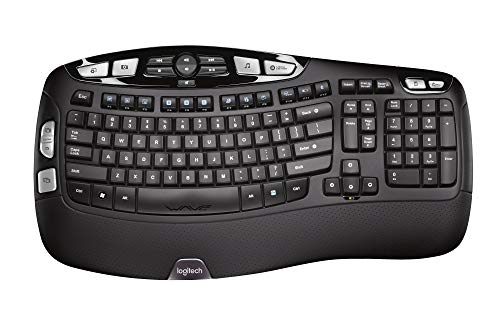
- Wave layout guides hands into a natural position.
- Cushioned palm rest improves comfort for studying.
- Wireless receiver and long battery life reduce hassle.
Best For: students who want a comfortable, low-fuss curved keyboard
Retro Wired Value
Perixx PERIBOARD-106M Curved Ergonomic Keyboard

- Curved rows and keycaps support a natural typing posture.
- Plug-and-play USB setup with no software needed.
- Durable full-size build with long key travel.
Best For: students who prefer a wired, full-size ergonomic keyboard
Compact Multi-Device Pick
Logitech Wave Keys Ergonomic Wireless Keyboard

- Compact wavy layout supports natural hand positioning.
- Memory-foam palm rest adds comfort for long study sessions.
- Switches between up to 3 devices via Bluetooth or Logi Bolt.
Best For: multi-device students who want ergonomic comfort in a smaller layout
Split Comfort Pick
X9 Wired Ergonomic Keyboard with Wrist Rest

- Split layout encourages a natural hand position
- Cushioned wrist rest helps during long sessions
- Full-size 110-key design with shortcuts and numpad
Best For: Long study sessions and everyday desktop typing
Wireless Comfort Pick
Arteck Split Ergonomic Wireless Keyboard

- Split design supports a relaxed wrist position
- Cushioned wrist and palm rest for comfort
- Rechargeable wireless setup with long battery life
Best For: Students who prefer a wireless ergonomic setup
Quiet Study Pick
RECCAZR Curved Ergonomic Keyboard with Wrist Rest

- Curved stepped keycaps promote natural typing
- Silent membrane keys suit quiet study spaces
- Spill-resistant full-size wired keyboard
Best For: Quiet study spaces and long typing assignments
Best with Extra Features
Arteck Split Ergonomic Keyboard

- Split layout supports a more natural arm position.
- Cushioned wrist rest helps during long study sessions.
- 7-color backlighting adds visibility and style.
Best For: Students who want wired ergonomic comfort with backlighting
Dual-Connect Study Desk Pick
OMOTON Curved Split Ergonomic Keyboard

- USB-A and USB-C cable supports multiple devices.
- Curved split design encourages a more open arm position.
- Adjustable tilt and wrist rest support long typing sessions.
Best For: Students and office users who switch between modern and older devices
Ergo-First Premium Pick – Logitech Ergo K860 Wireless Ergonomic Split Keyboard
If you want curved keyboards for studying that prioritize long-session comfort, the Logitech Ergo K860 is built around posture support. Its split, sloping keyframe, pillowed wrist rest, and adjustable tilt legs are designed to keep typing more natural during hours of notes, essays, and research.
Best For: Students who spend long stretches typing and want stronger wrist and forearm support.
Pros:
- Curved split keyframe helps promote a more natural typing posture.
- Memory-foam wrist rest offers 54% more wrist support and less wrist bending.
- Adjustable palm lift gives you three tilt positions: 0, -4, and -7 degrees.
- Bluetooth or USB receiver connectivity plus quiet, full-size keys.
Cons:
- More specialized ergonomic shape may take some adjustment if you are used to flat keyboards.
- Full-size wireless design may be less compact for very small desks.
The ERGO K860 stands out if your study routine is hard on your wrists, since it combines a curved layout with strong wrist support and ergonomic certification. It is a practical pick when comfort matters more than a standard keyboard shape.
Budget-Friendly Curve – Logitech K350 Wireless Wave Keyboard
Logitech K350 Wave Ergonomic Keyboard with Unifying Wireless Technology - Black
Check Price On AmazonFor curved keyboards for studying that keep things simple, the Logitech K350 uses a wave-shaped layout to guide your hands into a more comfortable position. The cushioned palm rest and wireless setup make it a straightforward option for everyday homework, class work, and writing.
Best For: Students who want an easy, comfortable curved keyboard without a complicated ergonomic design.
Pros:
- Wave design with Constant Curve layout helps place hands in a more natural position.
- Cushioned palm rest adds comfort during long typing sessions.
- Wireless Unifying receiver keeps desk setup clean and simple.
- Up to three years of battery life means less maintenance.
Cons:
- Less advanced ergonomic shaping than split-style keyboards.
- Focuses on comfort and convenience rather than highly adjustable posture support.
The K350 is a sensible study keyboard if you want a curved layout that feels familiar and easy to live with. It balances comfort, wireless convenience, and long battery life without asking you to adapt to a more aggressive ergonomic shape.
Retro Wired Value – Perixx PERIBOARD-106M Curved Ergonomic Keyboard
If you are comparing curved keyboards for studying and prefer a wired, plug-and-play option, the Perixx PERIBOARD-106M is a practical choice. Its stepped curved rows and curved keycaps are designed to support a more natural typing posture during long writing or revision sessions.
Best For: Students who want a wired full-size curved keyboard with a classic desktop feel.
Pros:
- Stepped, curved key rows help reduce fatigue over long typing sessions.
- Curved keycaps are shaped to better match fingertip contours.
- USB plug-and-play setup requires no drivers or software.
- Long 4.2 mm key travel with tactile feedback and durable 20-million keystroke rating.
Cons:
- Wired connection is less flexible than wireless models.
- Retro full-size design is larger and heavier than compact alternatives.
This model makes sense if you want a study keyboard that stays simple, sturdy, and easy to set up. It is less about modern extras and more about dependable comfort, travel, and tactile typing.
Compact Multi-Device Pick – Logitech Wave Keys Ergonomic Wireless Keyboard
For curved keyboards for studying that fit a busy desk or laptop setup, the Logitech Wave Keys keeps the ergonomic shape but uses a more compact footprint. The wavy design, cushioned palm rest, and multi-device switching make it useful for students moving between laptops, tablets, and phones.
Best For: Students who switch between multiple devices and want a compact ergonomic keyboard.
Pros:
- Wavy design places hands, wrists, and forearms in a natural typing position.
- Cushioned memory-foam palm rest adds all-day support.
- Easy-Switch works with up to 3 devices via Bluetooth or Logi Bolt Receiver.
- Up to 3 years of battery life keeps maintenance low.
Cons:
- Compact layout may feel smaller than a standard full-size keyboard.
- Membrane switch feel will not match the tactile response of a mechanical board.
Wave Keys is a strong fit if you want ergonomic comfort without giving up desk space or device flexibility. It is especially appealing for study setups where you move between different screens throughout the day.
Split Comfort Pick – X9 Wired Ergonomic Keyboard with Wrist Rest
If you’re comparing curved keyboards for studying, the X9 is built for long typing sessions with a split ergonomic layout, cushioned wrist rest, and a full-size 110-key design. It’s a straightforward wired option for students who want a more natural hand position without extra software or setup.
Best For: Students who want a plug-and-play ergonomic keyboard for extended note-taking, essays, and research.
Pros:
- Split ergonomic design supports a more natural hand position.
- Integrated cushioned wrist rest adds comfort during long study blocks.
- Full-size layout includes 110 keys, shortcuts, and a numeric keypad.
- Wired USB connection keeps setup simple with no drivers needed.
Cons:
- No backlit keys, so it’s less suited to low-light setups.
- Wired design may feel less flexible than a wireless option.
The X9 keeps the focus on comfort and productivity, making it a practical choice if you spend hours typing and want an uncomplicated ergonomic keyboard for study use.
Wireless Comfort Pick – Arteck Split Ergonomic Wireless Keyboard
Among curved keyboards for studying, the Arteck stands out if you want a wireless setup with a split design and cushioned palm rest. It’s geared toward comfortable everyday typing, and the simple nano receiver setup makes it easy to start using on a laptop or desktop.
Best For: Students who want a wireless ergonomic keyboard with a comfortable split keyset and easy setup.
Pros:
- Split ergonomic design helps position wrists and forearms naturally.
- Cushioned wrist and palm rest adds comfort for longer typing sessions.
- 2.4G wireless connection keeps the desk less cluttered.
- Rechargeable battery is rated for up to 6 months per charge.
Cons:
- Compatibility details are centered on Windows devices.
- Uses a nano USB receiver, so you’ll need an available USB port.
The Arteck is a strong pick if you want a low-fuss ergonomic keyboard that reduces cable clutter while still offering the comfort features students need for daily work.
Quiet Study Pick – RECCAZR Curved Ergonomic Keyboard with Wrist Rest
If you’re shopping for curved keyboards for studying and want a quiet, full-size model, the RECCAZR focuses on natural typing posture, soft keystrokes, and spill resistance. It’s a wired USB keyboard that keeps things practical for schoolwork, note-taking, and long writing sessions.
Best For: Students who want a quiet, full-size ergonomic keyboard for focused studying and everyday computer use.
Pros:
- Curved, stepped keycap design supports a more natural typing posture.
- Wrist rest and foldable stand improve comfort during long sessions.
- Silent membrane keys are designed for quieter typing.
- Spill-resistant build adds a little extra peace of mind for daily use.
Cons:
- Wired USB-A connection may limit placement flexibility.
- Membrane keys may not appeal to users who prefer a mechanical feel.
This RECCAZR model is a practical study keyboard if you value quiet typing, full-size convenience, and a curved layout that aims to reduce hand strain over time.
Best with Extra Features – Arteck Split Ergonomic Keyboard
If you’re comparing curved keyboards for studying, this Arteck model is built to make long typing sessions feel less cramped. Its split ergonomic layout, cushioned wrist rest, and low-profile scissor-switch keys are aimed at keeping your hands in a more natural position while you take notes, write papers, or work through assignments.
Best For: Students who want a wired ergonomic keyboard with wrist support and adjustable backlighting.
Pros:
- Split design helps position wrists and forearms in a more relaxed posture.
- Cushioned palm rest adds support during longer study sessions.
- 7 backlight colors with 3 brightness levels can help in dim rooms.
- USB wired setup is simple: plug in and start typing.
Cons:
- Wired-only design may be less convenient for flexible desk setups.
- Backlighting and ergonomic shape may take some getting used to.
- Compatible primarily with Windows devices according to the supplied details.
This is a practical choice if comfort matters more than portability. The Arteck focuses on posture support and easy plug-and-play use, making it a solid study desk keyboard for users who type for extended periods.
Dual-Connect Study Desk Pick – OMOTON Curved Split Ergonomic Keyboard
For curved keyboards for studying, this OMOTON model stands out for flexibility and comfort. The curved split layout is designed to open up your arm position, while the cushioned leather wrist rest and adjustable tilt options help reduce strain during long homework, spreadsheet, or typing sessions.
Best For: Students and office users who want a wired ergonomic keyboard with USB-A and USB-C support.
Pros:
- Dual USB-A and USB-C interface makes it easy to move between devices.
- Curved split layout helps reduce cramped shoulder and wrist positioning.
- Sweat-proof leather wrist rest is easy to wipe clean.
- Adjustable tilt settings can help match different desk heights.
Cons:
- Full-size layout takes up more desk space than compact keyboards.
- Wired design may not suit users who want a clutter-free desk.
- Its ergonomic shape is focused on comfort, not portability.
If you study at more than one setup, the dual-interface cable is especially useful. OMOTON combines ergonomic shaping with simple plug-and-play convenience, making it a sensible pick for longer daily typing sessions.
Natural Typing Value – Nulea Ergonomic Split Keyboard
If you want curved keyboards for studying that prioritize hand comfort, this Nulea model is designed around a 3D curved split layout and a wide palm rest. It’s built to support a more natural typing posture, which can be helpful when you’re writing notes, drafting essays, or spending hours at a desk.
Best For: Students and home users looking for a wired split keyboard with a wide palm rest and dual USB support.
Pros:
- 3D curved split design is intended to reduce wrist pressure and muscle strain.
- Wide integrated palm rest supports wrists at a neutral angle.
- Type A and Type C connection adds compatibility with newer and older devices.
- Full-size layout and media hotkeys are useful for everyday study work.
Cons:
- Full-size design may feel large on smaller desks.
- Wired connection limits placement flexibility.
- Ergonomic split shape may require a short adjustment period.
Overall, this is a strong comfort-first option for study setups where typing takes priority. Its dual-interface cable, supportive palm rest, and curved key layout make it well suited to long sessions at a computer.
How We Picked the Best Curved Keyboards for Studying
We focused on keyboards that support long typing sessions, feel comfortable for extended use, and still work well in a study setup. That means prioritizing ergonomic shape, wrist support, stable key feel, reliable connectivity, and layouts that reduce the learning curve.
We also considered whether each model is practical for dorm rooms, library desks, and home study spaces, including wired vs. wireless convenience, compactness, and compatibility across common laptops and desktops.
Quick Comparison: Which Style Fits Your Study Routine?
If you want a simple transition from a standard keyboard, a wave-style model is usually the easiest place to start. If wrist comfort is your top concern, split keyboards often offer the most support. Wired models are best if you want zero battery management, while wireless options suit cleaner desks and laptop-focused setups.
Best for Different Needs
Choose a wave keyboard for a familiar feel, a split keyboard for more ergonomic positioning, and a full-size layout if you rely on a number pad for spreadsheets, coding, or data-heavy coursework.
Key Buying Factors for Curved Keyboards for Studying
Comfort and wrist support: Look for a built-in palm rest or cushioned wrist rest if you type for hours at a time. Good support can reduce strain during long reading notes or paper writing.
Typing feel and layout: A curved or split layout should feel intuitive enough that you can use it daily without constant adjustment. Key spacing, key travel, and overall stability matter more than fancy extras.
Connection type: Wireless keyboards are convenient for flexible desk setups, while wired models are dependable and never need charging. If you switch between devices, multi-device Bluetooth can be especially useful.
Desk space and portability: Students with limited space may prefer a slimmer design, while full-size models are better if you need a numpad or a more traditional typing layout.
Compatibility: Make sure the keyboard works smoothly with your laptop, desktop, or school-issued device, especially if you use USB-C, USB-A, or multiple operating systems.
Who Should Buy Which Curved Keyboards for Studying?
If you’re a heavy typist or spend hours on assignments, choose a more ergonomic split or wave design. If you mostly want better comfort without a big adjustment period, a curved wave keyboard is often the safest choice.
For budget-conscious students, wired models can deliver strong ergonomics without extra charging or dongle concerns. For shared desks, dorm setups, or laptop users, wireless curved keyboards may be the more convenient fit.
In short, the best option depends on how much support you need, how much desk space you have, and whether convenience or adjustability matters more for your study routine.