Studying is easier when your keyboard supports long typing sessions without adding distraction. The best wireless mechanical keyboards for studying balance comfort, quiet operation, and reliable multi-device connectivity.
Below, we focus on models that are practical for dorms, libraries, and shared spaces, with attention to layout, switch feel, and everyday usability.
Best 10 Wireless Mechanical Keyboards for Studying Picks for 2026
Budget-Friendly Custom Pick
Kisnt KN85 75% Wireless Mechanical Keyboard

- 75% compact layout saves desk space
- Bluetooth, 2.4GHz, and USB-C connectivity
- Hot-swappable switches and dampened sound profile
Best For: Students who want a compact, customizable study keyboard
Premium Office Choice
Logitech MX Mechanical Wireless Illuminated Keyboard

- Low-profile tactile quiet switches for less noise
- Smart backlight auto-adjusts to your environment
- Multi-device Bluetooth support with USB-C charging
Best For: Students who want a premium, quiet, full-size study keyboard
Quiet Productivity Pick
SOLAKAKA KI99 Pro Silent Wireless Mechanical Keyboard

- Silent switches with five noise-reducing layers
- 96% layout with a handy metal control knob
- 10,000mAh battery for long wireless use
Best For: Students who want a quieter keyboard with compact functionality
Quiet Creamy 75% Flex
AULA F75 Pro Wireless Mechanical Keyboard

- Tri-mode BT 5.0, 2.4GHz, and USB-C
- 4000mAh battery and multi-device support
- Hot-swap design with layered noise dampening
Best For: Students who want a compact, customizable keyboard with a creamy sound.
Solid Aluminum Workhorse
Redragon K556 PRO Wireless Mechanical Keyboard

- Aluminum frame for rock-solid stability
- Tri-mode BT, 2.4GHz, and USB-C
- Quiet linear hot-swap switches
Best For: Students who want a full-size, stable keyboard with a quiet typing feel.
Display-Heavy Study Desk Pick
RK ROYAL KLUDGE S98 Wireless Mechanical Keyboard

- Smart display shows key status info
- Knob controls volume and lighting settings
- 5-layer dampening with hot-swap support
Best For: Students who want a feature-packed keyboard with easy on-board controls.
Tri-Mode Flexibility
Redragon K671KS Wireless Mechanical Keyboard for Studying
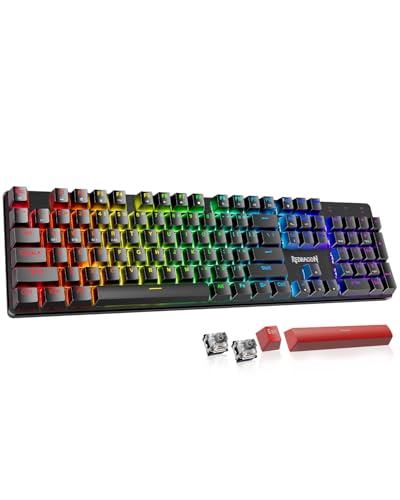
- Tri-mode BT/2.4GHz/USB-C connectivity
- 81-key compact layout with PBT keycaps
- Hot-swappable with spare switches included
Best For: Students who want a compact, customizable multi-device keyboard
Quiet Compact Build
AOC GK330 Wireless Mechanical Keyboard for Studying

- 75% compact layout with control knob
- Gasket mount plus 5-layer sound dampening
- BT, 2.4GHz, and USB-C connectivity
Best For: Students who prefer a smaller keyboard with softer, quieter typing
High-Capacity All-Rounder
AULA F99 Wireless Mechanical Keyboard for Studying

- BT5.0, 2.4GHz, and USB-C tri-mode support
- 8000mAh battery for long study sessions
- 96% hot-swappable layout with PBT keycaps
Best For: Students who want a larger, long-lasting keyboard with customization
Budget-Friendly Custom Pick – Kisnt KN85 75% Wireless Mechanical Keyboard
If you want wireless mechanical keyboards for studying that save desk space without feeling stripped down, the Kisnt KN85 is a strong budget-oriented option. Its 75% layout keeps the function row and arrow keys, while the tri-mode connection makes it easy to move between a laptop, tablet, or desktop setup.
Best For: Students who want a compact, customizable keyboard with quiet-enough everyday typing and multi-device flexibility.
Pros:
- 75% layout frees up desk space while keeping essential keys
- Bluetooth, 2.4GHz, and USB-C support with 3-device switching
- Hot-swappable 3/5-pin switches for easy future customization
- Sound-dampening foam and gasket mounting for a softer typing feel
Cons:
- RGB effects and wireless use can reduce battery life faster
- Windows-only software limits programming features on other systems
Overall, the KN85 is a practical choice if you want a smaller study keyboard with room to customize later. It leans more enthusiast-friendly than basic office models, but the compact size and flexible connectivity make it easy to live with on a student desk.
Premium Office Choice – Logitech MX Mechanical Wireless Illuminated Keyboard
For wireless mechanical keyboards for studying, the Logitech MX Mechanical stands out if you want a refined typing experience with less noise. Its low-profile tactile quiet switches, automatic backlighting, and multi-device support make it especially well-suited to long study sessions at a desk.
Best For: Students who prioritize comfort, quieter typing, and a premium full-size layout for daily coursework.
Pros:
- Tactile quiet switches provide feedback with reduced noise
- Smart backlighting turns on automatically and adjusts to lighting
- Supports up to 3 Bluetooth devices plus included Logi Bolt receiver
- USB-C rechargeable with up to 15 days of battery life per charge
Cons:
- Full-size layout takes more desk space than compact models
- Premium positioning may be overkill if you just need a basic study keyboard
The MX Mechanical is one of the most polished study-friendly options here, especially if you type a lot and want a quieter board. It’s a better fit for organized desk setups than cramped dorm spaces, but the ergonomic low-profile design and smart lighting are hard to ignore.
Quiet Productivity Pick – SOLAKAKA KI99 Pro Silent Wireless Mechanical Keyboard
If you’re comparing wireless mechanical keyboards for studying and want something quiet but still customizable, the SOLAKAKA KI99 Pro is built for that middle ground. The 96% layout keeps most keys in a tighter footprint, while the silent switches and gasket structure help reduce distracting typing noise.
Best For: Students who need a quieter mechanical keyboard with a compact layout and convenient control features.
Pros:
- Silent switches and five noise-reducing layers cut down typing noise
- 96% layout saves space while keeping a near-full key set
- Metal knob makes volume, media, and brightness changes quick
- 10,000mAh battery supports long stretches between charges
Cons:
- Windows-focused software support is more limited for other platforms
- 96% layout is still larger than a true compact board
This is a strong pick for study environments where quieter typing matters, especially if you want easy media and lighting control at your fingertips. It’s not the smallest keyboard in the roundup, but it balances silence, battery life, and usability very well.
Mac-Friendly TKL Pick – Keychron K8 Tenkeyless Wireless Mechanical Keyboard
The Keychron K8 is a straightforward option if you want wireless mechanical keyboards for studying and prefer a balanced tenkeyless layout. It keeps the navigation and function keys you actually use for assignments, while offering Bluetooth support and wired USB-C mode for flexible everyday use.
Best For: Students on Mac or Windows who want a reliable TKL keyboard with tactile brown switches and long battery life.
Pros:
- 87-key TKL layout preserves navigation keys without a numpad
- Bluetooth 5.1 supports up to 3 devices
- Up to 200 hours of use with backlight off and a 4000mAh battery
- Includes Mac and Windows keycaps for cross-platform use
Cons:
- White backlight is less customizable than RGB boards
- Plastic enclosure feels less premium than metal-bodied alternatives
For studying, the K8 is appealing because it stays practical and familiar rather than flashy. The TKL format works well on smaller desks, and the Mac/Windows support makes it a safe choice for students who switch between devices or operating systems.
Quiet Creamy 75% Flex – AULA F75 Pro Wireless Mechanical Keyboard
If you want wireless mechanical keyboards for studying that still feel fun to type on, the AULA F75 Pro is built around a compact 75% layout, tri-mode connectivity, and a soft, layered sound profile. It keeps arrow keys and a knob in a smaller footprint, so it can suit note-taking, essays, and lighter desk setups without giving up too many essentials.
Best For: Students who want a compact, customizable keyboard with a creamy sound and easy device switching.
Pros:
- Tri-mode connection supports Bluetooth 5.0, 2.4GHz, and USB-C wired use.
- 4000mAh battery and support for up to five connected devices.
- Hot-swappable 3-pin/5-pin support makes switch changes easy for beginners.
- Five-layer silencing and pre-lubed switches aim for a softer, less hollow typing feel.
Cons:
- RGB lighting and gaming-focused features may be more than some study setups need.
- 75% layout is compact, but it leaves out the full number pad.
The F75 Pro is a good pick if you care about typing comfort, a tidy desk, and flexible connectivity more than a plain office board. Its study-friendly strengths are the quieter feel, compact size, and quick switching between devices.
Solid Aluminum Workhorse – Redragon K556 PRO Wireless Mechanical Keyboard
For wireless mechanical keyboards for studying, the Redragon K556 PRO stands out if you want a sturdy full-size board that feels stable on a crowded desk. Its aluminum frame, tri-mode connectivity, and quiet linear switches make it a practical choice for long reading sessions, writing work, and everyday laptop use.
Best For: Students who want a full-size, stable keyboard with a quiet typing feel and lots of layout space.
Pros:
- Aluminum build is designed to feel solid and reduce wobble.
- Tri-mode connection includes Bluetooth, 2.4GHz wireless, and USB-C.
- Quiet linear switches are well suited to lower-noise study environments.
- Hot-swap sockets support 3-pin and 5-pin switches without soldering.
Cons:
- Full-size 104-key layout takes up more desk space than compact boards.
- RGB and gaming styling may be more than a basic study setup requires.
This is the most desk-dominant option here, but it also feels the most planted. If you want a reliable typing platform for classes, papers, and multi-device use, the K556 PRO is built for that steady, all-day routine.
Display-Heavy Study Desk Pick – RK ROYAL KLUDGE S98 Wireless Mechanical Keyboard
If you like wireless mechanical keyboards for studying that add useful desk features, the RK ROYAL KLUDGE S98 combines a compact 96% layout with a smart display and a knob. It gives you a lot of practical controls in one board, while the sound-dampening layers and top-mount design aim for a smoother, less hollow typing experience.
Best For: Students who want a feature-packed keyboard with a smaller footprint and easy on-board controls.
Pros:
- Smart display can show GIFs, date, connection mode, layout, and battery status.
- Knob controls volume, brightness, RGB settings, and connection mode.
- 5-layer sound dampening and top-mount design help reduce noise and hollow sound.
- Hot-swap PCB and double-shot PBT keycaps add flexibility and durability.
Cons:
- Smart display and RGB features add complexity if you only want a simple study keyboard.
- 96% layout is still fairly large compared with smaller compact boards.
The S98 is the most feature-rich option in this group, especially if you like having controls and status info built into the keyboard itself. It is a strong fit for study setups that double as a general-use desk and benefit from fewer software clicks.
Tri-Mode Flexibility – Redragon K671KS Wireless Mechanical Keyboard for Studying
If you want wireless mechanical keyboards for studying with plenty of connection options, the Redragon K671KS is built to switch between Bluetooth, 2.4GHz, and USB-C with up to five devices. Its 81-key layout, hot-swappable switches, and PBT keycaps make it a practical pick for students who want a compact board that still feels customizable and durable.
Best For: Students who need a compact, multi-device keyboard with customizable switches and RGB lighting.
Pros:
- Tri-mode connectivity supports Bluetooth, 2.4GHz, and USB-C use.
- Hot-swappable design includes 8 spare switches and 2 extra red keycaps.
- Compact 81-key layout saves desk space for notebooks and a laptop.
- PBT keycaps and metal panel add durability for everyday study sessions.
Cons:
- RGB lighting may be more than some study setups need.
- 81-key layout is smaller than full-size keyboards.
Overall, the K671KS is a flexible study keyboard if you value switching between devices and want room to customize later. It leans more toward feature-rich convenience than minimalist simplicity, but that can be a plus for busy students.
Quiet Compact Build – AOC GK330 Wireless Mechanical Keyboard for Studying
The AOC GK330 is a strong fit if you’re comparing wireless mechanical keyboards for studying and want a compact 75% layout with a quieter typing feel. It combines Bluetooth, 2.4GHz, and USB-C connectivity with a gasket mount, sound-dampening padding, and an included control knob for easy volume changes during long study sessions.
Best For: Students who want a space-saving keyboard with softer acoustics and easy device switching.
Pros:
- 3-mode connectivity supports wired, Bluetooth, and 2.4GHz use.
- 5-layer sound-dampening padding and gasket mount soften typing feel.
- 75% layout saves desk space while keeping essential keys and a knob.
- 4000mAh battery is rated for long sessions, with up to 220 hours backlight off.
Cons:
- Smaller layout may take adjustment if you rely on a full-size board.
- RGB and software features add complexity if you want a simple setup.
For study use, the GK330 stands out for its compact footprint and quieter, cushioned typing character. It’s a well-rounded option if you want a keyboard that stays comfortable through long note-taking or writing sessions.
High-Capacity All-Rounder – AULA F99 Wireless Mechanical Keyboard for Studying
The AULA F99 is a versatile choice for wireless mechanical keyboards for studying, especially if you want a near-full layout with enough space for both work and class tasks. It offers BT5.0, 2.4GHz, and USB-C connectivity, hot-swappable switches, and an 8000mAh battery, making it a flexible keyboard for long days on the desk.
Best For: Students who want a feature-packed keyboard with a larger layout and long battery life.
Pros:
- Tri-mode connection supports BT5.0, 2.4GHz, and USB-C.
- 8000mAh battery is built for extended use between charges.
- 96% layout keeps arrow keys and number area while saving space.
- Hot-swappable PCB and included puller make switch replacement easy.
Cons:
- 99-key layout is larger than ultra-compact study keyboards.
- RGB effects and macro features may be more than a basic student setup needs.
The F99 is a practical pick if you want a study keyboard that balances desk efficiency with fuller-keyboard convenience. Its bigger battery and hot-swap design make it easy to live with for daily note-taking, projects, and general use.
How We Picked the Best Wireless Mechanical Keyboards for Studying
For Wireless Mechanical Keyboards for Studying, the best choices prioritize low noise, stable wireless performance, comfortable key feel, and layouts that fit real-world note taking, writing, and research. We also looked at hot-swappable designs, battery efficiency, and features that improve convenience without adding clutter.
Quick Comparison
Tenkeyless and 75% boards save desk space and keep your mouse closer, which helps with posture during long sessions. Full-size and 96% layouts are better if you also use spreadsheets, data entry, or want a built-in numpad. Tri-mode connectivity is especially useful if you switch between a laptop, tablet, and desktop.
Key Buying Factors for Wireless Mechanical Keyboards for Studying
Noise Level
If you share a room, look for tactile or linear switches marketed as quiet, plus sound-dampening features like gasket mounts, foam, or lubed stabilizers. A softer bottom-out matters more than flashy lighting when you are studying late.
Layout and Portability
Compact layouts such as 75% and TKL are usually the sweet spot for students. They save space for notebooks and drinks while still keeping the most important keys easy to reach. Full-size boards make sense only if you truly need the numpad.
Wireless Flexibility
Bluetooth is convenient for tablets and school laptops, while 2.4GHz usually offers lower latency and a steadier connection. USB-C wired mode is a useful backup for charging and uninterrupted use during exams or long writing sessions.
Typing Feel and Customization
Hot-swappable sockets are valuable if you want to change switches later without replacing the whole keyboard. Pre-lubed switches and quality keycaps can make a noticeable difference in comfort over time.
Who Should Buy Which Wireless Mechanical Keyboards for Studying?
If you want the quietest, most distraction-free option, choose a model built around low-noise switches and damping. If you need maximum desk efficiency, go with a compact 75% or TKL board. If you study on multiple devices, prioritize tri-mode wireless and easy Bluetooth switching. And if you often handle numbers, spreadsheets, or finance coursework, a full-size or 96% layout will be the most practical choice.
In short, the best Wireless Mechanical Keyboards for Studying are the ones that fit your space, your noise tolerance, and your daily workflow—so you can focus on the work, not the keyboard.