Choosing a 32-inch monitor for studying can make long reading, writing, and multitasking sessions easier on your eyes and more productive on your desk. The right screen gives you more space for notes, browser tabs, and split-screen work without feeling cramped.
In this roundup, we focus on practical features that matter for schoolwork: text clarity, eye comfort, connectivity, and overall value. Whether you want a simple 1080p display or a sharper 4K or QHD option, there’s a strong fit here for different study setups and budgets.
Best 10 32 Inch Monitors for Studying Picks for 2026
Home Office Pick
ViewSonic VA3209M 32-inch IPS Monitor for Study

- 32-inch Full HD IPS panel with wide viewing angles
- Flicker-Free and Blue Light Filter for study comfort
- HDMI and VGA inputs for laptops and PCs
Best For: Students who want a simple, comfortable 32-inch monitor for reading and schoolwork
Curved Comfort Choice
LG 32MR50C-B 32-inch Curved Study Monitor

- Curved 32-inch Full HD VA panel with 3000:1 contrast
- 100Hz refresh rate for smooth everyday motion
- Reader Mode and tilt stand support longer study sessions
Best For: Students who prefer a curved screen for comfortable study and casual use
Multitasking Value
ViewSonic VX3276-MHD 32-inch IPS Monitor

- 32-inch Full HD IPS screen with thin bezels
- Screen split capability supports multitasking
- Flicker-Free and Blue Light Filter help reduce eye strain
Best For: Students who want a roomy IPS monitor for side-by-side study work
Warranty-Safe Option
Philips 32E1N1100L 32-inch FHD Monitor

- 32-inch Full HD VA panel with 100Hz refresh rate
- Flicker-free, LowBlue Mode, and Eye Care features
- Backed by a 4-year manufacturer warranty
Best For: Students who want a dependable 32-inch monitor with a long warranty
Premium 4K Study Monitor

- 4K UHD for sharp text and extra workspace
- ComfortView Plus reduces blue light emissions
- Anti-glare, height adjust, and tilt support
Best For: Students who want a premium large-screen study setup
Simple Office Study Pick
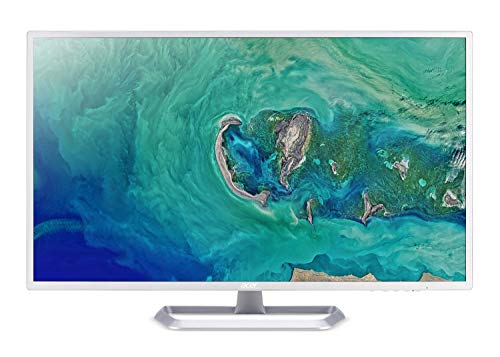
- 31.5-inch Full HD IPS display
- VisionCare, flicker-less, and blue-light features
- HDMI and VGA with 3-year warranty
Best For: Students who need a straightforward everyday study monitor
Balanced Everyday Study Monitor

- 32-inch FHD screen with 75Hz refresh
- Eye Saver Mode and Flicker Free help comfort
- Borderless design and wall-mount support
Best For: Students who want a clean, comfortable daily-use monitor
Budget-Friendly Eye Care Pick
ASUS 32 Inch 1080P Monitor (VA329HE)

- 32-inch IPS panel with 178° viewing angles
- 75Hz refresh rate with Adaptive-Sync
- Flicker-Free and Low Blue Light support
Best For: Students who want a roomy, comfortable monitor for everyday study tasks
Sharp 4K Study Station
LG 32UP83AK-W 32-inch Ultrafine 4K UHD Monitor

- 4K UHD IPS screen with over 8 million pixels
- USB-C with up to 60W charging
- Height, tilt, and pivot adjustable stand
Best For: Students who want a crisp 4K display and USB-C simplicity
Balanced QHD Pick
ViewSonic VS3225-2K 32 Inch QHD Monitor

- QHD 1440p IPS panel with thin bezels
- Flicker-Free and Blue Light Filter support
- HDMI and DisplayPort connectivity
Best For: Students who want sharper text and more workspace for study sessions
Home Office Pick – ViewSonic VA3209M 32-inch IPS Monitor for Study
If you want one of the more straightforward 32 inch monitors for studying, the ViewSonic VA3209M is built around comfort and everyday use. Its 32-inch Full HD IPS panel gives you a large workspace with wide viewing angles, while the flicker-free design and blue light filter are aimed at reducing eye fatigue during long reading or note-taking sessions.
Best For: Students who want a simple, comfortable 32-inch monitor for reading, writing, and daily schoolwork.
Pros:
- 32-inch IPS panel with Full HD resolution and 178-degree viewing angles
- Flicker-Free technology and Blue Light Filter for easier long study sessions
- 75Hz refresh rate and built-in speakers for basic everyday use
- HDMI and VGA inputs support laptops, PCs, and Macs
Cons:
- 1080p on a 32-inch screen is not as sharp as higher-resolution options
- Built-in sound is convenient, but not a replacement for dedicated speakers
The VA3209M is a practical pick if your priority is a large, low-fuss display for study tasks rather than premium sharpness or advanced features. It covers the essentials well and keeps the setup flexible for a home office or dorm desk.
Curved Comfort Choice – LG 32MR50C-B 32-inch Curved Study Monitor
The LG 32MR50C-B is a curved 32 inch monitor for studying that leans into comfort and smooth everyday motion. Its Full HD VA panel, 100Hz refresh rate, and Reader Mode are useful if you split time between documents, web research, and light entertainment after class.
Best For: Students who prefer a curved screen and want a comfortable all-around monitor for study and casual use.
Pros:
- Curved 32-inch Full HD VA display with strong 3000:1 contrast
- 100Hz refresh rate helps motion look smoother in daily use
- Reader Mode reduces blue light for more comfortable reading
- Tilt-adjustable stand makes it easier to find a good viewing angle
Cons:
- 1080p resolution may feel modest on a 32-inch screen for very detailed work
- Glossy screen finish may reflect more light than anti-glare alternatives
For students who like a curved display and want something easy on the eyes, this LG model is a sensible option. It balances a roomy screen with simple comfort features and flexible daily performance.
Multitasking Value – ViewSonic VX3276-MHD 32-inch IPS Monitor
If you need a large, clean-looking display for studying, the ViewSonic VX3276-MHD is designed for practical multitasking. The 32-inch Full HD IPS panel, ultra-thin bezels, and screen split capability make it easier to keep notes, research, and coursework visible at the same time.
Best For: Students who want a roomy IPS monitor for multitasking, writing, and side-by-side study work.
Pros:
- 32-inch Full HD IPS panel with wide 178-degree viewing angles
- Screen split capability helps with multitasking and study workflows
- Flicker-Free and Blue Light Filter support long sessions
- HDMI, DisplayPort, and VGA inputs offer broad compatibility
Cons:
- 1080p resolution on 32 inches is not especially sharp for fine detail
- 8ms response time is basic compared with faster panels
This is a strong fit if your study setup benefits from having multiple windows open and an uncluttered desk look. It focuses on usability first, with enough connectivity and comfort features to handle everyday academic tasks.
Warranty-Safe Option – Philips 32E1N1100L 32-inch FHD Monitor
The Philips 32E1N1100L is a practical 32 inch monitor for studying if you want a fast, easy-to-use screen with a strong warranty. It combines Full HD resolution, a 100Hz refresh rate, and eye-care features like LowBlue Mode and Flicker-free support for everyday academic work.
Best For: Students who value a 32-inch monitor with a long warranty and simple eye-comfort features.
Pros:
- 32-inch Full HD VA display with 100Hz refresh rate
- Flicker-free, LowBlue Mode, and Eye Care features support longer use
- 1ms MPRT response time and Adaptive-Sync for smoother motion
- 4-year manufacturer warranty adds peace of mind
Cons:
- 1080p resolution may be limiting if you want extra text clarity on a 32-inch panel
- Glossy screen finish can be less ideal in bright rooms
For students who want a dependable monitor and a strong warranty backing, this Philips model stands out. It focuses on comfort, speed, and practical connectivity rather than fancy extras.
Premium 4K Study Monitor – Dell 32 Plus 4K Monitor
If you want a large-screen option among 32 inch monitors for studying, this Dell 32-inch display is built for long sessions with a sharp 4K picture, anti-glare finish, and ComfortView Plus that reduces harmful blue light. The 120Hz refresh rate also makes scrolling documents and switching tabs feel smooth.
Best For: Students who want a spacious 4K screen for reading, research, and multitasking with strong eye-comfort features.
Pros:
- 4K UHD resolution gives plenty of space for side-by-side windows and crisp text.
- ComfortView Plus reduces harmful blue light emissions by up to 35% for extended use.
- Anti-glare screen and 99% sRGB help keep the display comfortable and color-accurate.
- Height adjustment, tilt adjustment, and built-in speakers add everyday convenience.
Cons:
- 4K resolution may be more than some study setups need.
- At 32 watts and 19.3 pounds, it is less minimal than smaller office monitors.
This is the most premium choice in the group, especially if you value sharp text, easy multitasking, and a more comfortable all-day viewing experience. It is a strong fit for a study desk that also handles productivity and creative work.
Simple Office Study Pick – Acer EZ321Q wi
For a budget-friendly option in 32 inch monitors for studying, this Acer 31.5-inch display keeps things straightforward with Full HD resolution, an IPS panel, and Acer VisionCare features. It is a practical choice if you mainly need a roomy screen for notes, web browsing, and everyday coursework.
Best For: Students who want a basic large monitor for schoolwork, browsing, and general home use.
Pros:
- 31.5-inch Full HD IPS panel offers wide viewing angles and simple everyday usability.
- Acer VisionCare, Flicker-less Technology, and bluelight filtering are geared toward comfort.
- Includes HDMI and VGA, with a VGA cable in the box for flexible connections.
- 3-year parts and labor warranty adds long-term peace of mind.
Cons:
- 60Hz refresh rate is basic compared with faster alternatives.
- Full HD on a 31.5-inch panel is less sharp than 4K models.
- No VESA mounting support is listed.
This Acer is the most no-frills pick here, but that can be a plus if you just want a large, comfortable display for studying without paying for premium extras. It covers the essentials well for simple productivity.
Balanced Everyday Study Monitor – Samsung S32B304NWN
This Samsung is a balanced middle-ground choice for 32 inch monitors for studying, combining a 32-inch screen, 75Hz refresh rate, and eye-care features in a clean borderless design. It is well suited to students who want a simple, modern monitor for homework, streaming lectures, and everyday multitasking.
Best For: Students who want a clean-looking, comfortable monitor for study work and light entertainment.
Pros:
- Three-sided borderless design looks clean and works well in multi-monitor setups.
- 75Hz refresh rate and AMD FreeSync help keep motion smooth.
- Eye Saver Mode and Flicker Free technology support extended viewing comfort.
- Wall mount support and a lightweight 11-pound build make placement easier.
Cons:
- Full HD resolution is less sharp than 4K alternatives at this size.
- 250 cd/m² brightness is modest compared with brighter monitors.
- Only one HDMI port is listed.
Overall, this Samsung stands out as a practical all-around option for study spaces that also double as entertainment setups. It offers a useful mix of comfort, smoothness, and a modern look without pushing into premium territory.
Budget-Friendly Eye Care Pick – ASUS 32 Inch 1080P Monitor (VA329HE)
If you want 32 inch monitors for studying, this ASUS model keeps things simple and comfortable. The 1080p IPS panel gives you a large workspace with wide viewing angles, while Eye Care features like Flicker-Free and Low Blue Light are helpful for longer reading, writing, and research sessions.
Best For: Students who want a roomy, easy-on-the-eyes screen for everyday classwork and browsing.
Pros:
- 32-inch IPS panel with 178° wide viewing angles
- 75Hz refresh rate with Adaptive-Sync for smoother motion
- Eye Care tech includes Flicker-Free and Low Blue Light
- Two HDMI ports plus VGA for flexible device hookups
Cons:
- 1080p resolution is less sharp than QHD or 4K on a 32-inch screen
- No USB-C or built-in speakers listed in the specs
This is a practical pick if you care more about comfort, size, and value than ultra-sharp detail. It’s especially appealing for standard study tasks where a big screen and easy connectivity matter more than premium resolution.
Sharp 4K Study Station – LG 32UP83AK-W 32-inch Ultrafine 4K UHD Monitor
Among 32 inch monitors for studying, this LG stands out for detail and flexibility. Its 4K UHD IPS display offers a very sharp workspace for reading, split-screen notes, and productivity apps, and the USB-C connection with up to 60W power delivery can help simplify a laptop-based desk setup.
Best For: Students who want a crisp 4K display and single-cable convenience for a laptop study desk.
Pros:
- 4K UHD resolution delivers over 8 million pixels of detail
- IPS panel with consistent brightness from wide viewing angles
- USB-C supports display, data, and charging up to 60W
- Height, tilt, and pivot adjustment make positioning easier
Cons:
- 60Hz refresh rate is more basic than higher-refresh alternatives
- No DCI-P3 percentage or speaker power details are listed beyond built-in speakers
If you spend a lot of time on documents, research, and multitasking, the extra resolution can make a noticeable difference. It’s a strong choice when a clean, modern study desk and better text clarity are priorities.
Balanced QHD Pick – ViewSonic VS3225-2K 32 Inch QHD Monitor
If you’re comparing 32 inch monitors for studying, this ViewSonic hits a useful middle ground. The QHD 1440p IPS panel gives you noticeably more screen space and detail than 1080p, while the anti-glare finish, Eye Care features, and frameless design make it well suited for long homework sessions and multitasking.
Best For: Students who want a sharper-than-1080p monitor for reading, note-taking, and split-screen work.
Pros:
- QHD 1440p resolution offers more workspace than 1080p
- IPS panel with 75Hz refresh rate and thin bezels
- Flicker-Free and Blue Light Filter for reduced eye fatigue
- HDMI and DisplayPort support laptops, PCs, and Macs
Cons:
- No USB-C port is listed for single-cable laptop setups
- Built-in speakers are included, but audio-focused details are limited
This model is a smart pick when you want a study monitor that feels more refined without jumping all the way to 4K. It balances sharp text, flexible connectivity, and comfort for everyday academic use.
How We Picked the Best 32 Inch Monitors for Studying
We focused on monitors that balance screen size, readability, and comfort for everyday academic tasks. That means clear text for essays and research, enough screen space for split-screen multitasking, and features that reduce strain during long sessions. We also looked for reliable connectivity, adjustable stands or VESA support, and specs that make sense for a study-first setup.
Quick Comparison: Which Display Type Fits Your Study Style?
If you mostly write papers, browse the web, and attend classes online, a 1080p IPS or VA monitor can be a solid budget-friendly choice. If you want sharper text and more room for side-by-side windows, QHD is a noticeable step up. For the cleanest text and best all-around workspace, 4K stands out, especially for note-taking, spreadsheets, and research-heavy coursework.
Key Buying Factors for 32 Inch Monitors for Studying
Resolution and Text Clarity
On a 32-inch screen, resolution matters more than on smaller displays. 1080p is workable and affordable, but QHD and 4K usually look sharper for reading and writing. If you spend hours on documents or coding, higher resolution can reduce visible pixelation and make text easier to scan.
Panel Type and Viewing Comfort
IPS panels generally offer stronger color consistency and wide viewing angles, which is useful if you shift posture often. VA panels often deliver deeper contrast, which can help with darker interfaces and late-night study sessions. Both can work well if eye-comfort features are included.
Refresh Rate and Eye Features
A 75Hz or 100Hz refresh rate can make scrolling and window movement feel smoother than standard 60Hz. Features like flicker-free backlighting, low blue light modes, and adaptive sync may not change your grades, but they can make long study blocks more comfortable.
Desk Space and Ergonomics
Large monitors need enough depth on the desk to avoid feeling overwhelming. Check for tilt adjustment, VESA mounting, and speaker inclusion if you want a cleaner setup with fewer accessories.
Who Should Buy Which 32 Inch Monitors for Studying?
Choose a 1080p model if you want the lowest cost and mainly use one window at a time. Pick QHD if you want better sharpness and more productive multitasking. Go for 4K if you spend a lot of time reading fine text, managing multiple apps, or want the most future-proof study display. For students who also game or stream, a higher refresh rate can be a nice bonus, but clarity and comfort should come first for 32 Inch Monitors for Studying.