Workstations running powerful processors, graphics cards, storage arrays, or networking equipment can build up heat quickly. The right cooling fan helps move hot air away from sensitive components without adding unnecessary noise or installation complexity.
We selected 10 computer cooling fans for workstations across USB and AC power formats, compact and multi-fan designs, adjustable-speed controls, and high-airflow configurations. Use the guide below to match a fan to your equipment, available power, noise tolerance, and cooling requirements.
Best 10 Computer Cooling Fans for Workstations Picks for 2026
High-Output Pick

- Up to 169 CFM at 4100 RPM
- Adjustable speed from off to full blast
- Dual-ball bearing design with protective grills
Best For: High-airflow workstation and cabinet cooling
Quiet Choice
AC Infinity MULTIFAN S5 Dual 80mm USB Fan

- 18 dBA total noise rating
- 52 CFM total airflow with speed control
- USB-powered dual-fan design
Best For: Quiet cooling for electronics and compact workstation spaces
Dual-Fan Value

- Two 120mm fans with 170 CFM stated total airflow
- Adjustable speed with AC plug
- Supports intake or exhaust placement
Best For: Larger workstation cases and server cabinets
Easy USB Pick

- USB-powered 120mm design
- 56.7 CFM airflow at 23 dBA
- Includes protective net and mounting hardware
Best For: Quick cooling for routers, mini PCs, consoles, and accessories
Plug-and-Play Pick

- Stepless 3V–12V airflow adjustment
- Includes grilles, feet, screws, and adapter
- Up to 95 CFM with dual-ball bearings
Best For: DIY workstation and electronics cooling
Quiet USB Option

- USB-powered 5V operation
- 56.7 CFM airflow at 1,500 RPM
- Rubber feet and removable switch cable
Best For: Quiet supplemental cooling near desks and equipment
High-Airflow Array

- Three fans rated up to 85 CFM each
- Adjustable AC speed controller with switch
- Dual-ball bearings support multiple orientations
Best For: Server racks, cabinets, and high-airflow workstation projects
Best with Extra Features
120mm Ultra-Quiet USB Cooling Fan

- 55.8 CFM airflow at up to 935 RPM
- 18dB(A) stated noise level
- USB-powered with flat or upright placement
Best For: Quiet cooling for USB-equipped workstation peripherals
Adjustable AC Power Pick
Variable-Speed 120mm Muffin Fan

- Adjustable 700–2800 RPM speed range
- Up to 95.8 CFM rated airflow
- AC-plug operation with included controller
Best For: High-airflow ventilation for cabinets and equipment near an outlet
Dual-Fan Flexibility Pick
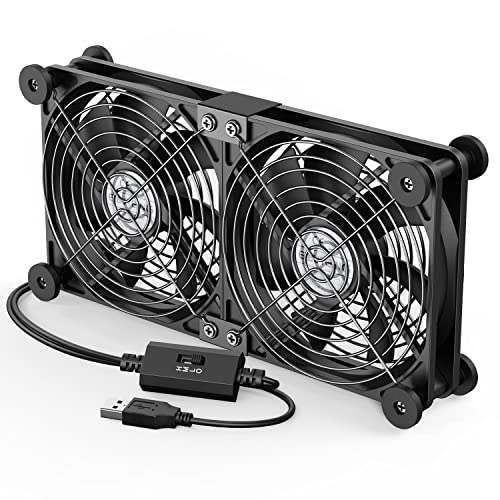
- Two connected 120mm fans run together
- Three speeds from 900 to 1500 RPM
- Horizontal or vertical USB-powered placement
Best For: Flexible external cooling for workstation peripherals and consoles
High-Output Pick – 120mm Variable-Speed AC Fan
For demanding computer cooling fans for workstations setups, this 120mm AC-powered model emphasizes high airflow and adjustable performance. It delivers up to 169 CFM at 4100 RPM and includes protective grills and a separate speed controller.
Best For: Workstations, server cabinets, mining rigs, and DIY electronics cooling where strong airflow and AC operation are useful.
Pros:
- High stated airflow of 169 CFM at full speed
- Variable control from off to full blast via adjustable input voltage
- Dual-ball bearings support flat or upright mounting and a stated six-year life
- Protective grills are included on both sides
Cons:
- Reported noise level is 50 dB
- Requires AC power and is larger than a typical slim case fan at 1.5 inches thick
- Only one fan is included
This is the performance-focused option in the group, but its higher noise rating and AC setup make it better suited to dedicated work areas, cabinets, or DIY cooling projects than quiet desktop use.
Quiet Choice – AC Infinity MULTIFAN S5 Dual 80mm USB Fan
The AC Infinity MULTIFAN S5 is a practical choice among computer cooling fans for workstations when low noise and flexible placement matter. Its two USB-powered 80mm fans provide 52 CFM total airflow and include a multi-speed controller.
Best For: Quiet cooling for AV receivers, game consoles, amplifiers, cabinets, and compact workstation accessories with an available USB port.
Pros:
- Quiet 18 dBA total noise rating
- Multi-speed controller helps balance airflow and sound
- Dual-ball bearings are rated for 67,000 hours
- Fans can be laid flat or stood upright
Cons:
- Total airflow is 52 CFM, lower than the larger high-output options
- USB power may not suit setups without a convenient USB port
- Each fan is only 80mm, limiting coverage for larger enclosures
With its quiet operation, USB connectivity, and flexible positioning, this is a strong fit for workstation-adjacent electronics and enclosed spaces where minimizing fan noise is a priority.
Dual-Fan Value – 240mm AC Cabinet Cooling Fan
This dual-120mm unit offers broad coverage for computer cooling fans for workstations, cabinets, and external enclosures. It combines two fans in a 240mm-wide assembly, an AC plug, adjustable speed control, and intake or exhaust positioning.
Best For: Server cabinets, external PC cases, workstation enclosures, and other larger spaces that benefit from two-fan airflow.
Pros:
- Two 120mm fans provide a stated 170 CFM combined airflow
- Variable speed control ranges from off to full operation
- Can be configured for intake or exhaust airflow
- Dual-ball bearings support flat or upright placement
Cons:
- The 9.45-inch-wide assembly needs more installation space
- Reported noise level is 35 dB
- Uses an AC plug rather than a standard internal PC fan connector
This model is a useful middle ground for cooling larger workstation or cabinet spaces: it provides more coverage than a single fan while retaining adjustable speed and flexible airflow direction.
Easy USB Pick – 120mm 5V USB Case Cooling Fan
For simple computer cooling fans for workstations and peripheral electronics, this 120mm USB model offers straightforward installation and a compact external design. It runs from 5V USB power and provides 56.7 CFM airflow at 23 dBA.
Best For: Routers, mini PCs, consoles, DVRs, projectors, and workstation accessories with limited space and an accessible USB port.
Pros:
- Simple USB connection for quick setup
- 120mm size delivers a stated 56.7 CFM airflow
- 23 dBA noise rating supports relatively quiet operation
- Includes protective net, mounting hardware, and foot columns
Cons:
- Sleeve bearing has a lower stated life of 35,000 hours than the dual-ball-bearing options
- Only one fan is included
- Fixed 5V USB power is less adaptable than models with variable voltage control
This is the easiest plug-and-play option for adding airflow around a workstation or electronics cabinet, especially when USB power is more convenient than an AC adapter or internal fan header.
Plug-and-Play Pick – Variable-Speed 120mm AC Fan
For computer cooling fans for workstations and other electronics, this 120mm AC-powered model offers adjustable airflow without extra wiring. Its included US plug adapter, speed control, protective grilles, and mounting hardware make it a practical choice for DIY cooling setups.
Best For: Workstations, routers, NAS devices, amplifiers, DVRs, game consoles, and other electronics needing configurable airflow.
Pros:
- Stepless 3V–12V speed adjustment helps balance airflow and noise.
- Includes grilles, rubber feet, screws, and a US plug adapter.
- Dual-ball bearing design supports flat, embedded, or external installation.
- Rated for up to 95 CFM and 3,000 RPM.
Cons:
- Its listed 37 dB noise level may be noticeable at higher speeds.
- A 120mm frame may not fit smaller enclosures.
This is a flexible option when you want workstation cooling with direct AC power and manual speed control. It is especially useful for custom electronics projects where installation position and airflow level may vary.
Quiet USB Option – 120mm Workstation Cooling Fan
This USB-powered fan is a convenient choice among computer cooling fans for workstations when you need supplemental airflow without a dedicated AC outlet. The 120mm format, removable switch cable, and rubber feet suit desks, cabinets, routers, and other equipment that runs warm.
Best For: Quiet supplemental cooling for workstations, routers, network cabinets, SSDs, streaming boxes, gaming consoles, and security equipment.
Pros:
- USB 5V power works with compatible USB ports and adapters.
- Rated at 23 dBA in the product notes, with a stated 56.7 CFM airflow.
- Rubber feet help reduce desktop vibration and movement.
- Includes a switch cable and a one-year quality assurance period.
Cons:
- Sleeve bearings are specified rather than dual-ball bearings.
- At 1,500 RPM, it provides less maximum speed than some larger or higher-speed options.
Choose this model when convenient USB operation and a quieter profile matter more than maximum airflow. Its broad device compatibility makes it a useful add-on fan for workstation peripherals and enclosed electronics.
High-Airflow Array – Triple 120mm AC Server Fans
For demanding computer cooling fans for workstations, servers, cabinets, or racks, this three-fan 120mm array provides substantial airflow from an AC-powered controller. The adjustable 3V–12V output lets you tune the fans for different cooling and noise requirements.
Best For: Server racks, workstation cabinets, computer cases, mining rigs, studios, consoles, and DIY intake or exhaust ventilation.
Pros:
- Three 120mm fans are rated at up to 85 CFM each.
- AC controller supports adjustable speed and a power switch.
- Dual-ball bearings support horizontal or vertical placement.
- Metal protective grilles allow use as an intake or exhaust setup.
Cons:
- The approximately 14.17-inch-wide array requires substantial installation space.
- The stated 35 dB noise level may be more noticeable at higher settings.
- Its AC-powered multi-fan design is less compact than a single USB fan.
This array is the stronger fit when cooling coverage and airflow are priorities. Its broad form factor and adjustable controller work well for rack, cabinet, and workstation ventilation projects where a single fan may not be enough.
Best with Extra Features – 120mm Ultra-Quiet USB Cooling Fan
For computer cooling fans for workstations that need simple, quiet supplemental airflow, this 120mm USB model is a practical choice. It delivers 55.8 CFM at up to 935 RPM, uses a built-in USB cable, and can sit flat or upright in compact spaces.
Best For: Quiet cooling for routers, mini PCs, consoles, receivers, DVRs, and other USB-equipped electronics.
Pros:
- Low stated noise level of 18dB(A), suitable for offices and living spaces.
- Strong 55.8 CFM airflow from a 9-blade 120mm fan.
- USB-powered design with a built-in 530mm cable and flexible placement.
- Shock-absorbing pads and a stated 40,000-hour lifespan.
Cons:
- USB power limits it to compatible 5V setups rather than standard internal PC fan connections.
- It has a fixed operating speed rather than an included speed controller.
This fan is best when quiet, portable cooling matters more than case integration. Its compact enclosure and USB power make it convenient for workstation peripherals and equipment cabinets, though users seeking adjustable or motherboard-controlled airflow should consider another style.
Adjustable AC Power Pick – Variable-Speed 120mm Muffin Fan
Among computer cooling fans for workstations, this AC-plug model stands out for adjustable airflow and broad equipment compatibility. Its included controller varies the 120mm fan from 700 to 2800 RPM, making it suitable for setups that need either stronger ventilation or a quieter operating level.
Best For: Workstation cabinets, servers, consoles, routers, and equipment that can be cooled from an AC outlet.
Pros:
- Wide variable-speed range from 700 to 2800 RPM.
- Rated airflow up to 95.8 CFM for demanding ventilation needs.
- AC-plug setup avoids dependence on a computer motherboard or USB port.
- Dual-ball bearings are rated for a 50,000-hour lifespan.
Cons:
- Its stated noise level is under 41dB, so it may be more noticeable than quieter USB models.
- The AC-powered design is less convenient for portable or tightly integrated computer builds.
- It uses a 2-pin connection and may require suitable mounting or enclosure space.
This is the strongest option here for users who want high airflow and hands-on speed control from a wall outlet. Verify the available space, mounting arrangement, and power requirements before using it in a workstation cabinet.
Dual-Fan Flexibility Pick – Adjustable USB Cooling Fan
This dual-fan unit is a useful option when computer cooling fans for workstations need flexible positioning and simple USB operation. Two connected 120mm fans run together, with three speed settings and a design that can be placed horizontally or vertically beside equipment.
Best For: Cooling laptops, routers, hard-drive enclosures, AV equipment, consoles, and other USB-equipped devices.
Pros:
- Two fans provide combined airflow with three selectable speeds.
- Adjustable output ranges from 900 to 1500 RPM per fan.
- USB plug-and-play operation with a 1m cable.
- Rubber shock absorbers, metal grilles, and hydraulic bearings support stable, protected use.
Cons:
- Its combined dual-fan footprint requires more desk or cabinet space than a single fan.
- Stated noise reaches 32.5dB at the highest setting.
- It is intended as an external USB cooler rather than a conventional internal case fan.
The ELUTENG is a good middle ground for users who want more coverage than a single external fan while retaining USB convenience. Its adjustable speeds and reversible placement suit workstation peripherals, but its larger dual-row format should be accounted for in crowded setups.
How We Picked the Best Computer Cooling Fans for Workstations
We compared these fans by the factors that matter most in real workstation setups: airflow potential, power compatibility, speed control, noise considerations, physical size, installation flexibility, and likely use cases. The selection includes USB-powered fans for routers, receivers, and compact enclosures, as well as AC-powered axial and multi-fan units suited to cabinets, servers, and equipment racks.
Because product specifications can vary by configuration, verify the listed voltage, connector, dimensions, and included controller before ordering. A fan designed for 5V USB power should not be connected to a higher-voltage source without the correct adapter.
Quick Comparison
| Fan type | Best for | Main advantage | Watch for |
|---|---|---|---|
| 120mm USB | Small equipment and enclosures | Simple, portable installation | Lower power and airflow than some AC models |
| Dual USB | Receivers, routers, and DVRs | Broader airflow coverage | Needs a suitable USB power source |
| AC-powered 120mm | Cabinets and fixed workstations | Convenient continuous operation | Check voltage and plug compatibility |
| Multi-fan arrays | Servers and larger equipment cabinets | High coverage and redundancy | More space, noise, and cable management |
| 120mm x 38mm high-CFM fan | Demanding cooling jobs | Strong airflow potential | Usually louder and deeper |
Key Buying Factors for Computer Cooling Fans for Workstations
Airflow and Static Pressure
High airflow is useful for ventilating open cabinets, while static pressure matters when air must pass through filters, grilles, or restricted spaces. A thicker 38mm fan may move more air, but it also needs additional mounting depth.
Power and Voltage
USB 5V fans are convenient for laptops, routers, receivers, and other low-voltage equipment. AC models are better for permanent installations near an outlet, but confirm whether the fan supports 110V, 120V, 220V, 240V, or a wide input range.
Noise and Speed Control
For an office or recording environment, prioritize ultra-quiet designs and adjustable speed. Higher-speed fans can cool more aggressively but may produce noticeable motor and airflow noise.
Size and Installation
Measure the mounting area before buying. A 120mm fan is common, but dual and triple-fan assemblies need more room and may require a flat panel, cabinet opening, or custom brackets.
Who Should Buy Which Computer Cooling Fans for Workstations?
Choose a compact USB fan for a router, receiver, DVR, or small workstation enclosure where easy setup matters most. Pick a dual USB model when one fan does not cover the heat-producing area. For fixed cabinets and server-style equipment, an AC-powered 120mm fan or multi-fan array offers more practical continuous cooling. Choose a variable-speed model if conditions change throughout the day, and select a high-CFM or thicker fan when heat loads and airflow restrictions are the primary concerns.