Finding the right dock can make a student laptop feel like a full desktop setup without adding clutter. The best options balance charging speed, display support, and the right mix of ports for classes, study sessions, and dorm or apartment life.
Below, we focus on docking stations with power delivery for students that can handle everyday schoolwork, external monitors, storage devices, and reliable wired internet.
Best 10 Docking Stations with Power Delivery for Students Picks for 2026
Editor’s Pick

- Dual 4K@60Hz or single 8K display support
- 100W PD input with up to 85W passthrough
- Ethernet, SD/TF, and 5Gbps USB ports
Best For: Students needing a compact all-purpose dock for monitors, charging, and peripherals
IT-Ready Pick
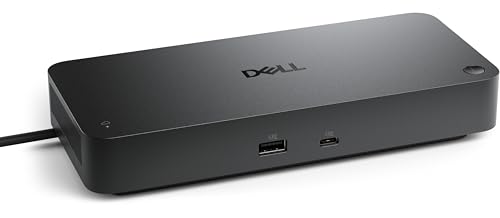
- 130W power delivery for compatible notebooks
- Supports up to four displays
- Remote management and WPA-3 security
Best For: Students in managed or enterprise-like setups who need high-power docking and admin controls
Value Pick

- Dual HDMI with 4K display support
- Up to 85W pass-through charging
- Ethernet and SD/microSD included
Best For: Students who want a compact dock for dual monitors and basic everyday expansion
Power User Pick
Baseus Spacemate 11-in-1 Triple Display Dock

- Triple-display support on Windows
- 10Gbps USB-C and USB-A data ports
- 100W PD input with up to 85W passthrough
Best For: Students who want a desktop dock for multiple monitors and fast file transfers
Compact Dual-Monitor Dock

- Dual 4K@60Hz HDMI outputs
- 100W PD charging support
- 4x 10Gbps USB-A/C data ports
Best For: Students who need a simple dual-monitor dock with fast charging
Feature-Packed Study Hub
Acer 11-in-1 Triple Display Dock

- Triple-display support with DP and HDMI
- 100W input, up to 85W to laptop
- Includes Ethernet and SD/MicroSD slots
Best For: Students who want an all-in-one dock with monitors, internet, and card readers
Premium Office Dock
Dell Pro WD25 100W Universal Dock

- Up to 100W power delivery
- Native support for up to four displays
- DisplayPort, HDMI, Ethernet, USB-A, and USB-C
Best For: Students building a permanent desk setup with multiple monitors
Value Dual-Monitor Dock

- Includes 96W adapter; laptop charging from 65W minimum
- Dual 4K HDMI outputs
- 12-port layout with Ethernet, SD/TF, audio, and USB
Best For: Students wanting an affordable dual-monitor setup with charging
Travel-Friendly 3-Display Dock

- Detachable desktop dock plus portable hub
- Up to 100W Power Delivery
- 13 ports with triple-display support
Best For: Students who want a dock for both desk use and portability
Editor’s Pick – UGREEN 10-in-1 Dual 4K Dock
If you want one of the more versatile docking stations with power delivery for students, this UGREEN model covers the everyday basics well: external displays, wired internet, card access, and extra USB ports. It’s a practical desk upgrade for classwork, homework, and hybrid setups, especially if you need to plug in multiple accessories from a single USB-C connection.
Best For: Students who want a compact all-around dock with dual-monitor support and 100W PD passthrough.
Pros:
- 2 HDMI outputs support dual 4K@60Hz or a single 8K@30Hz display setup.
- 100W PD input with up to 85W passthrough charging for the laptop.
- Includes 1Gbps Ethernet plus SD/TF card readers for school workflows.
- Offers 5Gbps USB-C and USB-A data ports for peripherals and file transfers.
Cons:
- MacBook external monitors mirror the same content rather than extending independently.
- USB-A and USB-C data ports do not support charging or video output.
For students who need a straightforward dock without extra complexity, this is a strong balance of display output, charging, and connectivity. It’s best viewed as a reliable workspace hub rather than a specialty workstation dock.
IT-Ready Pick – Dell Pro Smart Dock SD25
Among docking stations with power delivery for students, the Dell Pro Smart Dock SD25 stands out if your setup overlaps with a managed office or campus IT environment. It combines high-wattage charging with support for up to four displays, while also offering remote management features that can simplify deployment and maintenance in shared or controlled spaces.
Best For: Students in enterprise-style or IT-managed environments who need strong charging and multi-display support.
Pros:
- 130W power delivery support for charging compatible notebooks.
- Supports up to four displays for more expansive multitasking.
- Remote management via Dell Device Management Console for dock updates and configuration.
- WPA-3 192-bit encryption and hardware-based tamper-resistant encryption for security.
Cons:
- More dock than many typical student setups need.
- Larger and heavier than compact USB-C travel docks.
- Best fit is tied to Dell’s smart dock ecosystem and management tools.
This is a capable choice when charging power, security, and centralized management matter more than portability. For a student desk that functions like a managed work station, it brings a lot of infrastructure in one box.
Value Pick – Anker 8-in-1 Dual HDMI Hub
If you’re comparing docking stations with power delivery for students and want a simpler, proven option, this Anker hub keeps the focus on the essentials. It adds dual HDMI, wired networking, card readers, and USB-A ports from a single USB-C connection, making it a solid fit for a dorm room or study desk.
Best For: Students who want a compact, no-frills dock for dual displays and everyday connectivity.
Pros:
- Dual HDMI can output one 4K@60Hz display or two 4K@30Hz displays.
- Up to 85W pass-through charging with a compatible USB-C PD charger.
- Includes Ethernet plus microSD/SD card reader support.
- Works with USB-C, USB4, and Thunderbolt connections on supported laptops.
Cons:
- Charger is not included, so you need a 100W PD wall charger and USB-C cable.
- Not compatible with Linux.
- Fewer total ports than larger docking stations.
For students who mainly need monitor output, charging passthrough, and a few extra ports, this is an easy-to-understand pick. It’s not the most expansive dock here, but it covers core daily needs well.
Power User Pick – Baseus Spacemate 11-in-1 Triple Display Dock
This Baseus dock is a strong match for students who need more screen space and faster data speeds from their docking stations with power delivery. With triple-display support for Windows, 10Gbps data ports, and 100W PD input, it’s built for multitasking-heavy study sessions, content work, and organized desk setups.
Best For: Students who want triple-monitor expansion, fast data transfer, and a desktop-style USB-C hub.
Pros:
- Triple-display support on Windows with 4K output via HDMI and DisplayPort.
- USB-C and USB-A 10Gbps ports for fast transfers.
- 100W PD input with up to 85W passthrough charging.
- Vertical aluminum design with LED status screen and screen-lock button.
Cons:
- MacOS does not support triple-display mode.
- Power adapter and input cable are not included.
- Best performance depends on using an adequate 65W+ adapter, ideally 100W under load.
If your student setup needs serious multitasking room, this dock offers more display flexibility than most compact hubs. It’s best treated as a desk centerpiece for users who value monitors and transfer speed over portability.
Compact Dual-Monitor Dock – UGREEN 7-in-1 USB-C Dock
If you want docking stations with power delivery for students that keep a desk setup simple, this UGREEN dock covers the basics well. It adds dual HDMI outputs, fast USB data ports, and 100W PD charging in a small aluminum body, so you can plug in a laptop, peripherals, and a charger with one connection.
Best For: Students who want a compact dual-monitor dock with fast charging and plenty of high-speed USB ports.
Pros:
- Two HDMI ports support dual 4K at 60Hz on compatible Windows laptops.
- Includes 4 high-speed USB ports rated up to 10Gbps for accessories and file transfers.
- 100W PD charging support helps keep a laptop powered during class or study sessions.
- Lightweight aluminum design makes it easy to move between home and campus.
Cons:
- macOS is limited to mirror mode on the external displays.
- Your laptop needs a full-function USB-C or Thunderbolt port to use the dock properly.
- 10Gbps performance depends on using a compatible cable.
Overall, this is a straightforward pick if you need a student-friendly USB-C dock for charging, display expansion, and everyday peripherals. It is best suited to Windows setups where dual extended monitors matter more than extra features like Ethernet or card slots.
Feature-Packed Study Hub – Acer 11-in-1 Triple Display Dock
For students looking at docking stations with power delivery for students and a lot of expansion in one device, this Acer hub is the most feature-rich option here. It combines triple-display support, 100W PD input, Ethernet, card readers, and multiple USB ports, making it a strong all-in-one desk dock for schoolwork and multitasking.
Best For: Students who want a full desktop-style dock with triple displays, wired internet, and memory card slots.
Pros:
- Supports up to three monitors, including 8K@30Hz on DP or 4K@60Hz on HDMI.
- Offers 10Gbps USB-C ports plus SD/MicroSD slots for faster transfers.
- Includes 1Gbps Ethernet for a more stable campus or dorm network connection.
- 100W charging input can deliver up to 85W to the laptop.
Cons:
- Triple-display output depends on the device’s bandwidth and monitor capabilities.
- For best results, the laptop needs USB-C with DisplayPort Alt Mode support.
- Some output combinations are limited by the laptop’s HDMI version and system compatibility.
This Acer dock is a strong fit if you want more than just display output and charging. It is especially useful for students who juggle classwork, external drives, wired networking, and multiple monitors from a single USB-C connection.
Portable Dual-4K Dock – Anker Nano 8-in-1 USB-C Hub
If portability matters most, this Anker option is a smart choice among docking stations with power delivery for students. It keeps the footprint small while still offering dual HDMI, 10Gbps USB ports, SD/TF card slots, and up to 85W pass-through charging for compatible laptops.
Best For: Students who need a slim, travel-friendly dock for dual monitors and fast laptop charging.
Pros:
- Supports dual 4K@60Hz external displays on compatible Windows laptops.
- Offers 10Gbps USB-C and USB-A data ports for quick file transfers.
- Provides up to 85W host charging with a 100W PD charger.
- Includes SD/TF 3.0 card slots for media and project files.
Cons:
- No Ethernet port is included.
- macOS only mirrors the same content across external monitors.
- A 100W charger and cable are required to reach full charging output and are not included.
In practice, this dock is best for students who want a slim setup for a dorm room, library desk, or travel bag. It favors clean portability and dependable everyday performance over extra ports like Ethernet or advanced workstation features.
Premium Office Dock – Dell Pro WD25 100W Universal Dock
If you want docking stations with power delivery for students that can also handle a serious desk setup, the Dell Pro WD25 is built for plug-and-play productivity. It supports up to 100W charging, multiple display outputs, and a broad mix of USB and network ports, so it works well for a laptop-first study space with peripherals.
Best For: Students who need a durable, office-ready dock for a main desk setup with external displays and wired networking.
Pros:
- Delivers up to 100W power delivery for compatible laptops.
- Supports up to four high-resolution displays.
- Includes DisplayPort, HDMI, Ethernet, USB-A, and USB-C ports.
- Designed for plug-and-play use with modern manageability features.
Cons:
- More of a desk dock than a portable student accessory.
- Best suited to users who will actually use multiple displays.
Overall, this is the most workstation-focused option in the group, with strong charging and expansion for a student who studies, writes, edits, or attends classes from one main setup. The durable connector and recycled-materials design are nice extras if you want a dock that feels built for long-term use.
Value Dual-Monitor Dock – NewQ 12-in-1 USB-C Dock
This is a practical pick if you want docking stations with power delivery for students without moving into a premium office dock. The NewQ 12-in-1 includes a 96W power adapter in the box, dual HDMI outputs, and a useful spread of everyday ports for schoolwork, web classes, and general productivity.
Best For: Students who want a budget-friendly dual-monitor dock with built-in power adapter and extra device charging.
Pros:
- Includes a 96W power adapter and supports at least 65W laptop charging.
- Dual 4K HDMI outputs for two external displays.
- Offers 12 total ports, including Ethernet, SD/TF, audio, and USB-A.
- No drivers needed and broad compatibility across many laptop brands.
Cons:
- USB-C PD output is limited to 18W for charging phones or accessories.
- MacOS does not support triple extended displays.
For students who need a straightforward way to hook up two monitors and keep a laptop charged, this dock covers the essentials well. It is less travel-oriented than a compact hub, but the included adapter and wide port selection make it a good all-around value for a study desk.
Travel-Friendly 3-Display Dock – Anker Nano 13-in-1 Dock
If you need docking stations with power delivery for students who split time between campus and home, the Anker Nano stands out with a detachable hub and a full desktop dock in one package. It combines 100W laptop charging, triple-display support, and a compact portable section that snaps off when you do not need the full base.
Best For: Students who want one dock for a desk setup and a smaller hub for carrying between classes or study spots.
Pros:
- Detachable 2-in-1 design separates into a desktop dock and portable hub.
- Supports up to three external displays, depending on mode and laptop.
- Provides up to 100W Power Delivery with a 140W power adapter included.
- Offers 13 ports total, including HDMI, DisplayPort, Ethernet, SD/TF, and USB-C data.
Cons:
- macOS external displays are mirrored, not fully extended.
- Works only when a laptop is connected through the upstream port.
This is the most flexible choice for students who need both portability and a full workstation at home. The detachable hub makes it easier to pack for library sessions, while the port count and charging output still make it a strong everyday desk dock.
How We Picked the Best Docking Stations with Power Delivery for Students
We prioritized student-friendly docks that combine strong USB-C power delivery, practical monitor support, and enough USB and network connectivity for school workflows. We also considered portability, compatibility, and whether each dock offers useful extras like SD card slots, fast data ports, and multiple display outputs.
Quick Comparison: What Matters Most
If you need one external monitor and a simple desk setup, a smaller 7-in-1 or 8-in-1 dock may be enough. If you use dual monitors, want a more permanent workstation, or need more accessory ports, an 11-in-1 or 12-in-1 model is usually the better fit. Students with demanding display setups or shared lab-style spaces may benefit from docks with broader display support and higher wattage delivery.
Key Buying Factors for Docking Stations with Power Delivery for Students
Power Delivery Wattage
Make sure the dock can supply enough wattage for your laptop while also powering accessories. Many thin-and-light laptops do well with 85W to 100W, while larger or more power-hungry systems may benefit from higher output.
Display Support
Check how many monitors you plan to use and whether your laptop supports extended displays through USB-C, Thunderbolt, or DisplayPort Alt Mode. Some docks are best for dual-monitor setups, while others are designed for triple-display use on compatible Windows systems.
Port Selection
Students often need more than video output. Look for USB-A and USB-C data ports, Ethernet for stable video calls and downloads, and SD or microSD readers if you work with photos, presentations, or media projects.
Compatibility and OS Limits
Not every dock behaves the same on Windows, macOS, and Chromebook devices. Before buying, confirm your laptop supports the number of displays and power level you expect, especially if you want advanced multitasking features.
Who Should Buy Which Docking Stations with Power Delivery for Students?
If you want a compact everyday setup, choose a simpler dock with strong charging and dual-monitor support. If you keep a permanent study station, choose a higher-port-count model with Ethernet and extra USB ports. Business and campus power users who need remote management, larger display arrays, or a more stable office-like setup should look at the more advanced docking options in this roundup.
For most students, the best choice is the dock that matches your actual class load: one monitor and a few accessories for basic use, or a more fully loaded station if you edit, present, code, or multitask across several windows every day.