If you want a distraction-light way to read, annotate, and take class notes, e ink tablets for studying are a smart middle ground between paper and a full tablet.
This 2026 roundup focuses on models that make it easier to stay organized, write naturally, and review course material without the visual clutter of a standard screen.
Best 10 E Ink Tablets for Studying Picks for 2026
Studious All-in-One Note Hub
Huion Ink EB1011 10.3" E Ink Notebook

- 10.3" laminated anti-glare E Ink display
- Battery-free stylus with 8192 pressure levels
- Handwriting-to-text, split-screen, and text-to-speech
Best For: Students who need reading, note-taking, and document annotation in one device
Premium Color Study Notebook
reMarkable Paper Pro with Marker Plus

- 11.8" color E Ink display with reading light
- Marker Plus pen with built-in eraser and spare tips
- Folders, tags, PDF markup, and handwriting-to-text
Best For: Students who want a premium, distraction-free study notebook with color
Large-Canvas Study Board

- 10.3" 300 ppi E Ink screen with front light
- InkSense Plus stylus support with 4,096 pressure levels
- Android 15 with Wi-Fi, Bluetooth, and 64GB storage
Best For: Students who want a roomy, flexible E Ink tablet for reading and handwriting
Premium Focus Pick
reMarkable Paper Pure 10.3" Writing Tablet

- 10.3-inch black-and-white display
- Fast 21 ms digital ink response
- Templates, tags, and note-to-text tools
Best For: students who want a distraction-light tablet for handwritten notes and reading
Most Flexible Pick
BOOX Note Air 5 C 10.3" Color ePaper

- Android 15 with third-party app support
- 10.3-inch Kaleido 3 color E Ink screen
- Wide file support plus microSD expansion
Best For: students who want an Android-based E Ink tablet with app flexibility
Smart Study Pick
iflytek AINOTE 2 10.65" AI Note Tablet

- Voice-to-text with 18-language transcription
- Handwritten-to-text plus AI study tools
- Ultra-thin 4.2 mm body for portability
Best For: students who want AI-assisted note-taking for lectures and review
Compact Study Companion
VIWOODS AiPaper Mini 8.2" E Ink Tablet
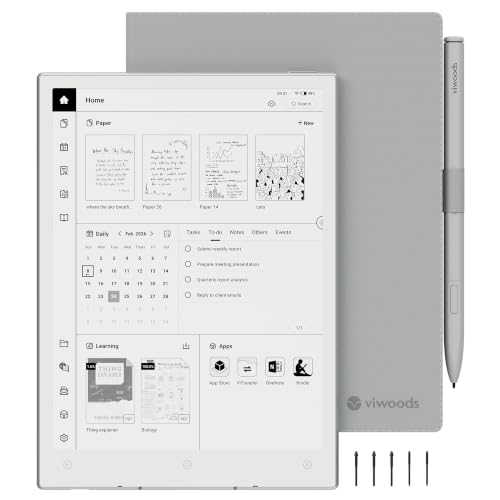
- 230g portable build for easy carry.
- 8.2-inch 292 PPI display with warm light.
- Includes stylus, cover, nibs, and 128GB storage.
Best For: Students who need a lightweight E Ink tablet for daily reading and notes.
AI Lecture Helper
iFLYTEK AINOTE Air 2 8.2" E Ink Tablet

- Voice-to-text transcription supports 18 languages.
- AI summaries and note Q&A help organize study content.
- Warm/cool lights and 4,096 pressure levels improve usability.
Best For: Students who want AI note capture, transcription, and summaries for study.
Paper-Like Large Screen
Penstar eNote2 10.3" E-Ink Notebook

- 10.3-inch 300 PPI screen gives more room for study work.
- 8192-level pressure and low lag suit handwritten notes.
- Split-screen, folders, tags, and voice-to-text aid organization.
Best For: Students who want a larger E Ink tablet for reading and annotation.
Studious All-in-One Note Hub – Huion Ink EB1011 10.3" E Ink Notebook
If you want one of the more versatile e ink tablets for studying, the Huion Ink EB1011 is built for reading, handwritten notes, PDF work, and sharing. Its 10.3-inch anti-glare E Ink screen, split-screen support, and handwriting-to-text tools make it practical for class, revision, and document review without the glare of a typical tablet.
Best For: Students who want a study-focused E Ink tablet for reading, note-taking, and organizing class materials.
Pros:
- 10.3-inch 227 PPI laminated E Ink display with anti-glare glass for comfortable reading
- Battery-free pen with 8192 pressure levels, felt tip, and tail eraser for natural writing
- Handwriting-to-text conversion plus QR code/cloud sharing for quick study handoff
- Supports PDFs, EPUB, MOBI, DOCX, split-screen, and text-to-speech for long sessions
Cons:
- Pen input is tied to the included stylus ecosystem and study workflow
- Android 11 and app support add flexibility, but also more setup than a simpler e-reader
- At 10.3 inches, it is portable, but not as pocketable as smaller models
This is a strong pick if you want a study tablet that balances reading comfort with serious note-taking tools. It leans more toward organization and annotation than entertainment, which is exactly what many students need.
Compact Reading Companion – BOOX Go 7 B/W 7" E Ink Tablet
The BOOX Go 7 B/W is a compact choice for e ink tablets for studying when portability matters most. Its 7-inch 300 ppi screen, page-turn buttons, warm and cold front light, and Android 13 support make it a practical option for reading coursework, carrying class documents, and using third-party apps.
Best For: Readers who want a small, lightweight E Ink tablet for portable study sessions.
Pros:
- 7-inch HD E Ink screen at 300 ppi for crisp text reading
- Very light at about 195 g, with page-turn buttons for easy one-handed use
- Warm and cold front light helps with reading in different environments
- Android 13 with support for 3rd-party apps, plus Wi-Fi, Bluetooth, speaker, and microphone
Cons:
- Only supports the BOOX InkSense active stylus, and it is not included
- Smaller screen is less comfortable for split-screen study or heavy annotation
- E Ink refresh is slower than LCD/OLED, so navigation can feel less responsive
This model makes the most sense if your study routine is mostly reading and light note handling on the go. It is compact, flexible, and easy to carry, but it is not the biggest canvas for handwriting-heavy work.
Premium Color Study Notebook – reMarkable Paper Pro with Marker Plus
The reMarkable Paper Pro is aimed at people who want a focused digital notebook for studying with a premium paper-like feel. Its 11.8-inch color e ink display, adjustable reading light, and handwriting-to-typed-text tools make it well suited for reading, sketching, and keeping class work organized in one place.
Best For: Students who want a large, distraction-free notebook with color support and a paper-like writing feel.
Pros:
- Large 11.8-inch color E Ink display with low-glare reading
- Marker Plus included with built-in eraser and spare tips
- Folders, tags, PDF markup, and handwriting-to-text conversion for organization
- Adjustable reading light supports day and night study sessions
Cons:
- Designed exclusively for the included Marker Plus ecosystem
- More focused on note-taking and reading than app-heavy tablet use
- Larger size is less convenient for very small bags or casual carry
This is one of the most polished options if you want a distraction-free study device with a premium writing experience. The color display adds flexibility, while the software stays centered on notes and documents rather than general tablet features.
Large-Canvas Study Board – BOOX Go 10.3 Gen II Lumi
If you need a larger writing surface for e ink tablets for studying, the BOOX Go 10.3 Gen II Lumi offers a roomy 10.3-inch 300 ppi E Ink screen with front light support. It is built for reading, handwriting, and file handling, and its Android 15 platform plus third-party app support make it useful for students who want a flexible study device.
Best For: Students who want a big, lightweight E Ink tablet for reading and handwritten notes.
Pros:
- 10.3-inch 300 ppi ePaper screen for clear reading and note-taking
- Boox InkSense Plus stylus support with 4,096 pressure levels
- Warm and cold front light for studying in different lighting conditions
- Android 15 with Wi-Fi, Bluetooth, dual speakers, microphone, and 64GB storage
Cons:
- Battery average life is listed as 1 day, so it may need more frequent charging than some rivals
- Stylus support is specific to the InkSense Plus ecosystem
- At 364 g, it is lighter than many tablets but still larger than pocketable E Ink readers
This model is a good fit if you want a spacious screen for school PDFs and handwritten work without moving into laptop territory. It combines study-friendly hardware with a more open Android platform than many focused note devices.
Premium Focus Pick – reMarkable Paper Pure 10.3" Writing Tablet
If you want e ink tablets for studying that keep distractions low, the reMarkable Paper Pure is built around note-taking, reading, and document review. Its 10.3-inch black-and-white display, fast 21 ms ink response, and uncluttered software make it easy to stay focused while handwriting class notes or marking up PDFs.
Best For: Students who want a distraction-light tablet for handwritten notes, reading, and simple document workflows.
Pros:
- Whiter third-generation 10.3-inch display with stronger contrast
- 21 ms digital ink response feels quick for handwriting and sketching
- Note templates, tags, and folders help keep study materials organized
- Can convert handwritten notes to text and send files via apps or email
Cons:
- Black-and-white display only, so it is not built for color content
- Focused software means fewer general-purpose app features than Android tablets
Overall, this is a strong choice if your priority is clean, focused studying rather than app-heavy flexibility. It works especially well for handwritten notes, reading, and lightweight document handling.
Most Flexible Pick – BOOX Note Air 5 C 10.3" Color ePaper
BOOX Tablet 10.3" Note Air 5 C 6G 64G E Ink Tablet Color ePaper Digital Notebook
Check Price On AmazonFor e ink tablets for studying that need more versatility, the BOOX Note Air 5 C stands out with Android 15, stylus support, and broad file compatibility. It combines a 10.3-inch Kaleido 3 color screen with 6GB RAM, 64GB storage, and support for third-party apps, making it useful for reading, annotation, and app-based study workflows.
Best For: Students who want an Android-based e ink tablet for studying, file handling, and app flexibility.
Pros:
- Android 15 supports third-party apps and broader study workflows
- 10.3-inch Kaleido 3 screen handles both monochrome and color content
- Works with many formats, including PDF, EPUB, DOC, PPT, and more
- Includes front light, auto rotation, fingerprint recognition, and microSD expansion
Cons:
- Color E Ink is inherently darker and lower-resolution than LCD or OLED displays
- Some app experiences may feel less ideal on E Ink than on conventional tablets
- Heavier than some slim E Ink competitors at about 430 g
This is a practical pick if you want the most flexibility in a study tablet and can accept the trade-offs of color E Ink. It is better suited to static content, reading, and document work than animation-heavy apps.
Smart Study Pick – iflytek AINOTE 2 10.65" AI Note Tablet
If you are comparing e ink tablets for studying and want built-in note assistance, the iflytek AINOTE 2 brings AI tools, handwriting support, and transcription features into a thin 10.65-inch package. Its frontlight-free display is designed for comfortable viewing in normal lighting, while the voice-to-text and handwritten-to-text features can help turn class content into organized notes.
Best For: Students who want AI-assisted note-taking for lectures, meetings, and study review.
Pros:
- Voice-to-text and 18-language transcription support lecture capture
- Handwritten-to-text and AI note tools help with review and organization
- Ultra-thin 4.2 mm design is easy to carry for class and travel
- Calendar and note syncing support cross-device access through apps
Cons:
- AI and transcription features require Wi-Fi and internet access
- Frontlight-free screen is not meant for dark-room writing without external light
- Offline use is limited to basic note-taking
This model is a strong fit if your study routine includes lectures, summaries, and quick review after class. It is especially appealing when transcription and organization matter as much as the writing experience.
Compact Study Companion – VIWOODS AiPaper Mini 8.2" E Ink Tablet
If you want e ink tablets for studying that are easy to carry between class, home, and the library, the VIWOODS AiPaper Mini is built around portability and everyday note-taking. Its 8.2-inch 292 PPI E Ink screen, adjustable warm light, and included stylus make it a practical pick for reading PDFs, annotating lessons, and keeping handwritten notes in one place.
Best For: Students who want a lightweight, compact E Ink notebook for reading and note-taking on the go.
Pros:
- Very portable at 230g, with a compact 8.2-inch design that fits easily in a bag.
- Adjustable warm front light helps with reading in bright rooms or dim study spaces.
- W2 Stylus Pro supports precise note-taking, PDF annotation, sketches, and to-do lists.
- 128GB storage and sync options via OneDrive, Google Drive, Dropbox, WLAN, Bluetooth, USB, or ViTransfer.
Cons:
- The notes mention that natural E Ink refresh latency is expected.
- The small screen may feel limited if you prefer a larger canvas for split-screen study.
Overall, the AiPaper Mini is best when portability matters more than screen size. It covers the basics well for reading, marking up study materials, and carrying a full digital notebook setup without much bulk.
AI Lecture Helper – iFLYTEK AINOTE Air 2 8.2" E Ink Tablet
For e ink tablets for studying that do more than display notes, the iFLYTEK AINOTE Air 2 adds transcription, translation, and AI summaries to the usual paper-like writing experience. Its 8.2-inch E Ink screen, warm and cool lights, and 4,096 pressure levels make it useful for lectures, meetings, and reading PDFs with handwritten annotations.
Best For: Students who want AI-powered note capture for lectures, study sessions, and multilingual material.
Pros:
- Real-time voice-to-text transcription supports 18 languages for lectures and conversations.
- AI meeting summaries and note Q&A help organize and review study content faster.
- 8.2-inch matte E Ink display with 4,096 pressure levels offers a paper-like writing feel.
- Warm and cool front light with 24 brightness levels helps in different study environments.
Cons:
- Voice transcription and handwriting-to-text cannot run at the same time.
- The compact 8.2-inch size is portable, but not ideal if you want a larger writing surface.
This is a strong choice if your studying involves lectures, recordings, or multilingual content. The AINOTE Air 2 is less about plain note storage and more about helping you capture and organize information as you learn.
Paper-Like Large Screen – Penstar eNote2 10.3" E-Ink Notebook
If you’re comparing e ink tablets for studying and want a larger page for reading and writing at the same time, the Penstar eNote2 stands out with its 10.3-inch display and 300 PPI resolution. It focuses on a clearer paper-like view, precise pen input, and smart document tools that can help when you’re working through PDFs, class notes, or long reading assignments.
Best For: Students who prefer a larger E Ink workspace for reading, annotating, and organizing notes.
Pros:
- 10.3-inch 300 PPI E Ink display offers more room for reading and writing.
- 8192-level pressure and low-lag response support precise, paper-like handwriting.
- Split-screen reading and note-taking is useful for PDFs and study materials.
- 128GB storage, 6,500mAh battery, and cloud sync support longer study sessions.
Cons:
- At 409 grams, it is less portable than smaller 8.2-inch tablets.
- The larger size may be bulkier for quick commute-style use.
The eNote2 makes sense if you want more space and a cleaner reading experience instead of maximum portability. Its combination of size, battery life, and note organization features makes it a practical study tablet for heavier reading workloads.
How We Picked These E Ink Tablets for Studying
We prioritized study-friendly features that matter in real use: comfortable writing feel, readable displays, front lighting, battery life, stylus quality, storage, portability, and note organization tools. We also looked at whether a tablet is better suited for handwritten notes, reading PDFs, classroom use, or all-day campus carry.
Quick Comparison
In broad terms, 10.3-inch tablets are the best all-around choice for most students because they balance portability and workspace. Smaller 8.2-inch models are easier to carry and better for quick notes, while larger or color models can be appealing for textbook highlighting, diagrams, and more versatile reading. AI note-taking features are useful for meetings and lecture capture, but they should not replace a good writing experience.
Key Buying Factors for E Ink Tablets for Studying
Screen Size and Portability
If you carry your device between classes, dorms, and libraries, size matters. A 10.3-inch display usually offers the best compromise for note-taking and PDF reading. Smaller tablets are lighter, but they can feel tight for split-page notes or dense academic documents.
Writing Feel and Stylus Performance
Look for low-latency input, strong palm rejection, and pen pressure support if you handwrite often. A pen that feels stable and accurate will matter more than extra software features for long study sessions.
Reading and Annotation Needs
Students who read a lot of journal articles or textbook PDFs should value crisp text rendering, good zoom behavior, and annotation tools. If you frequently mark up diagrams or color-coded notes, a color E Ink display may be worth the tradeoff in contrast and price.
Battery Life, Storage, and Sync
Long battery life helps you get through a full day of classes without charging anxiety. Enough storage is important if you keep large PDF libraries, lecture recordings, or exported notes. Cloud sync and file transfer options also matter if you work across a laptop and tablet.
Who Should Buy Which E Ink Tablets for Studying?
Choose a full-size 10.3-inch model if you want the safest all-around pick for class notes and reading. Go smaller if portability is your top priority and you mostly jot quick notes. Pick a color or AI-enabled model if your studies involve visual materials, lectures, or frequent voice-to-text capture. If your main goal is focused reading and handwriting with minimal distractions, a simpler monochrome device may be the best fit.
For most shoppers, the best E Ink Tablets for Studying are the ones that match your note-taking style first and your feature list second. Focus on comfort, clarity, and workflow before chasing extras you may rarely use.