If you want a device that handles reading, handwriting, annotations, and quick ideas in one place, e-readers with note taking can be a smart upgrade. The best models balance a comfortable display, responsive stylus input, and battery life that outlasts most tablets.
In this roundup, we focus on the most practical options for readers, students, and professionals who want a distraction-light way to capture notes without giving up the benefits of E Ink.
Best 10 E Readers with Note Taking Picks for 2026
Premium Large-Screen Note Taker
Kindle Scribe 32GB (Newest Model)

- 11-inch glare-free display with front light
- Included Premium Pen needs no charging
- AI notebook tools for summaries and cleanup
Best For: People who want a large, focused reading-and-writing device
Color Annotation Reader

- 7-inch color E Ink display for books and markups
- Kobo Stylus 2 compatibility for notes and highlighting
- IPX8 waterproofing with page-turn buttons
Best For: Readers who want color E Ink and stylus-based annotations
Focused Digital Notebook

- 10.2-inch glare-free front-lit display
- AI tools convert, summarize, and refine notes
- Active Canvas adds space for notes on books
Best For: People who want a writing-first e reader with document markup
Compact Color Highlighter

- 6-inch glare-free color E Ink display
- Multicolor highlighting with easy edits
- IPX8 waterproof with audiobook support
Best For: Readers who want a small waterproof color eReader for highlighting
Refurbished Value Pick
Like-New Kindle Scribe 32GB with Premium Pen
- 10.2-inch glare-free display for reading and writing
- AI notebook tools for handwriting cleanup and summaries
- Includes Premium Pen; refurbished with same limited warranty
Best For: Budget-minded buyers who want Kindle Scribe note taking
Open Ecosystem Pick
PocketBook InkPad One 10.3-inch with Stylus

- Large 10.3-inch E Ink screen for active reading
- Active stylus with essential note-taking tools
- 25-format support plus Bluetooth and Text-to-Speech
Best For: Readers who want broad format support and handwriting tools
Premium Color Pick
Kindle Scribe Colorsoft 64GB with Pen

- 11-inch paper-like Colorsoft display with front light
- AI notebook tools plus cloud and OneNote support
- Included pen has eraser, shortcut button, and no charging
Best For: Shoppers who want a large color e-reader with strong note tools
Paper-Like AI Note Tablet
Penstar eNote2 10.3” E-Ink Notebook

- Whiter E-Ink display with reduced haze
- 8192-level pen pressure and low-lag writing
- Split-screen notes, voice-to-text, and 128GB storage
Best For: People who want a paper-like E-Ink reader with strong note-taking and document tools.
Refined Kindle Note Option
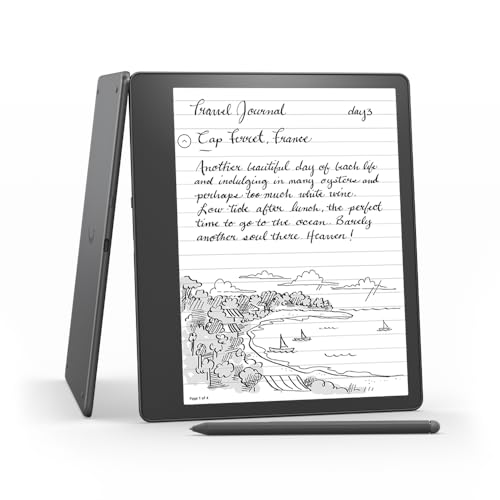
- 10.2-inch 300 ppi glare-free display
- Write in books and PDFs with Active Canvas
- Built-in notebook tools and long battery life
Best For: Kindle users who want an affordable refurbished reader with writing and markup features.
Color Android Note Pad

- Three display modes with a 90Hz color LCD
- 16K-sensitivity stylus for detailed annotations
- Note app includes handwriting-to-text and PDF tools
Best For: Users who want a color Android tablet for reading, writing, and study notes.
Premium Large-Screen Note Taker – Kindle Scribe 32GB (Newest Model)
If you want e readers with note taking that feel closer to a digital notebook than a tablet, the newest Kindle Scribe is built for exactly that. Its 11-inch glare-free display, included Premium Pen, and notebook tools make it easy to read, write, and mark up documents in one focused device.
Best For: Readers who want a large-screen Kindle for long-form reading, handwritten notes, and document markup.
Pros:
- 11-inch glare-free display with front light and adjustable warmth for comfortable reading.
- Included Premium Pen never needs charging and has an eraser plus shortcut button.
- Built-in notebook tools support notes, AI summaries, handwriting cleanup, and text conversion.
- Can annotate books, import documents from cloud services, and export marked-up PDFs.
Cons:
- Larger format may be less pocket-friendly than smaller e readers.
- Focused design means no distracting apps or notifications, which some users may miss.
The Kindle Scribe stands out if you want one device for reading and serious note taking without drifting into tablet distractions. It is especially appealing for users who want room to write directly on books and documents while keeping the experience simple and paper-like.
Color Annotation Reader – Kobo Libra Colour
For e readers with note taking that add color to your reading workflow, the Kobo Libra Colour brings book covers, comics, and annotations to life on a 7-inch color E Ink display. With Kobo Stylus 2 compatibility, waterproofing, and strong reading customization, it is a practical pick for readers who want to highlight and annotate in color.
Best For: Readers who want color E Ink plus note-taking and highlighting support.
Pros:
- 7-inch color E Ink display makes covers, comics, and markups more vivid.
- Kobo Stylus 2 compatibility lets you annotate, highlight, and note take in color.
- Page-turn buttons, rotation, and font/margin customization improve comfort.
- IPX8 waterproofing adds peace of mind for reading near water.
Cons:
- Stylus is sold separately.
- Color E Ink is useful for notes and visuals, but the screen is still optimized for reading first.
The Libra Colour is a strong choice if you want a compact reader that handles color markups without giving up the calm E Ink experience. It balances usability, portability, and annotation features better than many basic e readers.
Focused Digital Notebook – Kindle Scribe 64GB
This Kindle Scribe is aimed squarely at e readers with note taking needs, combining reading, handwriting, and document markup in one device. The 10.2-inch glare-free front-lit display, Premium Pen, and built-in AI notebook tools make it easy to keep notes organized without the distractions of a tablet.
Best For: Users who want a no-frills writing and reading device with AI note tools.
Pros:
- Built-in AI tools can convert handwriting, summarize notes, and adjust length or tone.
- Premium Pen feels like pen on paper and does not need charging.
- Active Canvas lets you write directly on book pages and manage margins for notes.
- Imports documents and PDFs for direct markup, all on a glare-free display.
Cons:
- Smaller display than the newest 11-inch Kindle Scribe model.
- Designed to avoid notifications and social media, so it is less versatile than a tablet.
If your priority is writing first and reading second, the Kindle Scribe 64GB offers a clean, focused workflow. It is a good fit for anyone who wants a single place for handwritten ideas, book notes, and document annotations.
Compact Color Highlighter – Kobo Clara Colour
If you want e readers with note taking in a smaller, simpler package, the Kobo Clara Colour is an easy entry point. Its 6-inch glare-free color E Ink display, multicolor highlighting, waterproof build, and audiobook support make it a versatile everyday reader.
Best For: Readers who want a compact color eReader with easy highlighting and waterproofing.
Pros:
- 6-inch glare-free color E Ink display shows covers, comics, and illustrations in color.
- Multicolor highlighting lets you add, erase, and change highlight colors easily.
- IPX8 waterproofing makes it suitable for travel and reading near water.
- 16GB storage and weeks of battery life support a large book library.
Cons:
- Smaller screen is less comfortable for heavy annotation than larger devices.
- Note-taking is centered on highlighting rather than advanced handwriting tools.
The Clara Colour is a smart pick if you value portability and color highlights more than deep writing features. It keeps the reading experience simple while still giving you useful tools for marking up books.
Refurbished Value Pick – Like-New Kindle Scribe 32GB with Premium Pen
If you want e readers with note taking capabilities without paying full price, the like-new Kindle Scribe is a practical way to get a dedicated reading and writing device. It combines a 10.2-inch glare-free display, a bundled Premium Pen, and built-in AI notebook tools for cleaning up handwriting, summarizing notes, and adjusting note length and tone.
Best For: Readers and note-takers who want a refurbished Kindle Scribe with strong writing tools and months-long battery life.
Pros:
- Like-new refurbished unit includes the same limited warranty as a new device
- AI notebook tools can convert handwriting, summarize notes, and refine tone
- Premium Pen is included and does not need charging
- Active Canvas lets you write directly on book pages and expand margins for notes
Cons:
- Refurbished item may arrive in a generic Amazon-branded box
- Monochrome display, so it does not offer color note-taking
This is a strong pick if you want a distraction-free Kindle that handles reading, document markup, and handwriting in one place. The refurbished pricing makes it easier to get the Scribe experience with pen input and AI note tools at a lower entry point.
Open Ecosystem Pick – PocketBook InkPad One 10.3-inch with Stylus
For e readers with note taking features and an open format-friendly design, the PocketBook InkPad One is built around a large 10.3-inch E Ink screen and an active stylus. It adds essential handwriting tools, Bluetooth audiobook support, Text-to-Speech, and 25-format compatibility for people who read across multiple platforms.
Best For: Readers who want a stylus-equipped e-reader with broad format support and flexible listening features.
Pros:
- 10.3-inch paper-like E Ink screen gives you plenty of space for notes
- Active stylus supports handwriting and note-taking
- Supports Bluetooth audiobooks and Text-to-Speech
- Open ecosystem with 25-format support, including Adobe and LCP DRM
Cons:
- At 1.61 pounds, it is heavier than many compact e-readers
- Button-free design may not suit readers who prefer physical controls
This model stands out if you care about compatibility as much as note taking. It is a good fit for readers who want a large writing surface, multiple ways to consume books, and the freedom to buy from different platforms.
Premium Color Pick – Kindle Scribe Colorsoft 64GB with Pen
If you want e readers with note taking features and prefer a color display, the Kindle Scribe Colorsoft is Amazon’s most advanced Scribe model. It pairs an 11-inch paper-like Colorsoft screen with built-in notebook tools, AI note features, cloud service support, and a pen that is ready to use out of the box.
Best For: Buyers who want a large color e-reader for reading, handwriting, and document markup in one device.
Pros:
- 11-inch Colorsoft display adds paper-like color while staying easy on the eyes
- Built-in notebook includes AI tools for summaries, questions, and handwriting cleanup
- Pen is included, never needs charging, and has an eraser plus shortcut button
- Supports Google Drive, Microsoft OneDrive, OneNote, and PDF exports
Cons:
- Larger 11-inch format may be less portable than smaller e-readers
- Focused on reading and writing, so it is not designed like a general tablet
This is the most feature-rich option here for people who want color, a roomy writing surface, and strong note organization tools. It is especially appealing if you work with notebooks, documents, and Kindle books and want all three in one dedicated device.
Paper-Like AI Note Tablet – Penstar eNote2 10.3” E-Ink Notebook
If you want e readers with note taking that feel close to real paper, the Penstar eNote2 is built around a whiter, cleaner E-Ink screen and a responsive pen experience. It’s aimed at readers who also annotate PDFs, split their screen for notes, and want AI tools to help organize and convert their writing.
Best For: Readers, students, and professionals who want a paper-like E-Ink tablet for reading, handwriting, and note organization.
Pros:
- 10.3-inch E-Ink display with reduced haze for whiter whites and punchier blacks
- 8192-level pen pressure and low-lag writing for natural handwritten notes
- Split-screen reading and note-taking, plus voice-to-text and handwriting conversion
- Large 128GB storage and 6,500mAh battery for portable all-day use
Cons:
- Best suited to monochrome E-Ink use rather than color-rich media
- Weighs 409 grams, so it is not the lightest note-taking device available
The Penstar eNote2 stands out if you want a reading-first device with serious note-taking features and smart document tools. Its focus on paper-like clarity, organization, and pen input makes it a strong all-in-one option for study and work.
Refined Kindle Note Option – Like-New Kindle Scribe 16GB
For shoppers comparing e readers with note taking, the Like-New Kindle Scribe is a simple way to get Kindle reading and notebook features in one device. It supports writing in books, creating notebooks, and marking up PDFs, while the front-lit 10.2-inch display keeps reading comfortable.
Best For: Kindle readers who want a refurbished note-taking device with built-in writing and markup tools.
Pros:
- 10.2-inch 300 ppi glare-free display for reading and writing
- Write directly in books with Active Canvas and expand margins for extra notes
- Built-in notebook tools with AI summarizing and refining features
- Import and mark up documents and PDFs, with months of reading battery life
Cons:
- Like-New refurbished unit may arrive in generic Amazon-branded packaging
- 16GB storage is modest compared with larger-capacity note tablets
This is a practical pick if you already like the Kindle ecosystem and want note-taking without moving to a full tablet. The refurbished status may appeal to value-focused buyers who still want the core Scribe experience.
Color Android Note Pad – XPPen Magic Note Pad 10.95”
If you want e readers with note taking in a more tablet-like package, the XPPen Magic Note Pad adds color display modes, a fast refresh rate, and a feature-rich note app. It is not an E-Ink device, but it’s designed for reading, annotating, studying, and meeting notes with a paper-like AG etched screen.
Best For: Users who want a color Android note tablet for writing, PDF study, and flexible reading modes.
Pros:
- Three display modes, including monochrome, light color, and nature color
- 10.95-inch AG nano-etched LCD with 90Hz refresh and reduced ambient light interference
- X3 Pro Pencil 2 with 16K sensitivity and soft nib for varied annotation effects
- Note-taking app supports handwriting-to-text, sound recording, PDF import, and cloud upload
Cons:
- Explicitly not an E-Ink tablet, so it won’t match E-Ink reading behavior
- Color LCD and Android features may be more distracting for pure reading focus
This model is best if you want a modern Android note device with color and stronger app-style flexibility. It is a better fit for mixed productivity than for buyers who specifically want a traditional E-Ink reading experience.
How We Picked the Best E Readers with Note Taking
We focused on devices that make writing feel useful, not just included as a checkbox. That means prioritizing pen latency, palm rejection, note organization, storage, file support, and display size. For E Readers with Note Taking, the best choice is usually the one that matches how you actually work: long-form reading, meeting notes, PDF markup, sketching, or a mix of all four.
We also weighed portability, battery life, sync options, and whether the software helps you find and export notes easily.
Quick Comparison: What Matters Most
Smaller 6- to 7-inch models are easier to carry and better for casual reading plus quick annotations. Larger 10- to 11-inch devices are more comfortable for handwriting, margin notes, and PDF workflows. Color E Ink can be helpful for highlights, charts, and notebooks, but monochrome models often deliver sharper text and simpler, more focused reading.
Best Fit by Use Case
If you want a dedicated reading-first device with occasional notes, a lighter compact model makes sense. If you plan to replace paper notebooks, choose a larger screen with a strong stylus experience and enough storage for documents and notebooks.
Key Buying Factors for E-Readers with Note Taking
Screen size: Bigger screens are better for handwriting and document review. Smaller screens are easier to hold for reading in bed or on the go.
Stylus experience: Look for low-latency writing, good pressure response, and a pen that feels comfortable over long sessions.
Notebook tools: Organization features matter. Folders, tags, templates, handwriting search, and export options can save time.
File support: If you read PDFs, Word files, or work documents, confirm how well the device handles imports, markup, and conversion.
Cloud and ecosystem: Some buyers prefer Kindle integration, while others want broader file flexibility. Choose the ecosystem that fits your library and workflow.
Color or monochrome: Color can improve highlights and visual notes, but it may come with tradeoffs in sharpness or price. For many E Readers with Note Taking, black-and-white still offers the best everyday reading experience.
Who Should Buy Which E Readers with Note Taking?
Students: Pick a larger screen if you annotate PDFs, outline lectures, or want a true digital notebook.
Professionals: Choose a model with strong document support, reliable sync, and easy note export for meetings and planning.
Casual readers: A compact reader with basic note tools is usually enough, especially if portability matters more than extensive handwriting.
Heavy note-takers: Go with the biggest screen and the best pen software you can afford. That combination will feel closest to paper and remain the most comfortable over time.
In the end, the best device is the one that matches your reading habits, writing volume, and preferred ecosystem. Focus on comfort, organization, and file handling, and you’ll get far more value from your purchase.