Electronic notebooks for students can make lectures, homework, and study sessions easier to organize without carrying piles of paper. The best options balance writing feel, battery life, app syncing, and enough storage for school use.
In this roundup, we focus on student-friendly picks that help with note-taking, sketching, planning, and keeping assignments in one place.
Best 10 Electronic Notebooks for Students Picks for 2026
Hybrid Paper Sync Notebook

- Writes on real A5 paper with instant phone sync
- Offline writing plus Google Cloud backup
- Lightweight body with fast charging battery
Best For: students who want paper feel and digital note syncing
Reusable Planner Notebook
Rocketbook Fusion for School Planning

- 7 templates for calendars, tasks, and notes
- Scans to cloud apps with the Rocketbook app
- Reusable pages wipe clean for repeat use
Best For: students who need a planner for assignments and schedules
Bluetooth Note Tablet
HUION Note for Class and Sketching

- Real A5 paper with live note capture to the app
- Audio recording and playback for lecture review
- Can switch into graphics tablet mode
Best For: students who want note syncing plus audio and sketching features
AI Reading Notebook

- Large 10.2-inch glare-free display
- AI tools convert and summarize handwriting
- Reads books and marks up PDFs in one device
Best For: students who read heavily and want AI-assisted note organization
Portable LCD Sketch Pad

- Pocket-sized at 2.65 oz for easy carry
- Lock switch helps prevent accidental erasing
- Eye-comfort LCD screen with one-tap erase
Best For: Younger students who want a reusable practice pad for travel and quick notes
Smart Pen Note System
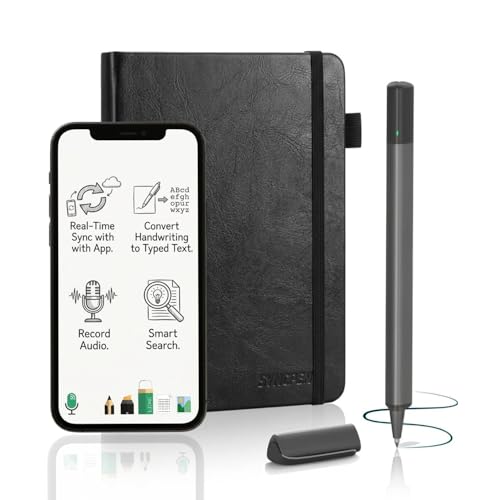
- Real-time paper-to-app syncing while you write
- OCR turns handwriting into editable text
- Includes audio sync and unlimited cloud storage
Best For: Students who want handwritten notes with digital backup, search, and lecture audio
Best for Comfort
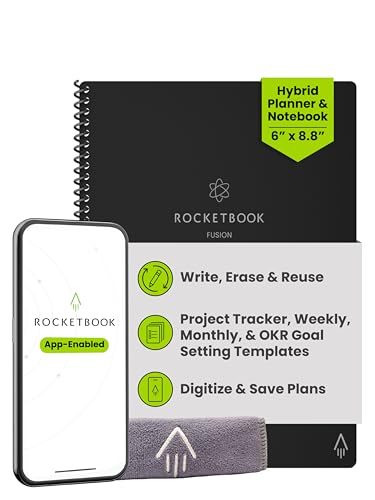
- Seven reusable page templates for planning and notes
- Scans directly to cloud apps through the Rocketbook app
- Wipes clean for repeat use with Frixion pens
Best For: Students who need a reusable planner for schedules, goals, and assignments
Glare-Free Smart Note Taking
Reusable Notebook for Focused Study

- Glare-free LCD helps reduce eye strain during long sessions.
- Tap-to-save smart pen captures writing and sketches quickly.
- Cloud sync sends notes to popular services like Drive and OneNote.
Best For: students who want a reusable digital notebook with cloud backup
Color Study Tablet

- Three display modes support monochrome, light color, and nature color.
- XPPen Notes adds handwriting-to-text, audio recording, and PDF tools.
- X3 Pro Pencil 2 offers 16K sensitivity for precise annotation.
Best For: students who want a color digital notebook with study apps and advanced note tools
Paper Notes to Phone

- Real-time syncing sends handwritten notes to the app.
- OCR turns handwriting into editable text and Word files.
- Audio recording links lecture sound to your notes.
Best For: students who want a paper-based notebook with digital sync and searchable notes
Hybrid Paper Sync Notebook – XPPen Note Plus for Students
If you want one of the more flexible electronic notebooks for students, the XPPen Note Plus focuses on writing naturally on real A5 paper while syncing your notes to your phone. It’s a practical pick for lectures, sketches, and quick study ideas when you want the feel of pen on paper without losing the digital backup.
Best For: Students who want real-paper writing with instant phone sync and easy cloud storage.
Pros:
- Writes on real A5 paper and syncs strokes to your phone via Bluetooth 5.3.
- Supports offline writing, then auto-syncs when reconnected.
- Includes editing tools, tagging, quick search, and Google Cloud backup.
- Lightweight design with long battery life and fast charging for campus use.
Cons:
- Only works with the exclusive matching ink pen.
- Requires a compatible smartphone and supported OS for syncing.
- Not a screen-based tablet, so it’s geared toward note capture rather than full-on display use.
The XPPen Note Plus is a strong option if you value handwriting comfort and want a low-friction way to digitize class notes. Its mix of paper feel, syncing, and note management makes it especially useful for day-to-day school workflows.
Reusable Planner Notebook – Rocketbook Fusion for School Planning
The Rocketbook Fusion is a reusable, app-connected planner that works well for students who need structure as much as note-taking. Among electronic notebooks for students, it stands out for combining calendars, task lists, and notebook pages in one reusable format that you can scan, erase, and use again.
Best For: Students who want a reusable planner for assignments, schedules, and organized study planning.
Pros:
- Includes 7 page templates, including monthly and weekly calendars, to-do lists, and notes pages.
- Scans to cloud apps like Google Drive, Dropbox, and OneNote through the Rocketbook app.
- Reusable pages wipe clean with a damp cloth when used with Pilot Frixion pens.
- Durable spiral binding and waterproof cover make it suitable for school use.
Cons:
- Requires Pilot Frixion pens for the erase-and-reuse system.
- Not a full digital device; it’s a reusable paper planner with app support.
- Letter size may feel large for students who prefer compact notebooks.
This is a smart choice if your school routine depends on planning, deadlines, and checklist-style organization. It’s less about screen features and more about staying organized with a reusable, digitized workflow.
Bluetooth Note Tablet – HUION Note for Class and Sketching
The HUION Note is a good fit if you want electronic notebooks for students that capture handwriting while still letting you write on a normal A5 pad. It sends your notes to the app in real time, adds audio recording, and can even switch into a drawing tablet mode, making it useful for class notes, sketching, and study sessions.
Best For: Students who want note capture, audio sync, and a bonus drawing tablet mode.
Pros:
- Captures handwriting to the app in real time with vector lines.
- Audio record and playback helps match notes to lectures.
- Bluetooth 5.0 pairing and app support on iOS and Android.
- Can convert into a graphics tablet mode with the panel inside the box.
Cons:
- Uses a separate app and device pairing workflow.
- Requires replacing inner pages when the refill notebook runs out.
- At 433 g, it’s not the lightest option for all-day carry.
For students who want more than basic note capture, the HUION Note adds useful extras like audio syncing and a tablet mode for creative work. It’s a versatile pick if you want one tool for classes, brainstorms, and sketching.
AI Reading Notebook – Kindle Scribe for Study Notes
If you want a single device that handles reading and writing, the Kindle Scribe is one of the more polished electronic notebooks for students. It lets you read books and documents, write directly on pages, and use built-in AI tools to convert handwriting, summarize notes, and help organize class material.
Best For: Students who want an all-in-one reading and writing device with AI note tools.
Pros:
- 10.2-inch glare-free, 300 ppi front-lit display works well for reading and writing.
- Built-in AI can convert handwriting to readable text and summarize notes.
- Supports document and PDF markup through Send to Kindle.
- Premium Pen is included and does not need charging.
Cons:
- Refurbished unit, even though it is tested and certified like new.
- No social media or notification features by design, which may limit multitasking.
- Pricier and more tablet-like than paper-based notebook alternatives.
The Kindle Scribe makes the most sense for students who read a lot and want their notes tied closely to books and documents. Its AI notebook tools and large display give it a more complete digital study experience than simple scan-and-sync notebooks.
Portable LCD Sketch Pad – 6.5in Reusable Writing Tablet
If you want electronic notebooks for students that are simple, lightweight, and easy to carry, this 6.5-inch LCD writing tablet is a practical pick. It gives students a mess-free way to practice letters, sketch ideas, and jot quick notes, while the lock switch helps prevent accidental erasing.
Best For: Younger students, travel use, and quick practice without paper waste.
Pros:
- Very portable at 2.65 oz with a slim pocket-friendly design.
- One-button erase and a lock switch for safer note keeping.
- LCD screen is glare-free and designed for eye comfort.
- Useful for drawing, handwriting practice, and simple learning games.
Cons:
- Best in bright light, since screen brightness depends on ambient light.
- No app syncing or digital file storage.
- Small 6.5-inch display limits longer note-taking.
For students who mainly need a reusable scratchpad rather than a full digital notebook, this is an easy everyday option. It works well as a low-mess practice tool, especially for quick classroom-style exercises and on-the-go use.
Smart Pen Note System – SyncPen Digital Notebook Set
Among electronic notebooks for students, this smart pen set stands out if you want handwritten notes captured digitally in real time. It combines a paper notebook with app syncing, OCR handwriting recognition, and audio recording, making it useful for lectures, study sessions, and organized note capture.
Best For: Students who prefer writing on paper but want searchable digital notes and synced audio.
Pros:
- Real-time sync captures handwritten pages as you write.
- OCR converts handwriting into editable text in 71+ languages.
- Audio recording syncs with notes for lecture context.
- Lifetime app access with no subscriptions and unlimited cloud storage.
Cons:
- Requires the companion app to get the full digital experience.
- Uses a paper notebook format, so it is not a screen-based tablet.
- More complex than a basic reusable writing pad.
This is a strong choice for students who want the feel of real pen and paper but need digital organization after class. The combination of sync, search, and export options makes it especially appealing for heavy note-takers.
Best for Comfort – Rocketbook Fusion Executive
If you need electronic notebooks for students that help with planning as much as note-taking, this reusable Rocketbook is built for organization. It offers multiple page templates for goals, weekly planning, to-do lists, and notes, then lets you scan and erase pages for repeat use.
Best For: Students who want one notebook for planning, goals, and reusable study organization.
Pros:
- Seven page styles cover calendars, task lists, goals, and notes.
- Reusable pages can be wiped clean and used again.
- App support sends scans to cloud services like Google Drive and OneNote.
- Durable spiral binding and waterproof cover add everyday usability.
Cons:
- Requires Pilot Frixion pens for proper use.
- Smaller executive size may not suit users who want lots of writing space.
- Not a screen-based digital notebook.
This is a smart fit for students who like structured planning and want a reusable system instead of a traditional paper planner. It is especially practical if you want one notebook to handle schedules, assignments, and study goals.
Glare-Free Smart Note Taking – Reusable Notebook for Focused Study
If you want electronic notebooks for students that feel closer to writing on paper than tapping through apps, this smart notebook is built for focused note-taking, sketching, and class planning. Its LCD canvas is designed for low eye strain, and the smart pen captures notes with a tap-to-save workflow that keeps ideas moving without interruption.
Best For: Students who want a reusable digital notebook with cloud sync and a paper-like writing feel.
Pros:
- Glare-free LCD display is designed for long writing sessions with less eye strain.
- Tap-to-save smart pen supports quick capture, writing, sketching, and erasing.
- Cloud sync can send notes to NoteoriusApp, Evernote, OneNote, or Google Drive.
- Magnetic folio makes it easier to carry between classes or meetings.
Cons:
- It is focused on note capture and organization rather than a full tablet experience.
- Best suited to handwriting and sketching workflows rather than typing-heavy study tasks.
This is a practical pick for students who value simplicity, portability, and an uncluttered writing surface. The combination of instant save, cloud storage, and a reusable canvas makes it easy to keep school notes organized.
Color Study Tablet – Paper-Like Android Notebook
For students comparing electronic notebooks for students, this XPPen tablet stands out because it combines note-taking tools with a full Android tablet experience. It is not an e-ink device, but its AG nano-etched display, 90Hz refresh rate, and paper-like certifications are aimed at comfortable reading, writing, and study sessions.
Best For: Students who want a color digital notebook with app flexibility, handwriting tools, and PDF study features.
Pros:
- Three display modes let you switch between monochrome, light color, and nature color views.
- AG nano-etched LCD and low blue light certifications are designed for easier viewing.
- XPPen Notes supports handwriting-to-text, audio recording, PDF editing, and cloud uploads.
- X3 Pro Pencil 2 adds 16K sensitivity and a soft nib for detailed writing and annotation.
Cons:
- It is explicitly not an e-ink tablet, which may matter to buyers seeking that look and feel.
- Feature depth may be more than some students need for simple class note-taking.
This is the strongest pick here if you want a study-ready tablet with color display options and broader software support. It offers more versatility than a basic notebook device while still keeping the writing experience front and center.
Paper Notes to Phone – Smart Pen Study Set
If you prefer writing on paper but still want digital backups, this smart pen set is a straightforward option among electronic notebooks for students. It records handwritten notes in real time, syncs them to your phone, and can convert writing into editable text for easier review later.
Best For: Students who want a paper-based note system with instant phone syncing and audio support.
Pros:
- Real-time syncing captures handwritten notes directly to the Ophaya Pro+ app.
- Handwriting recognition makes notes searchable and easier to retrieve later.
- OCR can convert handwriting into editable text and generate Word files.
- Audio recording syncs with notes, which is helpful for lectures and study sessions.
Cons:
- It relies on a paper-and-pen workflow rather than a standalone tablet screen.
- Some buyers may want a more integrated display-based digital notebook.
This set is a strong fit for students who like the feel of physical handwriting but need digital organization. The offline storage and sharing options add flexibility for class use, group work, and later review.
How We Picked These Electronic Notebooks for Students
We looked for devices and systems that fit real student workflows: fast note capture, readable displays, reliable syncing, comfortable writing feel, and practical extras like OCR, cloud backup, and reusable pages. We also favored options that suit different budgets and study styles, from simple writing tablets to full-featured digital notebooks.
Quick Comparison
If you want a low-cost distraction-free board, a basic LCD writing tablet is the simplest choice. If you need searchable notes, app sync, and better organization, smart pen systems and reusable notebooks are a stronger fit. For readers who want to annotate textbooks and keep documents together, a larger e-note device stands out. Students who sketch, diagram, or take math-heavy notes may prefer a color display or pressure-sensitive pen support.
Key Buying Factors for Electronic Notebooks for Students
Writing Experience
Look for a pen tip and screen or page surface that feels natural for long note-taking sessions. Battery-free pens are convenient, while pressure sensitivity matters more for drawing, diagrams, and handwritten precision.
Storage and Sync
For students, cloud backup and app sync are often more important than raw storage size. Searchable notes, OCR, and automatic uploads help keep class notes organized across devices.
Display Size and Portability
Smaller models are easier to carry between classes, but larger screens are better for split-page note-taking, reading PDFs, and annotating documents. Choose the size that matches your backpack space and your course load.
Reusability and Cost Over Time
Reusable notebooks can reduce paper waste and save money over a semester. If you prefer a traditional notebook feel, hybrid systems that combine paper and digital capture may be the most comfortable compromise.
Battery Life and Reliability
Long battery life is valuable during packed class days. Also check whether the device needs frequent charging, special refills, or proprietary accessories that could add ongoing costs.
Who Should Buy Which Electronic Notebooks for Students?
Choose a simple writing tablet if you want quick scratch notes, reminders, or doodles. Pick a smart pen and reusable notebook if you like handwriting on paper but still want digital backups. Go with a larger e-note or premium digital notebook if you need organized study notes, document annotation, and all-in-one school planning. For students who mostly need a lightweight classroom aid, the most basic options are often the easiest to live with.