Electronic reading magnifiers can make books, labels, menus, photographs, and handwritten notes easier to see by enlarging text on a built-in screen. The right model depends on more than maximum zoom: screen size, image clarity, controls, lighting, and portability all affect everyday usability.
We selected 10 options ranging from compact handheld readers to larger high-definition video magnifiers. Use the guide below to narrow your choices by reading habits, visual needs, and budget.
Best 10 Electronic Reading Magnifiers Picks for 2026
Best Compact Handheld Pick
Eyoyo 3.5-Inch Digital Magnifier

- 2X-25X magnification range
- Eight display color modes
- Foldable bracket and TV output
Best For: Portable everyday reading and map viewing
Best Large-Screen Option
8-Inch Electronic Digital Magnifier

- 8-inch 1280-by-800 display
- 2X-99X adjustable zoom
- Autofocus camera with HDMI output
Best For: Home or office reading with a large viewing area
Best Lightweight Travel Pick
4.3-Inch Digital Video Magnifier

- Weighs 6.4 ounces
- 4X-32X zoom range
- 17 color modes and foldable handle
Best For: On-the-go reading of prescriptions and instructions
Best Versatile Display Controls
VEVOR 5-Inch Digital Magnifier

- 2X-48X magnification range
- 13MP near and far dual lenses
- 26 color modes with HDMI and AV output
Best For: Flexible close and distance viewing
Best TV-Connected Mouse Magnifier
Portable Electronic Reading Aid
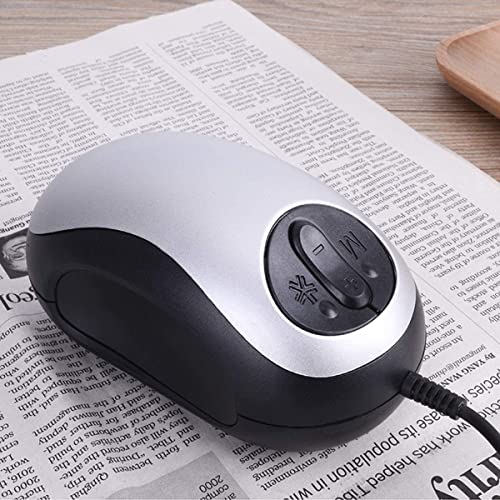
- Connects to a TV or monitor for enlarged viewing
- Includes freeze mode and 10 color modes
- Wide-angle mouse design for reading and writing
Best For: Home reading with a connected television or monitor
Best Large-Screen Portable Magnifier
Eschenbach Visolux Digital XL FHD
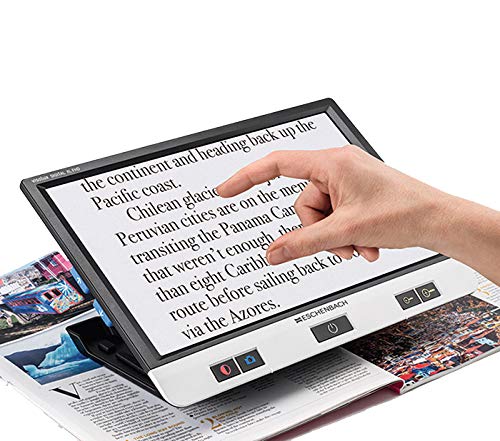
- Features a 12-inch color HD display
- Battery-powered portable video magnifier
- Glass lens and dedicated viewing format
Best For: Readers who prefer a large built-in screen
Best Portable High-Zoom Aid
5-Inch Digital Reading Magnifier

- Offers 3x–48x zoom on a color LCD
- Foldable handle and over-four-hour battery
- Simplified controls plus photo, playback, and TV output
Best For: Portable reading of labels, menus, maps, and other short text
Portable High-Power Pick
Foldable-Handle Digital Magnifier

- 2X–32X zoom with 26 color modes
- 5-inch 800×480 HD color display
- Foldable, left- or right-hand-friendly design
Best For: Portable reading, menus, shopping, and low-vision use
Simple-Control Pick

- Simplified buttons for easier operation
- 2X–32X magnification with color modes
- TV and computer connection via included cable
Best For: Older users, children with amblyopia, and straightforward reading
Glass-Lens Versatility Pick

- Glass lens with 2X–32X zoom
- 26 color modes and HD color display
- Simplified controls with foldable bracket
Best For: Users seeking adjustable, portable low-vision reading support
Best Compact Handheld Pick – Eyoyo 3.5-Inch Digital Magnifier
If you want electronic reading magnifiers for books, newspapers, or maps without carrying a larger viewer, the Eyoyo offers a compact handheld design with selectable magnification from 2X to 25X. Its fixed-focus design works best when placed directly on the reading material.
Best For: Seniors and low-vision users who want a lightweight reading aid with basic image-capture and TV-display features.
Pros:
- Four magnification settings from 2X to 25X
- Eight color modes for different viewing preferences
- Foldable bracket supports hands-free desktop use
- AV output, freeze function, snapshots, and support for TF cards up to 32GB
Cons:
- Must be placed on books or newspapers for a clear image
- TF card is not included
- Smaller 3.5-inch screen than the larger models in this roundup
The Eyoyo is a practical choice when portability and straightforward controls matter most. Its compact screen limits viewing area, but the foldable bracket and multiple display modes make it useful for everyday reading.
Best Large-Screen Option – 8-Inch Electronic Digital Magnifier
For shoppers comparing electronic reading magnifiers with a larger viewing area, this 8-inch model combines a 1280-by-800 anti-glare screen with adjustable 2X-99X zoom. Its autofocus camera is designed for both close reading and farther viewing.
Best For: Users who prioritize a large screen, extensive zoom, and touch-based controls for books, labels, medication instructions, and documents.
Pros:
- Large 8-inch anti-glare display with 1280-by-800 resolution
- 13MP autofocus camera supports near and far scenes
- 26 display modes and five brightness levels
- Built-in 16GB memory, HDMI output, and up to four hours of battery use
Cons:
- Heavier than the smaller portable magnifiers at 1.2 pounds
- Its larger size may be less convenient for travel
- High zoom settings may be more capability than some users need
This model stands out for screen size and feature depth. It is a strong fit for home or office use, especially when touch controls, stored images, and external display support are more important than minimum weight.
Best Lightweight Travel Pick – 4.3-Inch Digital Video Magnifier
This 4.3-inch model is one of the more travel-friendly electronic reading magnifiers, weighing 6.4 ounces and offering a foldable structure. Its 4X-32X zoom and 17 color modes help users read prescriptions, manuals, and other small text while away from home.
Best For: Travelers and seniors who need a compact magnifier for quick reading of instructions, labels, and documents.
Pros:
- Lightweight 6.4-ounce design with foldable handle
- 4X-32X magnification for small text
- 17 adjustable color modes can help tailor contrast
- Snapshot, screen-lock, AV output, and TF-card support
Cons:
- 4.3-inch screen provides less viewing area than larger models
- TF card is not included
- Its feature set is focused on basic viewing rather than extensive storage
The YS010 balances portability and useful reading features well. It is especially appealing for errands and travel, though users who prefer a larger screen may find the 4.3-inch display restrictive.
Best Versatile Display Controls – VEVOR 5-Inch Digital Magnifier
The VEVOR 5-inch model is a flexible choice among electronic reading magnifiers, offering 2X-48X magnification, near and far cameras, and 26 color modes. Its 13MP dual-lens setup is intended for both reading close-up material and viewing distant signs or boards.
Best For: Low-vision users who want adjustable display settings, near-and-far viewing, and the option to connect the magnifier to a TV.
Pros:
- 2X-48X magnification with 13MP near and far dual lenses
- 26 color modes, five brightness levels, and adjustable LED lighting
- AV and HDMI outputs support larger-screen viewing
- Foldable stand, rechargeable 2500mAh battery, and TF-card support
Cons:
- TF card is not included
- 5-inch screen is smaller than the 8-inch alternative
- Best focus is achieved by placing it over books or newspapers for close reading
With its dual-lens design and extensive display adjustments, the VEVOR is a well-rounded option for users who switch between close reading and distance viewing. The foldable stand also makes it practical for desk use and transport.
Best TV-Connected Mouse Magnifier – Portable Electronic Reading Aid
This electronic reading magnifier is a practical choice for low-vision users who prefer viewing enlarged text on a television or monitor. Its mouse-style design rolls over text, while freeze mode, three display modes, and 10 color modes support more comfortable reading and writing.
Best For: Low-vision users who want a simple, TV-connected aid for reading, writing, and other printed materials.
Pros:
- Offers 1–4x enlargement at the device, with the connected screen providing additional apparent size.
- Includes image freeze, three display modes, and 10 color modes.
- Wide-angle design displays more text and connects through USB without an additional power supply.
Cons:
- Requires connection to a TV or monitor and is not a standalone screen magnifier.
- Its mouse-style operation may be less suitable for users wanting a handheld device.
Choose this model when a large existing screen is central to the reading setup. It is especially practical for home use, but less convenient for portable reading away from a TV or monitor.
Best Large-Screen Portable Magnifier – Eschenbach Visolux Digital XL FHD
The Eschenbach Visolux Digital XL FHD is a portable electronic reading magnifier built around a spacious 12-inch color HD display. Its battery-powered design can suit users who want a dedicated video magnifier rather than a device that depends on a television or monitor.
Best For: Users who prioritize a large built-in color screen in a portable video magnifier.
Pros:
- Provides a large 12-inch color HD display for viewing reading materials.
- Battery powered for use without a constant connection to household power.
- Portable video magnifier format with glass lens construction.
Cons:
- At 3.1 pounds, it is heavier than many compact handheld reading aids.
- The supplied details list 2x magnification, which may be less than some high-zoom alternatives.
This model makes the most sense for readers who value screen size and a dedicated viewing format. Consider its weight and listed magnification before choosing it for frequent travel or very small print.
Best Portable High-Zoom Aid – 5-Inch Digital Reading Magnifier
This electronic reading magnifier combines 3x–48x zoom with a 5-inch color LCD, foldable handle, and simplified controls. It is designed for practical short-text tasks such as menus, labels, recipes, maps, and price tags, with a battery rated for more than four hours.
Best For: Low-vision users who need a portable aid for shopping, dining out, travel, and reading small everyday text.
Pros:
- Provides 3x–48x zoom and an 800×480 HD color display.
- Foldable handle and lightweight design support portable use.
- Simplified buttons, memory function, photo and playback features, and TV output add flexibility.
- External battery lasts over four hours according to the supplied product notes.
Cons:
- The notes do not recommend it for long books or novels.
- TF card storage supports up to 32GB, but the card is not included.
- Its feature set may require more setup than a basic optical magnifier.
For everyday portability and strong zoom, this is the most versatile option of the three. Its compact screen is well suited to short printed items, while TV output can provide a larger view when needed.
Portable High-Power Pick – Foldable-Handle Digital Magnifier
This portable electronic reading magnifier combines 2X–32X zoom with a 5-inch HD color LCD, making it useful for menus, books, magazines, and shopping labels. Its foldable handle and bracket support hands-free angled reading, while 26 color modes let users adjust the display to their visual needs.
Best For: Low-vision users who want high magnification, flexible positioning, and a handle that can be configured for left- or right-handed use.
Pros:
- Offers 2X–32X magnification and 26 color modes.
- Uses an 800×480 HD color LCD with image-processing support.
- Foldable bracket helps create a more comfortable reading angle.
- Can switch between near and far cameras and connect to a TV.
Cons:
- Its 5-inch screen may feel limited for users wanting a larger viewing area.
- The feature set and controls may require some initial familiarization.
Choose this model if portability and positioning flexibility matter most. Its broad zoom range and display modes make it a versatile option among electronic reading magnifiers, particularly for users managing macular degeneration or other low-vision needs.
Simple-Control Pick – Auto-Focus Reading Aid
This electronic reading magnifier is designed around simplified controls, making everyday operation less intimidating for older users or children with amblyopia. It provides 2X–32X magnification, an 800×480 color display, multiple color modes, and a foldable bracket for angled reading.
Best For: Users who prioritize straightforward buttons and comfortable long-session reading over a more feature-heavy control layout.
Pros:
- Simplified buttons focus on essential daily reading functions.
- Provides 2X–32X magnification and multiple color modes.
- HD 800×480 display is designed to preserve colors and details.
- Includes connectivity to a television and computer using the included cable.
Cons:
- The plastic or acrylic lens material may be less appealing than a glass lens.
- Users seeking extensive manual controls may find the simplified interface limiting.
This is a practical choice when ease of operation is the priority. The memorized settings, ergonomic bracket, and simplified layout make it especially approachable for users who want electronic reading magnifiers without redundant controls.
Glass-Lens Versatility Pick – Blue Digital Video Magnifier
This blue electronic reading magnifier pairs a glass lens with 2X–32X zoom and 26 color modes. The 5-inch 800×480 display, simplified buttons, and foldable reading bracket are suited to users who need adjustable magnification for books, magazines, menus, or other close-up tasks.
Best For: Low-vision users who want a glass-lens model with simple controls, broad magnification, and flexible display options.
Pros:
- Glass lens and 2X–32X magnification support detailed viewing.
- Offers 26 color modes for different visual preferences.
- Simplified controls and memorized settings support easier operation.
- Foldable bracket enables angled, less-hunched reading.
Cons:
- The 5-inch screen may not provide as much coverage as a larger desktop magnifier.
- Its broad range of modes may take time to customize.
Consider this model if lens material and display flexibility are important factors. It delivers the same useful portability and ergonomic support as comparable handheld electronic reading magnifiers while adding a glass lens and 26-mode viewing adjustment.
How We Picked These Electronic Reading Magnifiers
We focused on the features that matter most during real-world reading: usable magnification ranges, screen size, image quality, autofocus or manual focus, contrast options, freeze-frame capability, lighting, battery-powered portability, and control simplicity. We also considered whether each design suits short tasks such as reading medication labels or longer sessions with books and newspapers.
Product descriptions and specifications can vary by seller, so confirm the current screen size, zoom range, battery details, included accessories, and return policy before buying. Magnification claims are useful for comparison, but a high maximum setting is not automatically better if the image becomes difficult to position or loses clarity.
Quick Comparison
| Best For | What to Look For |
|---|---|
| Travel and quick tasks | Compact body, foldable handle, rechargeable battery, and simple controls |
| Books and newspapers | Larger screen, smooth movement, stable stand, and comfortable viewing angle |
| Very small print | Broad zoom range, sharp focus, strong lighting, and contrast modes |
| Extended reading | Five-inch or larger display, image freeze, ergonomic controls, and reduced glare |
| Maximum viewing area | Large-screen design such as a 12-inch portable video magnifier |
Key Buying Factors for Electronic Reading Magnifiers
Screen Size and Image Quality
A larger display shows more words at once and can reduce the need to move the device constantly. Smaller models are easier to carry but may require more repositioning. Look for a clear, bright image with enough resolution to keep enlarged letters sharp rather than merely large.
Magnification and Focus
Check both the lowest and highest useful magnification. Lower settings help you see more of a page, while higher settings help with tiny print. Autofocus can simplify use, but manual focus or a focus-lock feature may be preferable when reading patterned pages or moving between surfaces.
Contrast, Color, and Lighting
Multiple contrast modes can make text easier to distinguish from the background, especially for users who find standard black-on-white tiring. Adjustable brightness, built-in LEDs, and color modes are valuable in dim rooms or with low-contrast print. Image-freeze functionality is helpful when you need to hold the device away from the page.
Controls, Battery, and Portability
Large, clearly labeled buttons are easier to operate than densely packed controls. Consider battery runtime, charging method, weight, handle design, and whether the unit can rest on a page or tabletop. A portable model is useful only if it is comfortable to hold and quick to position.
Who Should Buy Which Electronic Reading Magnifiers?
Choose a compact 3.5- or 4.3-inch model for occasional reading, shopping, travel, and checking labels. A five-inch device is a practical middle ground for users who want portability without giving up too much viewing area. Eight-inch models are better suited to frequent reading at home, while a 12-inch high-definition unit is the strongest choice for users who prioritize a broad, detailed view over compact size.
If controls and setup are the main concern, prioritize simplified buttons and automatic focus. If visual comfort is the priority, look for a larger screen, adjustable contrast, image freeze, and a stable reading position. For prolonged or changing vision needs, an occupational-therapy or low-vision specialist can help determine suitable magnification and viewing distance.