Students carry more than class notes on a drive—they carry drafts, research, photos, and sensitive files that should stay private. The best encrypted external hard drives for students make it easier to protect that work without slowing down daily use.
In this roundup, we focused on drives that balance security, portability, and real-world student value, from rugged hardware-encrypted options to simpler password-protected backups.
Best 10 Encrypted External Hard Drives for Students Picks for 2026
Rugged High-Capacity Pick
Apricorn Aegis Fortress L3 5TB
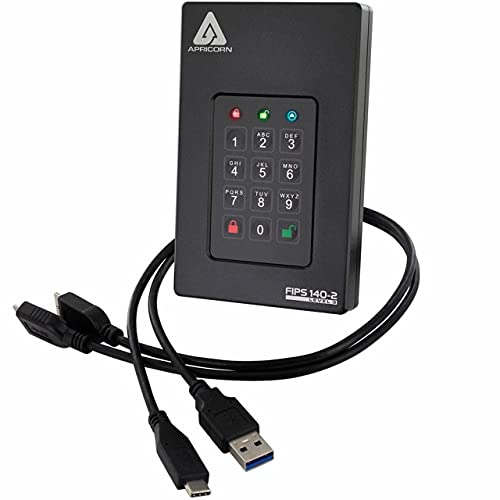
- 5TB portable storage for large school files
- 256-bit AES XTS hardware encryption
- FIPS 140-2 Level 3 validated with admin/user modes
Best For: Students needing maximum secure storage capacity
Fast Premium SSD Pick
ArmorLock Encrypted NVMe SSD 2TB

- Up to 1000MB/s read/write performance
- Phone unlock with no password needed
- IP67-rated with strong drop and crush resistance
Best For: Students who need fast secure transfers and rugged protection
Simple Password-Protected Option

- 7-15 digit PIN access with no software required
- AES-XTS 256-bit hardware encryption
- IP56 dust and splash resistance
Best For: Students wanting simple PIN security across many devices
Desktop Security Pick

- 2TB encrypted desktop storage
- Separate admin and user modes
- Brute-force defense for added protection
Best For: Students needing a secure stationary backup drive
Encrypted Portable Pick
Seagate One Touch 1TB for simple password-protected backups
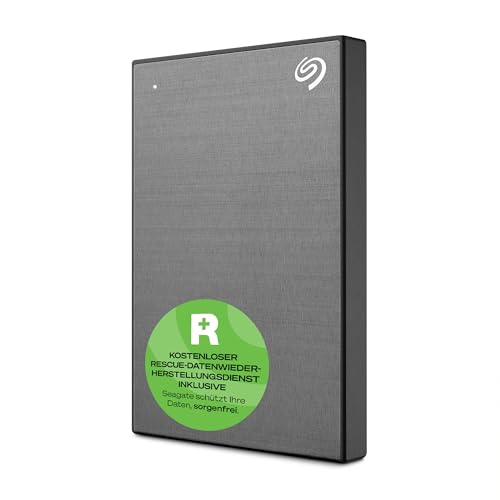
- Password-activated hardware encryption
- USB 3.0 one-click or scheduled backups
- 2-year warranty plus Rescue Data Recovery
Best For: Students who need portable encrypted backup with simple setup
Ransomware-Ready Choice
WD My Passport 2TB with password protection

- Hardware encryption with password protection
- Backup software includes ransomware defense
- 2TB capacity in a slim portable design
Best For: Students who want extra storage and backup protection
Heavy-Duty Security Pick
Apricorn Aegis Padlock 1TB with keypad encryption

- 256-bit AES XTS hardware encryption
- Wear-resistant keypad with brute-force protection
- Software-free design with rugged build
Best For: Students who prioritize maximum file security and keypad access
Best Premium Pick
WD My Passport Ultra 2TB Silver
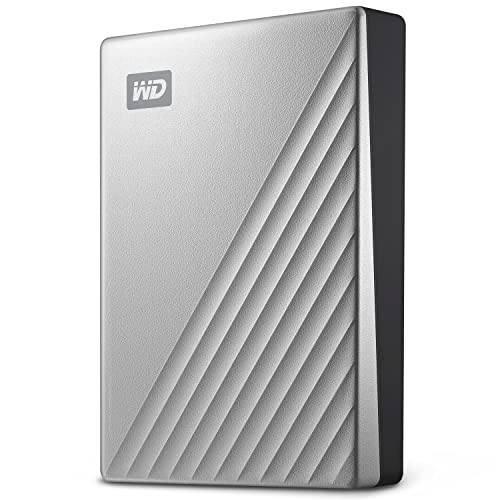
- 256-bit AES hardware encryption
- USB-C and USB 3.1 compatible
- 2TB portable metal enclosure
Best For: Students who want a sleek encrypted drive with modern USB-C support
Best Cross-Platform Choice
Seagate One Touch 2TB Space Gray

- Password-activated hardware encryption
- Windows and Mac compatible
- Includes backup software and Rescue plan
Best For: Students who need one encrypted drive for both Windows and Mac
Best Budget Capacity Option
WD My Passport Ultra 1TB Silver
- 256-bit AES hardware encryption
- USB-C and USB 3.1 compatible
- Compact 1TB portable metal drive
Best For: Students who need a smaller encrypted drive for everyday files
Rugged High-Capacity Pick – Apricorn Aegis Fortress L3 5TB
If you want encrypted external hard drives for students that prioritize security and capacity over portability extras, the Apricorn Aegis Fortress L3 is a strong fit. Its 5TB storage, hardware-based 256-bit AES XTS encryption, and FIPS 140-2 Level 3 validation make it a practical choice for keeping class files, research, and personal documents protected.
Best For: Students who need a large, secure drive for long-term file storage and shared desktop use.
Pros:
- 5TB capacity gives plenty of room for projects, media, and backups.
- Hardware encryption with FIPS 140-2 Level 3 validation adds strong security.
- Separate admin and user modes help with controlled access.
- Includes brute-force defense and two read-only modes for added protection.
Cons:
- It is a portable drive, but not as compact or lightweight as an SSD.
- USB 3.0 performance is solid, but not as fast as newer NVMe-based options.
Overall, this is a capacity-first encrypted drive that makes sense for students who value security and storage size more than top-end speed. The bundled travel pouch and USB-C cables are useful, but the main appeal is dependable encrypted storage.
Fast Premium SSD Pick – ArmorLock Encrypted NVMe SSD 2TB
For students comparing encrypted external hard drives for students, this ArmorLock model stands out because it combines security with speed. The 2TB NVMe SSD offers up to 1000MB/s read and write performance, plus phone-based unlocking and 256-bit AES-XTS hardware encryption for easy, secure access.
Best For: Students who want a fast encrypted drive for large files, backups, and frequent transfers.
Pros:
- Up to 1000MB/s read and write speeds for quick file transfers.
- Phone-based unlock removes the need to manage a password.
- Multi-user and multi-drive management can simplify shared use.
- Ultra-rugged build with IP67 dust/water resistance and drop/crush resistance.
Cons:
- 2TB capacity is smaller than some HDD-based options.
- Performance depends on the host device and usage conditions.
This is the best pick here if speed matters as much as security. It is especially appealing for students moving large media, design, or research files and who want a tougher, faster drive than a standard portable HDD.
Simple Password-Protected Option – iStorage diskAshur2 HDD 500GB
If you need encrypted external hard drives for students and want a straightforward, password-protected option, the iStorage diskAshur2 keeps things simple. It uses a 7-15 digit PIN and real-time AES-XTS 256-bit hardware encryption, so no software setup is required before securing your files.
Best For: Students who want easy PIN-based security and broad device compatibility.
Pros:
- PIN authentication is simple to use and does not require software.
- Hardware encryption protects data automatically when disconnected.
- Works with Windows, macOS, Linux, Chrome, Android, and more.
- IP56 dust and splash resistance adds everyday durability.
Cons:
- 500GB capacity is smaller than other drives in this roundup.
- Mechanical HDD speeds are lower than SSD-based alternatives.
This model is a practical pick for students who want strong security without a complicated setup. It is best when your files are important but your storage demands are modest.
Desktop Security Pick – Apricorn Aegis Padlock DT 2TB
Apricorn 2TB Aegis Padlock DT 256-Bit Encrypted USB 3.0 Hard Drive (ADT-3PL256-2000)
Check Price On AmazonFor students who want encrypted external hard drives for students but plan to keep the drive mostly at a desk, the Apricorn Aegis Padlock DT is a dependable desktop-style option. It combines 2TB of storage with 256-bit encrypted security, separate admin and user modes, and brute-force defense for controlled access.
Best For: Students who need a secure desktop drive for backups and larger local file libraries.
Pros:
- 2TB capacity is useful for backups, coursework, and media.
- Separate admin and user modes support access control.
- Brute-force defense adds another layer of security.
- Built-in hardware encryption keeps files protected on the drive.
Cons:
- 3.5-inch desktop design is less portable than compact drives.
- Best suited to a stationary setup rather than carrying between classes.
This is a solid fit if portability is not your top priority. It works best as a secure storage solution for a dorm desk, apartment, or home study setup where reliability and capacity matter more than size.
Encrypted Portable Pick – Seagate One Touch 1TB for simple password-protected backups
If you want one of the more straightforward encrypted external hard drives for students, the Seagate One Touch 1TB keeps things simple: plug it in over USB 3.0, back up with one click, and protect your files with password-activated hardware encryption. Its compact 2.5-inch design and lightweight build make it easy to carry between classes, the dorm, and home.
Best For: Students who want a slim, portable drive with hardware encryption and easy backup features.
Pros:
- Password-activated hardware encryption for file protection
- USB 3.0 connectivity for quick plug-in backups
- Portable 2.5-inch design with a minimalist brushed metal enclosure
- Includes a 2-year limited warranty and Rescue Data Recovery Service plan
Cons:
- 1TB capacity may feel limited if you store large video libraries
- Mac use may require reformatting for Time Machine
- Extra software offers are useful, but not necessary if you only need basic storage
Overall, this is a practical pick for students who want encrypted storage without a complicated setup. It focuses on portable backup, everyday compatibility, and basic peace of mind rather than advanced admin features.
Ransomware-Ready Choice – WD My Passport 2TB with password protection
For students comparing encrypted external hard drives for students, the WD My Passport 2TB offers a strong balance of portability, storage, and protection. It includes password protection with hardware encryption, plus backup software that adds defense against ransomware, which is useful if you keep class work, research files, and personal documents in one place.
Best For: Students who want more storage and built-in backup software alongside hardware encryption.
Pros:
- Password protection with hardware encryption
- Included backup software with defense against ransomware
- 2TB capacity gives more room for school files, media, and documents
- Compact portable design with a 3-year limited warranty
Cons:
- Mechanical drive design is not as fast as an SSD
- PC-focused hardware platform may be less convenient for some Mac users
- Security features depend on using the included software tools
This model is a sensible all-around option if you want a student-friendly drive with more headroom than a 1TB model. It leans into backup protection and security features while staying easy to toss in a backpack.
Heavy-Duty Security Pick – Apricorn Aegis Padlock 1TB with keypad encryption
If security is your top priority, this Apricorn Aegis Padlock is one of the more specialized encrypted external hard drives for students. It uses 256-bit AES XTS hardware encryption, a wear-resistant keypad, and a software-free design, so you can protect files without needing admin rights or extra installs. The rugged, compact build is made for regular travel.
Best For: Students who want strong hardware encryption and keypad-based access in a rugged drive.
Pros:
- 256-bit AES XTS hardware encryption with FIPS PUB 197 validated algorithm
- Wear-resistant keypad and brute-force self-destruct feature
- Software-free design with no admin rights needed
- Compact, rugged build suited for carrying on the road
Cons:
- 1TB capacity may be modest for large media collections
- Keypad-based security adds extra steps versus simple plug-and-play drives
- Designed primarily for security-focused use rather than broad feature extras
This is the most security-forward option in the group, especially if you want physical keypad access and a tougher privacy story. It trades convenience extras for a more locked-down approach to portable storage.
Best Premium Pick – WD My Passport Ultra 2TB Silver
If you want encrypted external hard drives for students that feel polished and practical, this WD My Passport Ultra is a strong fit. It combines 2TB of storage with USB-C and USB 3.1 compatibility, plus 256-bit AES hardware encryption and password protection to help keep school files private.
Best For: Students who want a compact, premium-looking drive with built-in hardware encryption and USB-C support.
Pros:
- 256-bit AES hardware encryption and password protection
- USB-C and USB 3.1 compatible for modern laptops
- 2TB capacity is useful for large class files, projects, and backups
- Refined metal cover and compact 2.5-inch portable design
Cons:
- Formatted for Windows out of the box
- Drive is geared toward PC use in the supplied details
Overall, this model stands out if security and portability matter as much as storage. It is a well-rounded option for students who want a small encrypted drive that looks and feels a step above basic plastic alternatives.
Best Cross-Platform Choice – Seagate One Touch 2TB Space Gray
For students comparing encrypted external hard drives for students, the Seagate One Touch is appealing because it pairs password-activated hardware encryption with Windows and Mac support. Its 2TB capacity, USB 3.0 connection, and portable design make it easy to carry between classes, dorms, and study spaces.
Best For: Students who use both Windows and Mac and want a password-protected portable backup drive.
Pros:
- Password-activated hardware encryption for added file security
- Works with Windows and Mac, with reformatting note for Time Machine use
- 2TB storage is suitable for documents, media, and backups
- Includes backup software features like single-click and scheduled backups
Cons:
- USB 3.0 interface is older than USB-C options
- Time Machine use may require reformatting
- Some bundled software perks are promotional and time-limited
This is a practical pick for students who switch between devices and want simple password protection without giving up portability. The included rescue service and warranty add extra peace of mind for everyday academic use.
Best Budget Capacity Option – WD My Passport Ultra 1TB Silver
This 1TB WD My Passport Ultra is a straightforward option if you need encrypted external hard drives for students without paying for more storage than you need. It offers 256-bit AES hardware encryption, password protection, and USB-C plus USB 3.1 compatibility in the same compact metal design as the larger model.
Best For: Students who want a smaller-capacity encrypted drive for coursework, notes, and light backups.
Pros:
- 256-bit AES hardware encryption with password protection
- USB-C and USB 3.1 compatibility for newer laptops
- Compact 2.5-inch portable design with metal enclosure
- 3-year limited warranty
Cons:
- 1TB capacity may be limiting for media-heavy students
- Formatted for Windows out of the box
- Supplied details point mainly to PC compatibility
If your schoolwork is mostly documents, class files, and backups, this version keeps the same security features in a more affordable capacity tier. It is a sensible choice when you want encryption and portability more than maximum storage.
How We Picked the Best Encrypted External Hard Drives for Students
We prioritized Encrypted External Hard Drives for Students that are practical for school life: strong security, easy portability, dependable storage capacity, and broad compatibility with common laptops and desktops. We also weighed whether the drive uses hardware encryption, password protection, or backup software that can help protect against data loss and ransomware.
Quick Comparison: What Matters Most
For most students, the right choice depends on how you use the drive. If you want the strongest protection for sensitive files, look for hardware encryption and a physical design built for travel. If you mainly need affordable backup space for documents and media, a simpler password-protected portable drive may be enough. Speed matters more for large project files and video, while capacity matters more for semester-long archives and backups.
Key Buying Factors for Encrypted External Hard Drives for Students
Security Type
Hardware encryption is the best fit when you want security built into the drive itself. Password protection is helpful too, but it is best treated as one layer of protection rather than the only one. If you handle personal records, research data, or shared-school-device files, stronger encryption is worth prioritizing.
Capacity and Speed
A 1TB drive is often enough for coursework, notes, and standard backups. Choose 2TB or more if you store lots of media, lab files, or full device backups. SSD-based models are faster and more shock-resistant, while HDD models usually offer more storage for the money.
Portability and Durability
Students should look for compact drives that fit easily in a backpack and can handle daily travel. Water- and dust-resistant designs, along with rugged housings, are especially useful for campus commutes and shared study spaces.
Compatibility and Ease of Use
Make sure the drive works with your laptop’s ports and operating system. USB-C is increasingly convenient for newer devices, while USB 3.0 remains widely compatible. Also consider whether setup requires special software, since quick plug-and-play use can be a big advantage for busy students.
Who Should Buy Which Encrypted External Hard Drives for Students?
Choose a high-security hardware-encrypted drive if you need to protect sensitive academic, financial, or personal files. Pick a fast encrypted SSD if you value speed and carry large projects often. Go with a larger-capacity portable HDD if budget and backup space matter most. If you want a simple student-friendly option for everyday file protection, a password-activated drive with backup features is often the most balanced choice.
In short, the best Encrypted External Hard Drives for Students combine secure access, enough storage for the school year, and a design that can survive life on the move.