If you spend hours reading, writing, researching, or attending classes on screen, the right monitor can make a real difference. The best eye-care models for study use combine crisp text, stable brightness, and comfortable viewing angles.
Below, we’ve focused on monitors that help reduce visual fatigue while still giving you good everyday value, practical features, and screen sizes that work well for desks, dorm rooms, and home offices.
Best 10 Eye Care Monitors for Studying Picks for 2026
Eye-Care Productivity Pick
BenQ GW2790TC 27-inch 144Hz USB-C IPS Monitor

- Eye-Care features for longer study sessions
- USB-C with video, data, and power delivery
- Height, tilt, and pivot adjustments
Best For: Students and remote workers who want a larger, comfortable monitor with USB-C simplicity
Budget Classroom Comfort
ViewSonic VS2247-MH 22-Inch Eye Care Monitor

- Flicker-Free and Blue Light Filter support
- 100Hz refresh for smoother everyday use
- Tilt, swivel, rotate, and height adjustments
Best For: Students and office users who want a smaller, affordable monitor with basic eye comfort features
Desk-Space Smart Choice
BenQ GW2490TC 23.8-inch Eye-Care USB-C Monitor

- Triple Eye Protection for extended study use
- USB-C for a cleaner single-cable setup
- Flexible stand with pivot and wall-mount support
Best For: Study desks where a 24-inch class monitor, USB-C convenience, and eye comfort are priorities
Portable Study Companion
ASUS ZenScreen MB16ACV 15.6-Inch Portable Eye Care Monitor

- Anti-glare IPS panel with eye care features
- Lightweight portable design with kickstand
- USB-C and USB-A compatible
Best For: Students who need a lightweight portable monitor for studying on the go
Budget Eye Comfort Pick
24-Inch KOORUI FHD 100Hz VA Monitor

- TÜV-certified low blue light and flicker-free
- 100Hz helps smooth scrolling for study tasks
- HDMI, VGA, and audio out for flexible setup
Best For: Students needing an affordable, eye-friendly monitor for everyday studying
Premium Study Screen
ASUS 27-Inch Eye Care FHD IPS Monitor

- 27-inch IPS display with wide-angle viewing
- TÜV-certified low blue light and flicker-free
- 120Hz refresh rate with HDMI, DP, and VGA
Best For: Students wanting a larger eye-care monitor with smooth scrolling and broad compatibility
Large Workspace Choice
ViewSonic 32-Inch FHD IPS Study Monitor

- Large 32-inch IPS screen for multitasking
- Flicker-Free and Blue Light Filter for comfort
- HDMI, VGA, and built-in speakers
Best For: Students who want a big screen for reading, writing, and split-screen work
BenQ Eye-Care IPS
BenQ GW2490 Eye-Care Desk Pick

- Low Blue Light Plus and Flicker-Free support easier long study sessions.
- 100Hz IPS display makes scrolling and multitasking feel smoother.
- HDMI, DisplayPort, VESA mount, and built-in speakers add flexibility.
Best For: students who want a comfortable 24-inch monitor for everyday studying
KOORUI Curved Eye Care
KOORUI Curved Study Comfort Monitor

- 1500R curved 24-inch screen suits relaxed reading and browsing.
- TÜV Rheinland eye care, low blue light, and no-flicker support long sessions.
- 100Hz with HDMI/VGA gives smooth everyday school use.
Best For: students who want a curved monitor for comfortable daily study
SANSUI Compact Eye Care
SANSUI 22-Inch High-Refresh Study Monitor
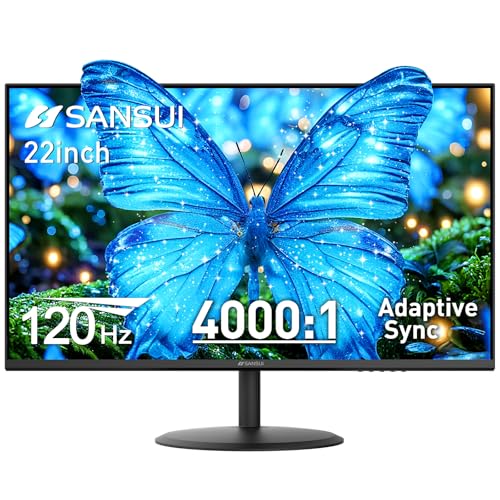
- 120Hz refresh rate keeps scrolling and cursor movement smooth.
- Anti-flicker, low blue light, and anti-glare help reduce strain.
- Dual HDMI, VESA support, and tilt adjustment suit study desks.
Best For: students who want a compact 22-inch monitor for comfortable everyday studying
Eye-Care Productivity Pick – BenQ GW2790TC 27-inch 144Hz USB-C IPS Monitor
If you want eye care monitors for studying that also feel smooth and modern for everyday work, the BenQ GW2790TC is built around comfort and convenience. Its IPS panel, Flicker-Free technology, Low Blue Light support, and ergonomic adjustments make it a practical choice for long reading sessions, note-taking, and multitasking at a desk.
Best For: Students and remote workers who want a larger, comfortable monitor with USB-C simplicity and eye comfort features.
Pros:
- BenQ Eye-Care technologies help reduce eye strain during extended screen time.
- USB-C one-cable setup can handle video, data, and power delivery.
- 144Hz refresh rate makes scrolling and general use feel smoother than 60Hz displays.
- Height, tilt, and pivot support make it easier to dial in a study setup.
Cons:
- 1080p resolution on a 27-inch screen may not feel especially sharp for everyone.
- USB-C is the main convenience feature, so users without it may not get the full benefit.
- More feature-rich than a basic student monitor, which may be more than some buyers need.
This is a strong pick if you want a study monitor that emphasizes eye comfort without giving up everyday usability. The combination of ergonomic flexibility, USB-C, and BenQ’s visual comfort features makes it easy to recommend for long sessions.
Budget Classroom Comfort – ViewSonic VS2247-MH 22-Inch Eye Care Monitor
The ViewSonic VS2247-MH is a practical option if you’re looking for eye care monitors for studying on a tighter budget. Its 22-inch Full HD screen, Flicker-Free technology, Blue Light Filter, and ergonomic stand are aimed at making everyday coursework and home-office use more comfortable.
Best For: Students, households, and office users who want a smaller, affordable monitor with basic eye comfort features.
Pros:
- Flicker-Free technology and a Blue Light Filter help reduce eye fatigue.
- 100Hz refresh rate offers smoother-than-standard viewing for study and browsing.
- Advanced ergonomics include tilt, swivel, rotate, and height adjustments.
- HDMI and VGA inputs make it easy to connect older and newer devices.
Cons:
- 22-inch screen size is compact, so it may feel small for multitasking.
- LCD panel and 250 cd/m2 brightness are fairly basic compared with higher-end options.
- Limited ports may not suit users with multiple modern accessories.
For straightforward study use, this monitor covers the essentials without overcomplicating the setup. It stands out more for comfort and value than for premium image quality, which is exactly what many students need.
Desk-Space Smart Choice – BenQ GW2490TC 23.8-inch Eye-Care USB-C Monitor
Among eye care monitors for studying, the BenQ GW2490TC is a well-rounded pick for a compact desk. Its 23.8-inch IPS panel, Triple Eye Protection features, and USB-C connectivity make it a strong fit for students who want a clean setup and reliable comfort during long work blocks.
Best For: Study desks where a 24-inch class monitor, USB-C convenience, and eye comfort are all priorities.
Pros:
- Triple Eye Protection combines Visual Optimizer, Low Blue Light, and Flicker-Free features.
- USB-C input supports a simpler one-cable workstation setup.
- 144Hz refresh rate can make scrolling and multitasking feel smoother.
- Height, tilt, pivot, and wall-mount support give you flexible placement options.
Cons:
- 1080p resolution on a 23.8-inch panel is practical, but not the sharpest option available.
- Only one HDMI and one USB-C connection may be limiting for some users.
- It is aimed at productivity first, so it may be overkill if you only need a basic display.
This model is especially appealing if you want a study monitor that balances comfort, speed, and desk simplicity. It offers the core eye-care features students look for, plus the convenience of USB-C and a flexible stand.
Portable Study Companion – ASUS ZenScreen MB16ACV 15.6-Inch Portable Eye Care Monitor
If your idea of eye care monitors for studying includes portability, the ASUS ZenScreen MB16ACV is a compact travel-friendly option. Its anti-glare IPS panel, Flicker-Free and Low Blue Light support, and USB-C compatibility make it a handy second screen for laptop-based study anywhere.
Best For: Students who need a lightweight portable monitor for studying on the go, at shared spaces, or alongside a laptop.
Pros:
- Portable 15.6-inch design is easy to carry for school, travel, or shared workspaces.
- Anti-glare surface plus Flicker-Free and Low Blue Light features support comfortable viewing.
- Hybrid-signal USB-C and USB-A support broad device compatibility.
- Kickstand design allows portrait or landscape positioning.
Cons:
- 60Hz refresh rate is standard, so it is not built for especially smooth motion.
- Smaller screen size offers less room for split-screen study than desktop monitors.
- Glossier screen finish may not appeal to users who prefer a matte display.
This is the most mobile-friendly option in the group, and that makes it useful for students who move between locations. It is less about a permanent desk setup and more about adding a comfortable, flexible second screen wherever you study.
Budget Eye Comfort Pick – 24-Inch KOORUI FHD 100Hz VA Monitor
If you want eye care monitors for studying without spending much, the KOORUI 24-inch display is a practical pick for reading, note-taking, and long homework sessions. Its FHD VA panel, anti-glare screen, and TÜV-certified low blue light and flicker-free tech are built for comfortable everyday use.
Best For: Students who want a compact, affordable monitor for schoolwork, online learning, and daily productivity.
Pros:
- 100Hz refresh rate helps scrolling and window switching feel smoother than a basic 75Hz display.
- TÜV Rheinland certified low blue light and flicker-free features support longer study sessions.
- 24-inch FHD screen with 99% sRGB and 4000:1 contrast gives clear text and decent color.
- HDMI, VGA, and audio out add flexible hookup options for modern and older devices.
Cons:
- No DisplayPort support is included.
- MacBook and USB-C devices need a separate USB-C to HDMI adapter.
- The 24-inch size may feel small if you prefer a larger study workspace.
This is a straightforward study monitor that focuses on comfort and value more than premium extras. If you mainly need a clean, easy-on-the-eyes screen for school tasks, it covers the basics well.
Premium Study Screen – ASUS 27-Inch Eye Care FHD IPS Monitor
Among eye care monitors for studying, the ASUS VA279QG stands out if you want a larger, smoother screen for reading, research, and multitasking. The 27-inch IPS panel, TÜV-certified Eye Care features, and 120Hz refresh rate make it a strong all-around option for school and home office use.
Best For: Students who want a larger 27-inch monitor with eye comfort features and versatile connectivity.
Pros:
- 27-inch Full HD IPS panel gives wide-angle viewing and a roomy workspace for study materials.
- ASUS Eye Care with Low Blue Light and Flicker-Free tech supports long sessions.
- 120Hz refresh rate and 1ms MPRT make scrolling and motion feel very smooth.
- HDMI, DisplayPort, and VGA connectivity works with newer and legacy devices.
Cons:
- Still a 1080p panel, so text sharpness is not as dense as higher-resolution 27-inch monitors.
- Only one HDMI port is listed.
- It may be larger than needed if you have a very small desk.
This monitor is a smart choice if you study for hours and want a bigger screen without giving up comfort features. It balances eye care, speed, and flexibility better than most basic office displays.
Large Workspace Choice – ViewSonic 32-Inch FHD IPS Study Monitor
If your study setup needs more screen space, this ViewSonic 32-inch monitor gives you a big, easy-to-read canvas for documents, browser tabs, and reference materials. It includes Flicker-Free technology and a Blue Light Filter, making it a comfortable option for long study or work sessions.
Best For: Students who want a large, simple monitor for reading, writing, and multitasking at a desk.
Pros:
- 32-inch Full HD IPS panel provides a large viewing area for split-screen study work.
- Flicker-Free technology and Blue Light Filter help reduce eye fatigue.
- Thin bezels and wide 178-degree viewing angles support a comfortable desktop setup.
- HDMI and VGA inputs plus built-in speakers add useful everyday convenience.
Cons:
- 75Hz refresh rate is more basic than faster study monitors.
- 1080p resolution on a 32-inch screen is less sharp than smaller FHD displays.
- Heavier and bulkier than the 24-inch or 27-inch alternatives.
This model makes sense if size matters more than pixel density and you want a simple, comfortable screen for studying. It is especially appealing for users who like room to keep multiple windows open side by side.
BenQ Eye-Care IPS – BenQ GW2490 Eye-Care Desk Pick
If you want eye care monitors for studying, the BenQ GW2490 is a practical 24-inch option built for long reading sessions, note-taking, and everyday desktop use. Its IPS panel, 100Hz refresh rate, and BenQ Eye Care Tech-Low Blue Light Plus are designed to keep text comfortable and motion smooth during busy study days.
Best For: Students who want a 24-inch IPS monitor with low blue light and flexible connectivity for schoolwork.
Pros:
- Low Blue Light Plus, Flicker-Free, and Brightness Intelligence tech help reduce eye strain.
- 100Hz refresh rate gives smoother scrolling and cursor movement than standard 60Hz screens.
- IPS panel with 99% sRGB and 178-degree viewing angles supports clear, consistent visuals.
- HDMI, DisplayPort, VESA mount support, and built-in speakers add setup flexibility.
Cons:
- 24-inch 1080p resolution is solid for studying, but not ideal if you want a sharper high-density display.
- Built-in speakers are included, but the monitor is still mainly a basic productivity display.
Overall, this BenQ model stands out as a balanced study monitor if eye comfort matters more to you than premium extras. It combines sensible image quality with features that suit long homework and research sessions.
KOORUI Curved Eye Care – KOORUI Curved Study Comfort Monitor
For eye care monitors for studying on a budget-friendly curved screen, the KOORUI 24-inch model offers a 1500R design, 100Hz refresh rate, and TÜV Rheinland-certified eye care features. It is aimed at home office and study use, with a VA panel that adds deeper blacks and a 178-degree viewing angle for general everyday work.
Best For: Students who prefer a curved monitor with eye-care certification for reading, browsing, and casual schoolwork.
Pros:
- 1500R curvature creates a more immersive viewing shape for desktop use.
- TÜV Rheinland certification, low blue light, and no-flicker design support comfortable extended use.
- 100Hz refresh rate and Adaptive Sync help keep motion and scrolling smoother.
- HDMI and VGA inputs make it easy to connect to common laptops and PCs.
Cons:
- Does not support VESA mounting, so wall or arm setups are not an option.
- No built-in speakers, so you may need external audio if you want sound.
In practice, this KOORUI is a good study monitor if you like a curved screen and want eye-friendly basics without spending on a more advanced display. Its tilt adjustment and simple connectivity make it easy to fit into a shared desk setup.
SANSUI Compact Eye Care – SANSUI 22-Inch High-Refresh Study Monitor
If you are comparing eye care monitors for studying, the SANSUI 22-inch display is a compact pick that emphasizes comfort and smoothness. It combines a 120Hz refresh rate, anti-flicker technology, low blue light, and an anti-glare coating, which makes it a practical fit for long reading, writing, and web-based coursework.
Best For: Students who want a smaller 22-inch monitor with strong eye-comfort features and smooth scrolling.
Pros:
- 120Hz refresh rate and Adaptive Sync help scrolling and cursor movement feel very smooth.
- Anti-flicker, low blue light, and anti-glare coating are designed to reduce eye strain.
- 100% sRGB and HDR mode provide solid color accuracy for general productivity tasks.
- Dual HDMI ports, VESA 75×75 support, and tilt adjustment make setup straightforward.
Cons:
- 22-inch size is compact, which may feel small if you like more screen space for multitasking.
- No built-in speakers, so you will need separate audio if required.
This SANSUI model is a sensible choice for study desks where comfort and space efficiency matter. It keeps the feature set focused on eye care and smooth everyday use rather than extras you may not need for schoolwork.
How We Picked These Eye Care Monitors for Studying
We prioritized displays that make long study sessions easier to manage: IPS or strong-viewing-angle panels, flicker-free operation, low blue light or TÜV-style eye care features, and refresh rates that keep scrolling and window switching feeling smooth. We also looked for sensible desk-friendly sizes, adjustable stands, USB-C or HDMI connectivity, and models with good value for students.
Quick Comparison: What Matters Most
For studying, the best monitor is not always the biggest or fastest. A 24-inch or 27-inch screen is often the sweet spot for text clarity and workspace balance. Larger 32-inch screens can help with split-screen work, while portable models are useful for shared spaces or laptop-only setups. If you read a lot of documents, prioritize sharp full HD text, comfortable brightness control, and stable color/contrast over gaming extras.
Key Buying Factors for Eye Care Monitors for Studying
Screen Size and Desk Space
Most students do well with 23.8 to 27 inches. Smaller screens fit tight desks, while larger screens support multitasking, lecture notes, and research side by side.
Panel Quality and Text Comfort
IPS panels usually offer better off-angle viewing and more consistent image quality, which is helpful when you sit for hours. A good full HD panel is enough for everyday study, especially on 24- and 27-inch monitors.
Eye Comfort Features
Look for flicker-free backlighting, low blue light modes, and brightness adjustment that stays comfortable in dim rooms. These features do not eliminate strain entirely, but they can help reduce discomfort during long reading sessions.
Connectivity and Adjustability
USB-C is convenient for modern laptops, while HDMI remains the most common and flexible option. Height and tilt adjustment are especially useful because monitor position affects posture and perceived eye strain as much as the panel itself.
Refresh Rate and Everyday Smoothness
A 100Hz or 120Hz monitor can make scrolling notes and moving between tabs feel smoother than a basic 60Hz display. That is not essential for every student, but it can make daily use more pleasant.
Who Should Buy Which Eye Care Monitors for Studying?
If you need a simple, affordable screen for essays, classes, and web research, a 24-inch FHD monitor is usually the best starting point. If you want more room for split-screen productivity, consider a 27-inch model with height adjustment. If you study in different locations or use a laptop as your main computer, a portable monitor may be the smartest fit. And if you prefer a larger workspace for reference documents or multitasking, a 32-inch option can be worth the extra desk space.
In short, the best Eye Care Monitors for Studying are the ones that match your desk setup, your laptop or PC connections, and how many hours a day you plan to look at the screen.