Choosing a keyboard can make a bigger difference than most students expect. The right mechanical ergonomic keyboard can reduce strain, improve posture, and make long note-taking sessions feel less tiring.
Below, we’ve rounded up ten options that balance comfort, layout, switch feel, and practicality for homework, coding, writing, and study marathons.
Best 10 Mechanical Ergonomic Keyboards for Students Picks for 2026
Compact Split Typing
Perixx PERIBOARD-335BL Ergonomic Mechanical Keyboard

- Compact tenkeyless split layout for smaller desks
- Integrated palm rest and adjustable tilt support posture
- Low-profile blue clicky switches with macro support
Best For: Students who want a compact ergonomic keyboard with programmable keys
Editor Pick
RK A70 Wireless Alice Keyboard

- Alice layout helps reduce wrist strain.
- Bluetooth, 2.4GHz, and USB-C support multiple devices.
- 65% format keeps arrow keys, knob, and space savings.
Best For: Students who want a comfortable wireless ergonomic keyboard with customization.
Typing Comfort Choice
Adesso EasyTouch 150 Full-Size Ergonomic

- Split contoured shape supports natural hand positioning.
- Integrated palm rest adds comfort for long typing sessions.
- Cherry MX Brown switches offer tactile, quiet feedback.
Best For: Students who type for long stretches and want a full-size wired board.
Premium Wireless Pick
Keychron Q13 Max Alice Wireless Metal Keyboard
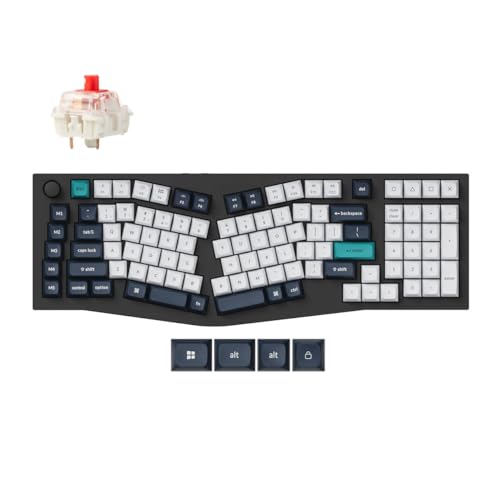
- Full-metal 96% Alice layout
- Bluetooth 5.2, 2.4 GHz, and USB-C support
- Hot-swappable, programmable, and RGB backlit
Best For: students who want a premium ergonomic keyboard with wireless flexibility and a metal build
Split Comfort with Macro Control – Cloud Nine C989M Ergonomic Mechanical Keyboard
If you’re shopping for mechanical ergonomic keyboards for students who spend long hours writing papers, coding, or studying, the Cloud Nine C989M is built to reduce strain while keeping a full-size layout. Its split design, built-in tenting, and palm support help keep wrists and shoulders in a more natural position, while the tactile brown switches offer a comfortable typing feel for daily use.
Best For: Students who want a full-size ergonomic keyboard with macro keys, palm support, and a tactile mechanical feel.
Pros:
- Split layout can separate hands by up to 8 inches for a more natural typing posture.
- Built-in tenting and palm support add comfort during long study sessions.
- Kailh Brown tactile switches provide a satisfying, low-force typing feel.
- RGB backlighting and 10 programmable macro keys add useful customization.
Cons:
- Full-size design takes up a lot of desk space.
- Best suited to PC use, as the notes focus on Windows compatibility.
- May be more feature-rich than some students need for basic note-taking.
Overall, this is a strong pick if you want an ergonomic mechanical keyboard that still behaves like a traditional full-size board. It balances comfort features with practical extras like macros, backlighting, and USB passthrough.
Clicky Low-Profile Typing – Perixx PERIBOARD-535BL Ergonomic Mechanical Keyboard
For students comparing mechanical ergonomic keyboards for students, the Perixx PERIBOARD-535BL stands out for its split-key layout and low-profile clicky switches. The ergonomic shape is meant to reduce wrist bending, while the curved rows and keycaps aim to support a more natural typing posture during long assignments and study sessions.
Best For: Students who like loud, clicky feedback and want an ergonomic board for long typing sessions.
Pros:
- Split-key ergonomic layout helps reduce wrist bending.
- Low-profile blue clicky switches give strong tactile and audible feedback.
- Curved rows and ergonomic keycaps support comfort over long sessions.
- NKRO and programmable keys add accuracy and customization.
Cons:
- Clicky switches may be too loud for shared dorms or quiet libraries.
- The ergonomic layout may take 1–2 weeks to feel natural.
- Full-size footprint may be less ideal for tight desks.
This model is a practical option if you want an ergonomic mechanical keyboard with a more compact split feel and a distinctly clicky typing experience. Its firmware update, programmability, and broad OS compatibility make it flexible for school use.
Tenkeyless Ergonomic Speed – Cloud Nine ErgoTKL Mechanical Keyboard
The Cloud Nine ErgoTKL is a smart choice if you’re looking for mechanical ergonomic keyboards for students and want a smaller desktop footprint without giving up comfort features. Its split layout, built-in tenting, and adjustable forward tilt are designed to keep your hands in a more natural position, while the Kailh brown switches offer a tactile feel for everyday typing.
Best For: Students who want a tenkeyless ergonomic keyboard with useful media controls and a tactile switch feel.
Pros:
- Tenkeyless split design saves desk space compared with a full-size board.
- Built-in 7-degree tenting and adjustable tilt support comfort while sitting or standing.
- Aluminum smart wheel adds quick volume, scrolling, and app-switching control.
- Programmable hotkeys, RGB backlighting, and USB passthrough improve flexibility.
Cons:
- Lacks a dedicated number pad, which some students may miss.
- Layout may require a short adjustment period if you’re new to split keyboards.
- Primarily positioned for PC use in the supplied details.
It offers a nice balance of ergonomics and desk efficiency, making it a strong fit for homework, note-taking, and long study blocks. The added wheel and hotkeys make it feel more adaptable than a basic tenkeyless board.
Compact Split Typing – Perixx PERIBOARD-335BL Ergonomic Mechanical Keyboard
If you want mechanical ergonomic keyboards for students that are easier to fit on a smaller desk, the Perixx PERIBOARD-335BL offers a compact tenkeyless split design. The curved frame and integrated palm rest are aimed at improving wrist posture, while the low-profile clicky switches provide clear feedback for typing, coding, and studying.
Best For: Students who need a compact ergonomic keyboard with programmable macros and a clicky feel.
Pros:
- Compact tenkeyless split design helps promote a more natural typing posture.
- Integrated palm rest and adjustable tilt support the wrists.
- Low-profile blue clicky switches give strong keypress feedback.
- Programmable keys and Mac/Windows switching add versatility.
Cons:
- Clicky switch sound may be disruptive in quiet environments.
- Ergonomic shape may take time to get used to.
- As a wired USB keyboard, it is less flexible than wireless options.
This is a good budget-minded ergonomic shape to consider if you want a smaller board with macro support and a distinct mechanical feel. It keeps the feature set focused on comfort, key feedback, and everyday productivity.
Editor Pick – RK A70 Wireless Alice Keyboard
If you’re comparing mechanical ergonomic keyboards for students, the RK ROYAL KLUDGE A70 stands out as a flexible option for mixed study and downtime use. Its Alice-style curved layout is designed to reduce wrist strain, while the 65% format still keeps arrow keys and essentials within reach. Tri-mode connectivity also makes it easy to move between a laptop, tablet, or phone without replugging constantly.
Best For: Students who want an ergonomic mechanical keyboard that feels comfortable but still has wireless convenience and customization.
Pros:
- Split, angled Alice design aims to reduce wrist and forearm strain.
- Tri-mode connectivity supports USB-C, Bluetooth, and 2.4GHz wireless.
- 65% layout saves desk space while keeping arrow keys and a volume knob.
- Hot-swappable PCB and pre-lubed linear switches make future changes easier.
Cons:
- Compact layout leaves out the full number pad.
- Ergonomic Alice shape may take some adjustment if you are new to it.
- RGB and wireless features add complexity compared with a basic wired board.
The A70 is a strong pick if you want an ergonomic board that does more than just reduce strain. Between the cushioned gasket feel, long battery life, and broad device support, it covers both comfort and everyday flexibility well.
Typing Comfort Choice – Adesso EasyTouch 150 Full-Size Ergonomic
The Adesso EasyTouch 150 is built for students who spend a lot of time typing and want a more traditional mechanical keyboard with ergonomic support. Its split, contoured shape and integrated palm rest are designed to keep hands, wrists, and forearms in a more natural position. Since it uses USB-A wired connectivity, it stays simple for a desktop study setup.
Best For: Students who want a full-size ergonomic mechanical keyboard for long typing sessions and data entry.
Pros:
- Split, contoured ergonomic design supports a more natural typing posture.
- Integrated palm rest adds wrist support during longer sessions.
- Cherry MX Brown switches provide tactile feedback with a quieter feel.
- Full-size 104-key layout includes a numeric keypad and N-key rollover.
Cons:
- Wired USB-A connection is less flexible than wireless models.
- Larger footprint takes more desk space than compact keyboards.
- Does not include RGB or other extra customization features.
If comfort and productivity matter more than portability, this is one of the most practical options here. It focuses on steady, dependable typing support rather than flashy extras, which may suit study-heavy routines very well.
Wireless Productivity Pick – RK A72 Alice Ergo Keyboard
For students shopping for mechanical ergonomic keyboards for students, the RK ROYAL KLUDGE A72 offers a strong mix of comfort, wireless freedom, and workflow features. Its Alice-style split angle is designed to ease wrist and forearm strain, while the compact 68% layout still preserves arrow keys. A tri-mode connection setup and built-in macro keys make it useful for both study and general computer use.
Best For: Students who want an ergonomic wireless keyboard with macro controls and a cushioned typing feel.
Pros:
- Alice ergonomic layout is shaped to support a more natural typing posture.
- Tri-mode connectivity supports Bluetooth, 2.4GHz wireless, and USB-C.
- Five macro keys and a volume knob help streamline quick actions.
- Gasket mount and 5-layer dampening aim for softer, quieter typing.
Cons:
- Compact layout means no full number pad.
- Customization features may be more than some students need.
- Ergonomic Alice design can feel unfamiliar at first.
The A72 is a good fit if you want comfort without giving up convenience features. Its web-based driver, hot-swappable switches, and long battery life make it especially appealing for a flexible study desk.
Editor’s Choice – X9 Performance Wireless Split Ergonomic Keyboard
The X9 Performance is a strong pick for students who want mechanical ergonomic keyboards for students that can handle long study sessions without feeling overly bulky. Its split layout, built-in palm support, and quiet Pink mechanical switches aim to make typing more comfortable whether you’re writing papers, taking notes, or working late in a dorm room.
Best For: Students who want a quiet, wireless ergonomic mechanical keyboard with a built-in wrist cushion and multiple connection options.
Pros:
- Split key layout and built-in palm rest support a more natural typing position.
- Bluetooth, 2.4G wireless, and wired modes make it flexible for school setups.
- Quiet Pink mechanical switches are better suited to shared study spaces.
- Compact design still includes a number pad, function row, and shortcut keys.
Cons:
- Backlighting is white only, so it lacks RGB lighting effects.
- It is a low-profile design, which may not suit everyone’s typing preference.
Overall, this is a practical all-around ergonomic keyboard for students who value comfort, low noise, and convenience across laptop and desktop use. The rechargeable battery and backlit keys add everyday usability without making the board feel complicated.
Customization Pick – MechLands Feker Alice98 Programmable Ergo Board
The MechLands Feker Alice98 is a good fit for students looking at mechanical ergonomic keyboards for students who also want deep customization. Its Alice layout, numpad, and VIA programmability make it useful for coursework, note-taking, and any workflow where remapping keys or setting macros would save time.
Best For: Students who want a customizable wired ergonomic mechanical keyboard with a numpad and an Alice layout.
Pros:
- Alice ergonomic layout with angled keys helps hands rest more naturally.
- Includes a numpad and split spacebar for added functionality.
- VIA support allows key remapping and macro creation.
- Hot-swappable PCB makes switch changes easy without soldering.
Cons:
- USB-C wired only, so it does not offer wireless convenience.
- More feature-heavy than a basic student keyboard, which may be overkill for simple use.
This keyboard stands out if you want a more advanced setup with comfort and customization in the same package. The sound-dampening layers, RGB lighting, and PBT keycaps make it feel polished, but it is still best for users who are comfortable with a wired desk setup.
Premium Wireless Pick – Keychron Q13 Max Alice Wireless Metal Keyboard
The Keychron Q13 Max is one of the more premium mechanical ergonomic keyboards for students who want a refined typing feel and wireless flexibility. Its full-metal Alice layout, 2.4 GHz and Bluetooth support, and hot-swappable design make it a strong option for a study desk that also doubles as a productivity station.
Best For: Students who want a premium wireless ergonomic mechanical keyboard with a metal body and Alice layout.
Pros:
- 96% Alice layout supports a more natural hand position.
- 2.4 GHz wireless, Bluetooth 5.2, and wired modes offer versatile connectivity.
- Full aluminum body gives it a sturdy, premium feel.
- Hot-swappable switches and programmable features add long-term flexibility.
Cons:
- Metal construction and premium design likely make it less budget-friendly.
- Large 96% layout may take up more desk space than compact student boards.
If you want a high-end ergonomic keyboard with a polished build and plenty of connectivity options, this model delivers a lot. It is especially appealing for students who use their keyboard for both schoolwork and heavier daily computing, but it is clearly the most premium choice in the group.
How We Picked the Best Mechanical Ergonomic Keyboards for Students
We focused on models that make daily student use easier, not just more specialized. That means considering ergonomic layout, typing comfort, desk footprint, connection options, and how easy each keyboard is to live with in a dorm, library, or shared workspace.
For Mechanical Ergonomic Keyboards for Students, the best picks usually combine a manageable learning curve with features that genuinely help long typing sessions.
Quick Comparison: What Matters Most
Split and Alice-style layouts can improve hand position, while tenkeyless and compact boards save desk space. Wired models tend to be simplest and most reliable, while wireless options are better for flexible setups. Switch feel also matters: tactile switches are often a strong middle ground for typing-heavy coursework, while clicky switches deliver more feedback but can be loud in quiet rooms.
Key Buying Factors for Mechanical Ergonomic Keyboards for Students
Layout and Comfort
Choose a layout that matches your typing habits. Split keyboards are best for reducing wrist angle, while Alice-style boards offer a gentler transition for most users. If you already type quickly on a standard keyboard, a less drastic ergonomic shape may be easier to adapt to.
Size and Desk Space
Students often need room for notebooks, a mouse, or a laptop stand. Tenkeyless and 75% layouts free up space, while 96% and full-size boards are better if you need a number pad for spreadsheets, accounting, or STEM work.
Switch Type and Noise
Tactile switches are popular for class notes and essays because they offer clear feedback without being overly loud. Clicky switches feel distinct but may bother roommates or classmates. If you study in public spaces, quieter tactile options are usually the safer choice.
Connectivity and Portability
Wireless support is convenient if you move between rooms or use multiple devices, but wired keyboards are often the most dependable and easiest to power. For students juggling laptops, tablets, and desktops, multi-mode connectivity can be a useful bonus.
Programmability and Features
Macro support, hot-swap sockets, and remapping can be helpful if you use shortcuts for writing, coding, or editing. Just make sure extra features don’t come at the cost of basic comfort and reliability.
Who Should Buy Which Mechanical Ergonomic Keyboards for Students?
If you want the easiest transition from a standard keyboard, look for an Alice-style or TKL ergonomic model. If space is tight, compact ergonomic boards are a smart fit. If you need flexibility across devices, choose a wireless split mechanical keyboard. And if you spend hours typing every day, prioritize comfort first, then decide whether you want tactile, clicky, or customizable switches.
For most students, the best choice is the one that supports long sessions without distraction. The strongest Mechanical Ergonomic Keyboards for Students are the ones that balance comfort, size, and everyday usability.