Choosing the right tablet for school is easier when stylus support, battery life, and display quality all work together. The best student tablets make it simple to take notes, annotate PDFs, sketch ideas, and switch between classes without slowing down.
In this roundup, we focus on tablets with stylus for studying that balance value, portability, and practical features for everyday coursework.
Best 10 Tablets with Stylus for Studying Picks for 2026
Galaxy Study Companion

- S Pen support for notes, math, and drawing
- Up to 16 hours of battery life
- Storage expands up to 2TB
Best For: Students who want a responsive stylus tablet with long battery life and AI tools
Eye-Friendly Notebook

- Includes a 4096-level T-PEN stylus
- NXTPAPER 4.0 helps reduce eye fatigue
- 8000mAh battery supports long study days
Best For: Students who read, annotate, and write by hand for long sessions
Student All-Rounder

- Includes pen and folio case
- 11-inch 1920x1200 display
- Up to 10 hours of battery life
Best For: Students who want a simple, portable study tablet with accessories included
Budget Study Tablet

- Included stylus for notes and study tasks
- 120Hz IPS display for smooth viewing
- Up to 2TB expandable storage
Best For: Budget-minded students who want a stylus and expandable storage
Premium Study Tablet
Lenovo Idea Tab Pro with Google Gemini

- 12.7-inch 3K display for reading and multitasking
- Includes pen and folio case
- 11-hour battery with 45W quick charge
Best For: students who want a larger display and bundled stylus
Reliable Note-Taking Pick

- Includes S Pen for note-taking and annotation
- 14-hour battery life for long school days
- 10.4-inch 2K display with Samsung DeX support
Best For: students who want a lightweight note-taking tablet
Balanced College Tablet

- Includes Tab Pen and folio case
- 256 GB storage for notes and files
- 11-inch 2.5K display with low blue light support
Best For: college students who want a balanced tablet with more storage
Large-Screen Note-Taker
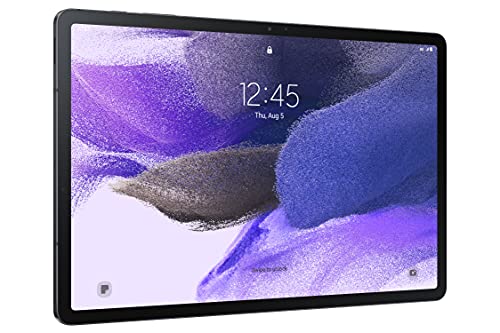
- 12.4-inch display for reading and split-screen work
- Included S Pen for notes, sketches, and markup
- Up to 13-hour battery with 64GB storage
Best For: students who want a big display and included stylus for study sessions
Lightweight Smart Study Tablet

- Includes Lenovo Tab Pen and folio case
- Study apps help with notes, sketching, and math
- 12.1-inch 2.5K display with up to 13-hour battery
Best For: students who want a thin, portable tablet with learning apps and pen support
Value Pen Bundle

- Includes USI 2.0 stylus pen and magnetic holder
- 11-inch 2K IPS display with 12GB RAM
- 8100mAh battery and expandable storage up to 1TB
Best For: students who want an included stylus, strong battery, and lots of memory
Galaxy Study Companion – Samsung Galaxy Tab S10 Lite
If you want a premium-feeling option among tablets with stylus for studying, the Samsung Galaxy Tab S10 Lite is built for note-taking, multitasking, and all-day reading. Its 10.9-inch display, included S Pen support, and study-friendly AI tools make it a practical pick for classes, homework, and organizing notes.
Best For: Students who want a responsive stylus tablet with long battery life, strong storage flexibility, and helpful AI features.
Pros:
- Included S Pen support makes note-taking, math, and drawing easier.
- 10.9-inch display and Vision Booster help with reading in different lighting conditions.
- Up to 16 hours of battery life, plus Super Fast Charging for quick top-ups.
- Expandable storage up to 2TB gives plenty of room for notes, files, and media.
Cons:
- 6GB RAM and Exynos 1380 are solid, but not aimed at heavy creative workloads.
- LCD panel may not feel as premium as higher-end AMOLED alternatives.
Overall, this is a well-rounded study tablet if you want stylus input, long battery life, and Samsung’s ecosystem features in one device. It stands out most for students who take a lot of handwritten notes and want smart tools to streamline daily school tasks.
Eye-Friendly Notebook – TCL NXTPAPER 11 Gen 2
The TCL NXTPAPER 11 Gen 2 is a strong option if you want tablets with stylus for studying and prefer a paper-like screen feel. With the included 4096-level T-PEN, NXTPAPER 4.0 eye-comfort display, and notebook-style tools, it’s designed for long reading, handwriting, and creative schoolwork.
Best For: Students who spend a lot of time reading, annotating, and writing by hand and want a display that’s easier on the eyes.
Pros:
- Included stylus with 4096 pressure levels supports notes and drawing.
- NXTPAPER 4.0 reduces blue light, glare, and flicker for long study sessions.
- Three display modes let you switch between regular viewing, reading, and creative work.
- 8000mAh battery and reverse charging add flexibility for all-day use.
Cons:
- Helio G80 and 6GB RAM are fine for study tasks, but not built for demanding performance.
- 64GB storage is modest unless you rely on expansion and cloud storage.
This tablet is especially appealing if comfort matters as much as productivity. The included case, stylus, and eye-focused display make it a practical study companion for reading-heavy coursework and handwritten notes.
Student All-Rounder – Lenovo Tab M11
The Lenovo Tab M11 is a straightforward choice for tablets with stylus for studying when you want an included pen and folio case without overcomplicating things. Its 11-inch display, 128GB storage, and 10-hour battery make it a dependable everyday tablet for classes, streaming, and note-taking.
Best For: Students who want a simple, portable study tablet with a pen and case included.
Pros:
- Includes a pen and folio case, which is convenient right out of the box.
- 11-inch 1920×1200 display offers clear visuals for reading and class materials.
- 128GB SSD storage gives solid room for apps and documents.
- Up to 10 hours of battery life supports a typical school day.
Cons:
- 4GB RAM is modest for heavier multitasking.
- Helio G88 is suitable for study use, but not for demanding performance needs.
For students who mainly need a reliable note-taking and media tablet, the Tab M11 keeps the buying decision simple. It offers the accessories most students want, plus enough battery and storage for daily coursework.
Budget Study Tablet – TECLAST P30T Stylus Bundle
If you’re shopping for tablets with stylus for studying on a tighter budget, the TECLAST P30T packs in a lot of useful extras. It includes a stylus for notes, a 120Hz display, expandable storage, and parental controls, making it a flexible pick for students and family use.
Best For: Budget-minded students who want a stylus, expandable storage, and a smooth display for everyday study use.
Pros:
- Included stylus is ready for note-taking and study work.
- 120Hz IPS display provides smooth scrolling and a comfortable viewing experience.
- 16GB max RAM with 128GB storage and up to 2TB expansion offers plenty of space.
- 6000mAh battery, dual speakers, and Widevine L1 improve daily versatility.
Cons:
- 3GB physical RAM means performance depends partly on virtual memory expansion.
- Helio T7250 is suitable for basic tasks, but not high-end workloads.
As a value-focused study tablet, the P30T does the essentials well and includes features that help it stretch beyond basic note-taking. It makes sense for students who want a low-cost tablet that can handle class apps, streaming, and handwritten notes.
Premium Study Tablet – Lenovo Idea Tab Pro with Google Gemini
If you want tablets with stylus for studying that also feel ready for entertainment, the Lenovo Idea Tab Pro stands out with its large 12.7-inch 3K display, included pen, and student-friendly AI tools. It’s built to handle note-taking, reading, and multitasking, while the low-blue-light screen and long battery life make it practical for long study sessions.
Best For: Students who want a larger display, included stylus, and AI-assisted study features.
Pros:
- Includes the Lenovo Tab Plus Pen and folio case in the box.
- 12.7-inch 3K LCD display with Low Blue Light certification for comfortable reading.
- MediaTek Dimensity 8300, 8 GB memory, and Wi-Fi 6E support smooth multitasking.
- 11-hour battery life and 45W quick charge help it last through long days.
Cons:
- Larger and heavier than smaller student tablets at 1.4 pounds.
- Storage starts at 128 GB, which may feel limited for some users.
- Designed more for productivity and media than ultra-portable use.
The Idea Tab Pro is a strong pick if you want a study tablet that feels premium without needing extra accessories right away. Its bigger screen and included pen make it especially useful for reading, annotating, and split-screen work.
Reliable Note-Taking Pick – Samsung Galaxy Tab S6 Lite
For tablets with stylus for studying, the Samsung Galaxy Tab S6 Lite is built around simple note-taking and everyday reliability. The included S Pen, 10.4-inch 2K screen, and lightweight design make it easy to carry between classes, while the 14-hour battery life supports long school days.
Best For: Students who want a lightweight tablet with an included S Pen for notes and annotation.
Pros:
- Includes the S Pen for handwriting, sketching, and document annotation.
- 14-hour battery life is well suited to all-day study use.
- 10.4-inch 2K display delivers crisp visuals for reading and classwork.
- Samsung DeX adds a more PC-like productivity mode.
Cons:
- Smaller display than some larger student-focused tablets.
- Storage is 64 GB built in, though it includes a 64 GB SD card.
- Charger is not included in the box.
This is a practical choice if you mainly want dependable handwriting support and long battery life rather than the biggest screen or the newest hardware. It keeps the focus on study basics, which makes it easy to recommend for everyday school use.
Balanced College Tablet – Lenovo Idea Tab 11-inch
If you’re comparing tablets with stylus for studying and want a balanced option, the Lenovo Idea Tab brings a 11-inch 2.5K display, included Tab Pen, and a roomy 256 GB of storage. It’s aimed at student use with learning apps, low blue light support, and enough battery life to carry you through classes and assignments.
Best For: College students who want a balanced study tablet with more storage and a bundled pen.
Pros:
- Includes the Lenovo Tab Pen and folio case.
- 256 GB storage gives you more room for notes, files, and apps.
- 11-inch 2.5K IPS display with TUV Rheinland Low Blue Light support.
- Learning apps like Lenovo AI Note, Squid, Nebo, and MyScript Calculator are included.
Cons:
- 12-hour battery life is solid, but shorter than the Samsung model here.
- Screen is smaller than the Lenovo Idea Tab Pro.
- Best suited to study and everyday use rather than heavier productivity tasks.
This model is a smart middle ground for students who want a modern Android tablet with stylus support and plenty of storage. It leans hard into studying features without feeling overbuilt for casual use.
Large-Screen Note-Taker – Samsung Galaxy Tab S7 FE
If you want one of the more spacious tablets with stylus for studying, the Samsung Galaxy Tab S7 FE stands out with its 12.4-inch display and included S Pen. It’s built for note-taking, sketching, and multitasking, with enough screen real estate to keep class materials and apps open side by side.
Best For: Students who want a big display for handwritten notes, reading, and split-screen study sessions.
Pros:
- 12.4-inch 2560 x 1600 display gives you plenty of room for reading and note-taking
- Included S Pen supports writing, drawing, clipping, and tapping for study work
- Galaxy connectivity and multiple windows help with multitasking across assignments
- Large 10090 mAh battery is rated for up to 13 hours of use
Cons:
- Renewed model, not brand new
- 4GB RAM and 64GB storage are modest for heavy app loads
- 60Hz display is less fluid than higher-refresh alternatives
This is a strong pick if you prioritize screen size and pen input over premium specs. For studying, it offers a comfortable writing experience and the kind of workspace that makes long reading sessions and assignment prep easier.
Lightweight Smart Study Tablet – Lenovo Idea Tab Plus
The Lenovo Idea Tab Plus is a practical choice among tablets with stylus for studying if you want a light device with built-in learning tools. Its 12.1-inch 2.5K display, included Tab Pen, and study-focused apps make it easy to organize notes, sketch ideas, and keep your workflow moving.
Best For: Students who want a thin, portable Android tablet with pen support and study apps.
Pros:
- Included Lenovo Tab Pen and folio case add value right out of the box
- Four learning apps, including Notepad, Squid, Nebo, and MyScript Calculator
- 12.1-inch 2.5K display with up to 800 nits brightness for clearer viewing
- Lightweight design at just over a pound with up to 13 hours of battery life
Cons:
- Folio keyboard is not included in this configuration
- LCD display lacks OLED-level contrast
- Best suited to study and productivity use rather than demanding performance tasks
Overall, this tablet is aimed squarely at students who want portability without giving up pen-based note-taking. It combines a sharp screen, included stylus, and useful learning tools in a very carry-friendly package.
Value Pen Bundle – LincPlus T4 Tablet
If you’re shopping for tablets with stylus for studying on a budget-friendly spec sheet, the LincPlus T4 brings a lot to the table. It includes a USI 2.0 stylus pen and magnetic holder, along with a sharp 11-inch 2K IPS display and enough memory to handle note-taking, reading, and multitasking.
Best For: Students who want a capable study tablet with a stylus, strong battery life, and generous memory.
Pros:
- USI 2.0 stylus pen and magnetic holder are included
- 11-inch 2K IPS display with 420 nits brightness
- 12GB RAM and 128GB storage, expandable up to 1TB
- 8100mAh battery with fast charging support for longer sessions
Cons:
- Stylus standard is USI 2.0, so compatibility should matter if you already own pens
- 11-inch screen is smaller than larger study tablets
- Case availability is planned, not yet included in the current listing
This model is a sensible pick if you want a well-equipped Android tablet for study tasks without stepping up to a larger, pricier device. Its combination of memory, display quality, and included pen makes it easy to recommend for everyday school work.
How We Picked the Best Tablets with Stylus for Studying
We prioritized models that make real academic work easier: responsive pen input, comfortable screen sizes for note-taking, strong battery life, enough storage for files and apps, and performance that can handle multitasking. We also favored tablets that include a stylus or support a capable active pen, since that reduces total cost and setup hassle.
Quick Comparison: What Matters Most
If you want a compact note-taker, an 11-inch tablet is often the sweet spot. If you prefer split-screen reading, lecture slides, and handwritten notes at once, larger 12- to 13-inch displays can feel more productive. Students who read heavily should also pay attention to panel quality, brightness, and eye-comfort features, while commuters may value lighter builds and longer battery life more than raw speed.
Key Buying Factors for Tablets with Stylus for Studying
Stylus Experience
Look for low-latency pen response, palm rejection, and pressure sensitivity if you plan to write a lot. A bundled stylus is ideal because it helps avoid compatibility confusion and extra spending.
Display and Size
For handwritten notes, 10.9- to 11-inch tablets are easy to carry and still roomy enough for class. Larger models are better for split-screen workflows, textbook markup, and research-heavy study sessions.
Battery and Storage
All-day battery life matters for lectures, libraries, and campus travel. Storage also deserves attention if you plan to keep offline textbooks, recordings, and many apps on the device.
Performance and Multitasking
Students should aim for at least enough memory to keep note apps, browser tabs, and PDF readers running smoothly. Faster chipsets and 8GB RAM or more help with smoother switching between tasks.
Who Should Buy Which Tablets with Stylus for Studying?
If you mainly take handwritten notes and want something simple, choose a smaller, pen-included tablet with solid battery life. If your workload includes split-screen studying, video lectures, and heavy PDF use, a larger and faster model makes more sense. Budget shoppers should focus on the best included stylus value, while power users should prioritize display quality, storage, and multitasking headroom. For most students, the best Tablets with Stylus for Studying are the ones that feel natural to write on and easy to carry every day.