Need a dependable printer for essays, handouts, lab reports, and presentation slides? Color laser printers can be a smart fit for students who want sharp text, vivid graphics, and less frequent toner changes than many inkjet models.
In this roundup, we focused on wireless convenience, duplex printing, scan and copy features, and practical paper handling so you can choose a model that fits dorm life, shared apartments, or a busy home study setup.
Best 10 Color Laser Printers for Students Picks for 2026
Easy-Use Color Printer
Brother HL-L3220CDW wireless color laser printer

- 19 ppm color and black output
- Automatic duplex printing
- 250-sheet tray with Wi-Fi and mobile support
Best For: Students who want a simple print-only laser printer for homework and presentations
All-in-One Study Hub
Canon imageCLASS MF662Cdw all-in-one color laser

- Print, scan, and copy in one unit
- Up to 26 ppm with auto duplex
- 5-inch touchscreen and mobile printing
Best For: Students who need scanning and copying as well as fast color printing
Compact Speed Pick
Brother HL-L3280CDW compact color laser printer

- Up to 27 ppm print speed
- Automatic duplex printing
- Wi-Fi, Ethernet, USB, and cloud access
Best For: Students who want a compact, fast printer for frequent school printing
Heavy-Duty All-in-One
HP Color LaserJet Pro 3301sdw all-in-one laser

- Print, scan, copy, and duplex
- Auto document feeder for multi-page jobs
- 250-sheet tray with wireless connectivity
Best For: Students who need an office-style all-in-one for frequent assignments and scanning
Compact 3-in-1 Student Choice
Brother HL-L3300CDW Wireless Color MFP

- Print, copy, and scan in one machine
- Automatic duplex printing saves paper
- Wireless, Wi-Fi Direct, and USB support
Best For: Students who need a compact all-in-one for homework and study tasks
Fast All-in-One Refurbished Option
HP Color LaserJet Pro MFP 3301cdw Renewed
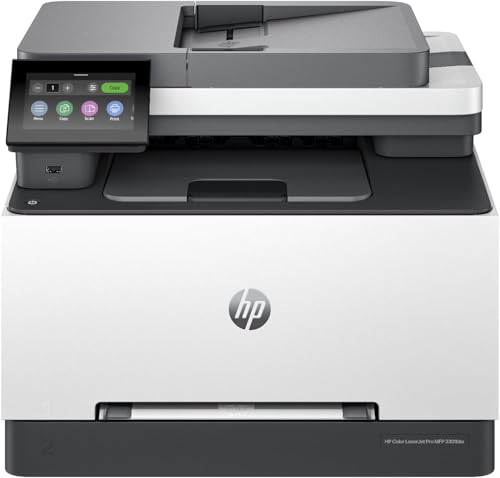
- 26 ppm printing in color and black
- Scan, copy, fax, and auto duplex support
- Dual-band Wi-Fi with self-reset
Best For: Students who need a fast all-in-one for busy coursework and documents
Print-Only Student Speedster
Canon imageCLASS LBP646Cdw Color Laser

- 26 ppm color and monochrome printing
- Automatic duplex printing saves paper
- Wireless setup with mobile printing support
Best For: Students who want a dedicated print-only laser printer with fast output
Campus Office Pick
Brother MFC-L3720CDW Color Laser All-in-One

- 19 ppm color laser printing with auto duplex
- 50-sheet ADF and 250-sheet tray
- Wi-Fi Direct, dual-band wireless, USB, and app control
Best For: Students who need an all-in-one printer for frequent scanning and printing
Fastest Home-Study Pick

- Up to 26 ppm with fast first print time
- 50-sheet duplex ADF and auto two-sided printing
- 5-inch touchscreen plus wireless and mobile printing
Best For: Students who value speed and easy all-in-one convenience
High-Volume Study Pick

- 35 ppm output with automatic duplex printing
- 1200 x 1200 resolution for sharper documents
- Wireless, Ethernet, USB, and ADF support
Best For: Students with heavier workloads who need speed and flexibility
Easy-Use Color Printer – Brother HL-L3220CDW wireless color laser printer
If you want color laser printers for students that balance speed, simplicity, and low-maintenance printing, the Brother HL-L3220CDW is a practical pick. It produces crisp text and vibrant graphics at up to 19 pages per minute, and its wireless plus mobile-device support makes it easy to print class handouts, essays, and presentations from a laptop or phone.
Best For: Students who need a straightforward color laser printer for everyday homework, reports, and occasional color projects.
Pros:
- Fast 19 ppm printing for quick turnarounds on assignments
- Automatic duplex printing helps save paper on double-sided handouts
- 250-sheet tray reduces the need for frequent refills
- Wireless and mobile printing support from laptops, smartphones, and tablets
Cons:
- Print-only design means no scanning or copying
- Manual feed slot is only for specialty media like envelopes and labels
- Heavier than a basic compact inkjet-style student printer
Overall, this Brother model is a solid fit if your priority is reliable color printing without extra all-in-one features. It keeps the setup simple while still offering duplex printing and a generous paper tray for school use.
All-in-One Study Hub – Canon imageCLASS MF662Cdw all-in-one color laser
For students who need more than just printing, this Canon is one of the more capable color laser printers for students because it combines print, scan, and copy functions in one machine. It prints up to 26 pages per minute, includes automatic two-sided printing, and adds a 5-inch touchscreen that makes common tasks easier to manage.
Best For: Students who need an all-in-one color laser printer for homework, document scanning, and copying class materials.
Pros:
- 3-in-1 design with print, scan, and copy functions
- Fast up to 26 ppm in color and monochrome
- Automatic duplex printing helps reduce paper use
- 5-inch color touchscreen and mobile printing support
Cons:
- Large and heavy compared with smaller dorm-friendly printers
- Uses a standard 250-sheet cassette, which may be enough but not oversized
- Only a 1-sheet multipurpose tray for specialty media
This Canon makes sense if your school workflow includes scanning handouts, copying notes, or printing multi-page documents regularly. The three-year limited warranty also adds extra peace of mind for long-term student use.
Compact Speed Pick – Brother HL-L3280CDW compact color laser printer
If you need a compact option among color laser printers for students, the Brother HL-L3280CDW stands out for its small footprint and strong speed. It delivers laser-quality color output at up to 27 pages per minute, supports automatic duplex printing, and connects through Wi-Fi, Ethernet, or USB for flexible setup in a dorm, apartment, or shared study space.
Best For: Students who want a fast, compact color laser printer with network flexibility and everyday reliability.
Pros:
- Compact design with a smaller footprint than many all-in-ones
- Fast up to 27 ppm printing
- Automatic duplex printing for double-sided documents
- Cloud printing support through a 2.7-inch touchscreen
Cons:
- Print-only model, so there is no scan or copy function
- Uses toner cartridges rather than inexpensive refill options
- Most useful for students who already have a separate scanning solution
For students who print often and want speed without giving up too much desk space, this Brother is a strong contender. The combination of mobile printing, cloud access, and duplexing makes it especially practical for busy school routines.
Heavy-Duty All-in-One – HP Color LaserJet Pro 3301sdw all-in-one laser
The HP Color LaserJet Pro MFP 3301sdw is a strong fit if you want color laser printers for students that feel more like a mini office machine. It offers printing, scanning, and copying, plus an automatic document feeder and duplex printing, so it can handle reports, packet scanning, and multi-page class work with less manual effort.
Best For: Students who need a dependable all-in-one printer for heavy document handling and regular class projects.
Pros:
- All-in-one design with print, scan, and copy functions
- Automatic document feeder for easier multi-page jobs
- Automatic two-sided printing helps save paper
- 250-sheet input tray supports regular printing needs
Cons:
- Heavier and bulkier than a typical student desk printer
- Uses HP Original 218A and 218X toner cartridges
- Designed with office use in mind, so it may be more printer than casual students need
This HP is best when schoolwork involves frequent scanning, copying, or larger print jobs. If you want a robust all-in-one with office-style features and reliable output, it is an easy model to justify.
Compact 3-in-1 Student Choice – Brother HL-L3300CDW Wireless Color MFP
If you want color laser printers for students that can also handle everyday homework tasks, the Brother HL-L3300CDW is a practical all-in-one option. It prints in laser-quality color, and it adds copy and scan features in a compact design that fits well in a dorm, shared apartment, or study space.
Best For: Students who need one compact machine for printing, scanning, and copying classwork.
Pros:
- 3-in-1 design adds print, copy, and scan in one compact unit
- Automatic duplex printing helps save paper on longer assignments
- Wireless, Wi-Fi Direct, and USB connection options add flexibility
- Up to 19 ppm print speed keeps routine jobs moving
Cons:
- Heavier than a basic single-function printer at 40.8 pounds
- Slower than the faster 26 ppm models in this roundup
- Best suited to everyday student use rather than high-volume output
Overall, this Brother is a solid student-friendly choice if you value versatility over speed. It covers the essential tasks most students need while keeping the footprint and feature set straightforward.
Fast All-in-One Refurbished Option – HP Color LaserJet Pro MFP 3301cdw Renewed
For students looking at color laser printers for students, the HP Color LaserJet Pro MFP 3301cdw stands out if you want a full-featured machine for heavier workloads. It combines printing, scanning, copying, faxing, automatic two-sided printing, and single-pass two-sided scanning, which can be useful for busy group projects and document-heavy semesters.
Best For: Students who need fast, all-in-one color printing with advanced scanning and office-style features.
Pros:
- Fast 26 ppm print speed in black and color
- All-in-one functions include print, scan, copy, and fax
- Auto document feeder and 2-sided single-pass scanning improve efficiency
- Dual-band Wi-Fi with self-reset helps maintain a stable connection
Cons:
- Renewed unit may not appeal to buyers who want brand-new hardware
- Uses HP chips or circuitry in cartridges, which limits third-party options
- More printer than many casual student users will actually need
This HP makes sense when you want speed and functionality in one device. It is especially strong for students balancing lots of paperwork, but the feature set is more office-like than minimalist.
Print-Only Student Speedster – Canon imageCLASS LBP646Cdw Color Laser
Canon Color imageCLASS LBP646Cdw Wireless Laser Printer, Duplex, 26 PPM, Print Only, White
Check Price On AmazonIf your priority is straightforward printing, this Canon is one of the more focused color laser printers for students. It is a print-only model with wireless connectivity, automatic duplex printing, and quick 26 ppm output, so it works well for essays, handouts, and presentation materials without extra features to learn.
Best For: Students who only need fast, reliable color printing and do not want scan or copy functions.
Pros:
- Fast 26 ppm printing in both color and monochrome
- Automatic two-sided printing helps reduce paper use
- Wireless setup and mobile printing support add convenience
- 250-sheet capacity is useful for regular class printing
Cons:
- No scanning, copying, or faxing functions
- Single-purpose design may be limiting for some students
- Heavier and larger than a very small desktop printer
For students who already handle scanning separately, this Canon keeps things simple and efficient. It is a strong fit if you mostly want dependable, high-speed color prints with minimal setup fuss.
Campus Office Pick – Brother MFC-L3720CDW Color Laser All-in-One
If you’re comparing color laser printers for students who also need scanning, copying, and faxing, the Brother MFC-L3720CDW is built for heavy everyday use. It prints up to 19 pages per minute, supports automatic duplex printing, and adds a 50-sheet auto document feeder plus a 250-sheet tray for fewer interruptions during busy weeks.
Best For: Students who want a dependable all-in-one laser printer for shared dorm, apartment, or campus-office use.
Pros:
- Color laser output with automatic duplex printing to save paper
- 50-sheet ADF and 250-sheet paper tray handle larger scan and print jobs
- Dual-band Wi-Fi, Wi-Fi Direct, USB, and mobile app control for flexible setup
- 3.5-inch color touchscreen with cloud shortcuts for common workflows
Cons:
- At 44 pounds, it’s not the easiest printer to move around
- Print speed is solid for school work, but not the fastest in this group
- Designed more for productivity than compact desk placement
Overall, this Brother is a practical pick if you want one machine that can handle class handouts, scanned assignments, and double-sided printing without constant paper refills. It’s especially appealing for students who share a printer and value connectivity and workflow features.
Fastest Home-Study Pick – Canon imageCLASS MF665Cdw
For students shopping for color laser printers for students, the Canon Color imageCLASS MF665Cdw stands out for speed and convenience. It prints up to 26 pages per minute in color and monochrome, includes a 50-sheet duplex ADF, and adds automatic two-sided printing to keep assignments moving.
Best For: Students who want a fast, easy-to-use all-in-one printer for home study and shared family use.
Pros:
- Up to 26 ppm print speed with quick first print time
- 50-sheet duplex ADF and auto 2-sided printing for efficient document handling
- 5-inch color touchscreen with customizable Application Library
- Wireless, mobile printing, and a 3-year limited warranty
Cons:
- Uses Canon Genuine Toner 075, so consumables are model-specific
- Heavier and larger than a basic student printer
- More office-oriented than a minimal dorm setup
This Canon is a strong fit if speed matters and you want a color laser all-in-one that can keep up with recurring papers, scans, and copies. The combination of fast output, duplexing, and mobile support makes it a practical long-term student choice.
High-Volume Study Pick – Canon imageCLASS MF753Cdw II
If you need color laser printers for students that can handle bigger workloads, the Canon Color imageCLASS MF753Cdw II is the most capable option here. It prints up to 35 pages per minute, offers automatic duplex printing, and uses a 250-sheet capacity with an output tray that also holds 250 sheets, which is useful when you’re juggling long reports and repeat assignments.
Best For: Students with heavier printing needs who want a fast, full-featured all-in-one laser printer.
Pros:
- Fast 35 ppm color and black-and-white output
- 1200 x 1200 resolution for sharper text and graphics
- Wireless, Ethernet, and USB connectivity for flexible setup
- Automatic duplexing, ADF scanning, and fax support in one device
Cons:
- At 60.6 pounds, it’s the heaviest model in this roundup
- Its size is better suited to a dedicated desk or shared space
- More printer than a casual, occasional-use student really needs
This model is the best fit when you want classroom-ready speed and more robust paper handling. It’s a strong choice for students in demanding programs or shared study spaces where one printer needs to serve many jobs.
How We Picked These Color Laser Printers for Students
We prioritized models that make student life easier: reliable wireless printing, automatic duplexing to save paper, compact designs for smaller spaces, and multifunction features for scanning assignments or copying forms. We also looked at print speed, paper capacity, and whether a printer can handle both everyday schoolwork and occasional heavier workloads.
Quick Comparison: What Matters Most
For most students, the best value usually comes from a balance of speed, size, and functionality. Single-function printers work well if you only need to print, while all-in-one models are better if you regularly scan textbooks pages, submit paperwork, or make copies. Faster output matters if you print last-minute assignments, but a quieter, smaller printer may be more important in a dorm room.
Key Buying Factors for Color Laser Printers for Students
Print Speed and Monthly Workload
Look for a printer that can keep up with class deadlines without feeling sluggish. Speeds in the 20- to 30-ppm range are usually plenty for student use, especially if you print multi-page documents or group projects.
Wireless and Mobile Printing
Easy printing from laptops, tablets, and phones is a must. If you move between campus, home, and study spaces, mobile-compatible printing can save time and reduce setup hassles.
Duplex Printing
Automatic double-sided printing is one of the most useful features for students because it cuts paper use and keeps long assignments more compact. It also helps when printing lecture notes or reading packets.
Scanner, Copier, and Fax Needs
If your classes require document uploads, signed forms, or quick copying, an all-in-one machine makes more sense than a print-only unit. Fax matters less for most students, but it can still be useful for certain administrative forms.
Size, Noise, and Paper Capacity
Smaller footprints are important in dorms and shared rooms, while a 250-sheet tray can reduce refills if you print often. A compact printer with a decent tray size is often the sweet spot for student setups.
Who Should Buy Which Color Laser Printers for Students?
If you only need crisp, reliable printing for papers and slides, choose a compact single-function model. If you scan homework, copy handouts, or submit paperwork regularly, go with an all-in-one. Students who print frequently should favor faster models with larger paper trays, while those with limited space may prefer a slimmer printer even if it has fewer features.
In short, the best Color Laser Printers for Students are the ones that match your workload, room size, and study habits without adding maintenance headaches.