If you spend long hours typing notes, essays, or discussion posts, the right keyboard can make studying feel a lot easier on your hands, wrists, and shoulders. Compact ergonomic keyboards are designed to help you stay comfortable without taking over your desk.
Below, we’ve narrowed down the best options for different study setups, from portable Bluetooth models to wired keyboards with built-in wrist support. Whether you want something for a dorm room, library bag, or a permanent home workstation, this roundup can help you choose wisely.
Best 10 Compact Ergonomic Keyboards for Studying Picks for 2026
Wave Keys for natural typing posture
Logitech Wave Keys ergonomic wireless keyboard

- Compact layout helps keep mouse closer
- Wavy keys support natural wrist position
- Memory-foam palm rest adds comfort
Best For: students who want wireless comfort and multi-device switching
Low-Profile Compact Keyboard for Desk Space
Evoluent wired compact scissor-switch keyboard

- No numpad keeps mouse closer to you
- Ultra-low profile helps reduce wrist strain
- 12 hotkeys work without an Fn key
Best For: students who prefer a wired, low-profile keyboard
Split Comfort for Long Study Sessions
Arteck split ergonomic wireless keyboard

- Split keyset supports a natural arm position
- Cushioned wrist rest improves typing comfort
- Rechargeable battery lasts up to 6 months
Best For: students who want split-layout comfort and wireless convenience
Foldable Travel Keyboard for On-the-Go Study
ProtoArc XK03 foldable ergonomic Bluetooth keyboard

- Folds flat for backpacks and travel
- Split V-shape encourages natural typing
- Connects to 3 Bluetooth devices
Best For: students who need portability and multi-device use
Ultra-Portable Foldable Option

- Folds to about smartphone size for travel
- Split ergonomic layout for more natural typing
- Supports up to 3 Bluetooth devices
Best For: Mobile students who need a pocket-sized keyboard for studying on the go
Wrist-Supported Compact Full-Size
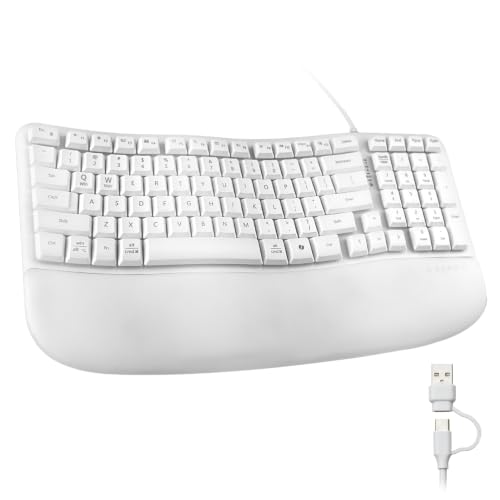
- Curved wave layout with cushioned wrist rest
- Compact 100-key format with numeric keypad
- USB-A and USB-C wired connections
Best For: Students who study at a desk and want ergonomic support with full-size function
MoKo Foldable Travel Pick
MoKo Ergonomic Foldable Keyboard

- Foldable and easy to pack for study sessions on the move
- Curved layout supports a more natural hand position
- Quiet scissor keys and multi-device connectivity
Best For: Students who want a portable ergonomic keyboard for tablets and laptops
Logitech Full-Size Comfort Choice
Logitech Ergo K860 Wireless Ergonomic Keyboard

- Split, curved design supports a more natural typing posture
- Pillowed wrist rest and adjustable tilt legs add comfort
- Quiet full-size layout works well for long desk sessions
Best For: Students who need maximum comfort for long hours at a study desk
ProtoArc Space-Saving Study Pick
ProtoArc EK04 Mini Compact Ergonomic Keyboard

- Compact no-number-pad layout saves desk space
- Split design and tilt legs support a relaxed typing posture
- Bluetooth/2.4G switching works with up to 3 devices
Best For: Students who need a smaller ergonomic keyboard for tight study setups
Wave Keys for natural typing posture – Logitech Wave Keys ergonomic wireless keyboard
If you want compact ergonomic keyboards for studying, the Logitech Wave Keys is built to keep your setup comfortable during long reading, note-taking, and writing sessions. Its wavy layout, compact size, and cushioned palm rest are meant to support a more natural typing posture without taking up too much desk space.
Best For: Students who want a compact wireless keyboard with a cushioned palm rest and easy device switching.
Pros:
- Compact design helps bring your mouse closer for a more natural shoulder position.
- Wavy key layout is shaped to support natural typing posture.
- Cushioned memory-foam palm rest adds wrist support for longer sessions.
- Can switch between up to 3 devices with Bluetooth or Logi Bolt receiver support.
Cons:
- Membrane typing feel may not suit users who prefer mechanical switches.
- Wireless setup depends on batteries instead of a wired connection.
Overall, Wave Keys is a practical pick if comfort matters more than a traditional full-size layout. It balances ergonomic shaping with everyday flexibility, making it a strong study desk option.
Low-Profile Compact Keyboard for Desk Space – Evoluent wired compact scissor-switch keyboard
For compact ergonomic keyboards for studying, the Evoluent Wired Compact Keyboard focuses on keeping your hands close and your wrist angle low. Its no-numpad design, ultra-low profile, and scissor-switch keys make it a straightforward choice for a tidy study setup.
Best For: Students who want a wired, low-profile compact keyboard with shortcut keys and no battery concerns.
Pros:
- No numeric pad helps keep the mouse closer to reduce arm strain.
- Ultra-low profile design sits 0.54 in above the desk to help reduce wrist strain.
- Scissor-switch keys are designed for precise typing.
- 12 one-touch hotkeys provide quick access without needing an Fn key.
Cons:
- Wired USB connection may be less flexible than wireless options.
- No numeric pad may be inconvenient if you enter lots of numbers.
This is a practical, no-frills ergonomic option for a study desk where simplicity matters. If you prefer a compact hardwired board and quick-access hotkeys, it fits the brief well.
Split Comfort for Long Study Sessions – Arteck split ergonomic wireless keyboard
If you’re comparing compact ergonomic keyboards for studying, the Arteck Split Ergonomic Keyboard leans into wrist comfort with a split keyset and cushioned palm support. It’s a good fit for a more relaxed typing position at a desktop or laptop, especially if you spend a lot of time drafting notes or papers.
Best For: Students who want a split ergonomic keyboard with wrist support and simple wireless setup.
Pros:
- Split design helps position wrists and forearms in a more natural, relaxed position.
- Cushioned wrist and palm rest adds comfort during typing.
- 2.4G wireless setup is simple with the nano USB receiver.
- Rechargeable battery is rated for up to 6 months on a single charge based on the stated usage.
Cons:
- Split layout may take some getting used to.
- Designed for Windows systems, so it may be less universal than some alternatives.
As a study keyboard, this model makes comfort the priority without adding setup complexity. It’s best if you want an ergonomic split style and are willing to adapt to the layout.
Foldable Travel Keyboard for On-the-Go Study – ProtoArc XK03 foldable ergonomic Bluetooth keyboard
For students shopping compact ergonomic keyboards for studying, the ProtoArc XK03 stands out because it folds down for travel while still offering a split ergonomic layout. It’s designed for libraries, cafes, airplanes, and other places where portability matters as much as typing comfort.
Best For: Students who need a foldable ergonomic keyboard that can move easily between classes, trips, and study spots.
Pros:
- 360° foldable, ultra-slim design makes it easy to carry in a backpack or briefcase.
- Split V-shape keyset is meant to promote a more natural typing position.
- Connects to up to 3 Bluetooth devices and switches between them easily.
- Type-C rechargeable battery offers long standby time for travel use.
Cons:
- Split ergonomic layouts can require an adjustment period.
- Smaller foldable form factor may feel less traditional than a full-size keyboard.
This is a strong choice if your study routine moves around and you want one keyboard for multiple devices. The tradeoff is that the foldable ergonomic design may take some adaptation, but it delivers excellent portability.
Quiet Ergonomic Wireless Pick – Perixx PERIBOARD-636B
If you want a compact ergonomic keyboard for studying that keeps the desk clutter down, the Perixx PERIBOARD-636B is built around a split wave layout with an integrated number pad. The detachable magnetic wrist rest and silent round-key typing make it a comfortable option for long note-taking sessions, while the 2.4GHz wireless connection keeps setup simple.
Best For: Students who want a quieter, wireless ergonomic keyboard with a built-in number pad for everyday study work.
Pros:
- Ergonomic split wave shape helps reduce strain and shortens mouse reach.
- Detachable vegan leather wrist rest adds comfort and flexibility.
- Silent typing is well suited to shared spaces like libraries or dorm rooms.
- Wireless 2.4GHz connection reduces cable clutter on a study desk.
Cons:
- Still takes up more space than a true mini keyboard because it includes a number pad.
- Membrane build may not appeal to users who prefer a mechanical feel.
- Wireless setup depends on a USB receiver rather than Bluetooth.
Overall, this Perixx model is a practical middle ground if you want ergonomic comfort without giving up numeric input. It makes more sense for home study setups than for ultra-portable use, but the quiet keys and wrist support are strong study-friendly touches.
Ultra-Portable Foldable Option – Targus PKF00302US
For students who move between classrooms, libraries, and coffee shops, this compact ergonomic keyboard for studying is designed to disappear into a bag when you are done. The foldable split layout keeps the typing position more natural, and Bluetooth 5.1 plus multi-device pairing makes it easy to switch between a laptop, tablet, or phone.
Best For: Mobile students who need a pocketable ergonomic keyboard for note-taking and lightweight multitasking.
Pros:
- Folds down to roughly smartphone size for easy travel storage.
- Split ergonomic design supports a more natural hand position.
- Pairs with up to three Bluetooth devices for switching between study devices.
- Rechargeable battery with auto on/off helps keep daily use simple.
Cons:
- No integrated wrist rest, so long sessions may feel less supported than larger ergonomic boards.
- Foldable design is great for portability but less substantial than a full desk keyboard.
- Best suited to Bluetooth devices, so wired users will need a different option.
This Targus model is the most travel-friendly pick here, and that portability is its main advantage. If your study routine changes locations often, its compact fold and multi-device support are easy to appreciate.
Wrist-Supported Compact Full-Size – SANWA GSKBERG10W
If your priority is a comfortable desk keyboard with familiar full-size functionality, this SANWA model offers a curved wave layout in a compact footprint. It is a strong fit for studying at a home desk because it combines a cushioned wrist rest, a 100-key layout, and 13 shortcut keys to speed up common tasks.
Best For: Students who want a full-size ergonomic keyboard with wrist support and shortcut keys for long study sessions.
Pros:
- Wave-shaped ergonomic design encourages a more natural typing position.
- Cushioned PU wrist rest adds support during longer study blocks.
- Compact 100-key layout keeps the numeric keypad while saving some desk space.
- USB-A and USB-C compatibility makes it easy to connect to different devices.
Cons:
- Wired design is less flexible than wireless or foldable alternatives.
- At 15.57 inches wide, it is compact for a full-size board but not truly small.
- Windows-focused shortcut features may matter less on some Mac setups.
This SANWA keyboard is the most traditional-feeling option in the group, but it still aims to reduce strain with ergonomic shaping and wrist support. If you study mostly at one desk and want easy access to a numpad and shortcut keys, it is a very sensible choice.
MoKo Foldable Travel Pick – MoKo Ergonomic Foldable Keyboard
If you want compact ergonomic keyboards for studying that are easy to carry between classes, libraries, and coffee shops, this MoKo foldable model is built around portability. Its curved key layout is meant to let your hands rest more naturally, while the folding design makes it simple to stash in a backpack or tablet sleeve.
Best For: Students who need a lightweight, foldable keyboard for tablets, phones, and laptop use on the go.
Pros:
- Foldable, ultra-slim design fits easily into a bag for travel or campus use
- Curved ergonomic layout aims to reduce wrist and shoulder discomfort during longer typing sessions
- Supports Bluetooth and 2.4G wireless connections, with up to 3 Bluetooth devices paired
- Scissor keys are designed for quiet typing, which helps in libraries and shared spaces
Cons:
- Uses a small 140mAh battery, so runtime is more limited than larger keyboards
- Folded form factor may feel less substantial than a full-size desk keyboard
This is a practical pick if your priority is packing light without giving up an ergonomic typing angle. It is especially appealing for students who switch between devices and need a quiet, portable study keyboard.
Logitech Full-Size Comfort Choice – Logitech Ergo K860 Wireless Ergonomic Keyboard
Among compact ergonomic keyboards for studying alternatives, the Logitech ERGO K860 is the comfort-first option if you type for long stretches at a desk. Its split, curved keyframe and pillowed wrist rest are designed to improve posture and reduce strain, making it a strong fit for long homework or research sessions.
Best For: Students who spend hours typing at a desk and want maximum wrist support and posture comfort.
Pros:
- Curved split keyframe is designed to promote a more natural typing posture
- Memory-foam wrist rest adds substantial support for longer study sessions
- Adjustable tilt legs help fine-tune wrist position whether seated or standing
- Quiet keys, full-size layout, and Bluetooth/USB connectivity make it versatile for home study
Cons:
- Much larger and heavier than portable compact keyboards
- Full-size layout takes more desk space than no-number-pad models
This model is less about portability and more about long-session comfort, so it makes sense if your study setup stays in one place. For desk-bound typing, it offers one of the most supportive ergonomic designs in the group.
ProtoArc Space-Saving Study Pick – ProtoArc EK04 Mini Compact Ergonomic Keyboard
If you specifically want compact ergonomic keyboards for studying, the ProtoArc EK04 Mini is built to save desk space without giving up a split ergonomic layout. By removing the number pad, it keeps your mouse closer to your body, which can help support a more natural shoulder position during long typing sessions.
Best For: Students who want a smaller ergonomic keyboard that frees up desk space and keeps the mouse closer.
Pros:
- No number pad, so it takes up less space on crowded study desks
- Split keyframe is designed to improve shoulder alignment and typing comfort
- Supports Bluetooth and 2.4G connections for up to 3 devices
- Rechargeable battery offers long standby time and USB-C charging
Cons:
- Hard palm rest is not cushioned and is non-removable
- Split layout may take time to get used to
- Not a full-size keyboard, so it lacks a 10-key number pad
This is a smart choice if desk space is tight and you still want the ergonomic benefits of a split design. It trades some traditional keyboard familiarity for a more compact, study-friendly footprint.
How We Picked the Best Compact Ergonomic Keyboards for Studying
We focused on keyboards that balance comfort, size, and everyday usefulness for students. That means ergonomic shaping that supports a more natural hand position, a compact layout that leaves room for a mouse or notebook, and connection options that fit modern study habits. We also looked for practical features such as wrist rests, multi-device pairing, foldable designs, and dependable battery life or wired reliability.
Because studying often means switching between laptops, tablets, and phones, portability and device compatibility mattered too. The best picks are easy to live with during long sessions and simple to pack up when you move from dorm to classroom to library.
Quick Comparison: What Matters Most
When comparing Compact Ergonomic Keyboards for Studying, start with your desk space and typing style. Split or wave-shaped keyboards are often best if you want a more open shoulder position and a natural wrist angle. Foldable models are better if portability is your priority. Wireless keyboards reduce cable clutter, while wired options can be ideal if you want zero charging concerns.
Also check whether the layout includes a number pad. Some students love it for spreadsheets and budgeting, while others prefer a smaller footprint without one. Palm rests and low-profile keys can make a big difference during long reading and writing sessions.
Key Buying Factors for Compact Ergonomic Keyboards for Studying
Comfort and Typing Posture
Look for a design that reduces strain rather than just shrinking the keyboard. Split layouts, curved frames, and cushioned wrist rests can all help support healthier study sessions.
Portability
If you move around often, prioritize lightweight or foldable keyboards that fit in a backpack. If the keyboard will stay on a desk, a sturdier wired or full-featured wireless model may be a better fit.
Connectivity
Bluetooth and multi-device support are especially useful for students who switch between a laptop, tablet, and phone. USB receivers can offer a simple plug-and-play setup for desktop use.
Layout and Shortcuts
Compact layouts save space, but make sure they still include the keys you use most. Shortcut keys can improve workflow for note-taking, browsing, and document editing.
Who Should Buy Which Compact Ergonomic Keyboards for Studying?
If you want the most comfortable all-day setup, choose a more traditional ergonomic model with a wrist rest and split or wave-style key layout. If you study in multiple locations, a foldable Bluetooth keyboard is usually the smartest pick. If desk space is tight, a mini compact keyboard with multi-device support can keep your setup tidy without sacrificing too much comfort.
For students who type heavily every day, the best choice is the one that makes long sessions feel easier to maintain. The right compact ergonomic keyboard should match your space, devices, and study routine first, then add convenience features after that.