If you want a distraction-light device for class notes, PDFs, and textbook reading, an e-reader with stylus support can be a smart study upgrade.
Below, we focus on models that balance comfortable reading, handwriting features, and practical storage for students.
Best 10 E Readers with Stylus for Students Picks for 2026
Premium Writing eReader

- 10.2-inch glare-free display for reading and writing
- Premium Pen included with no charging needed
- AI notebook tools convert and summarize handwriting
Best For: Focused students who annotate books, PDFs, and notes
Compact Color Study Reader
Bigme 7 Inch Color eBook Reader with Stylus
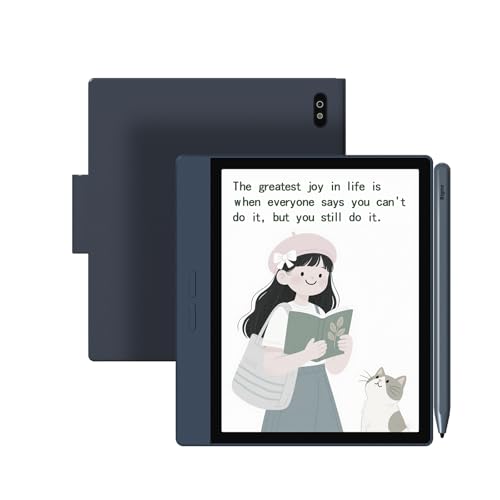
- 7-inch color ePaper screen for books and comics
- Includes stylus for annotations and handwritten notes
- 4G and Android 14 add mobile flexibility
Best For: Students who need a pocketable color reader with stylus input
Large Screen Note Reader
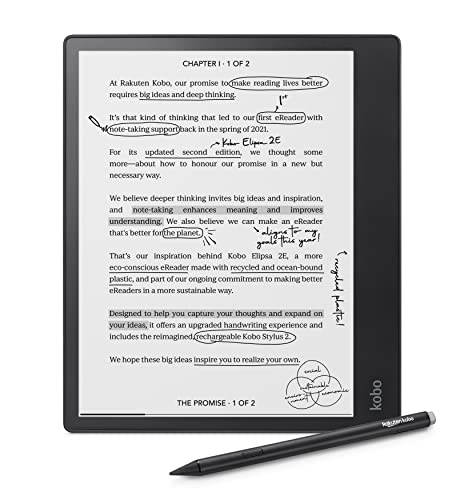
- 10.3-inch glare-free screen with ComfortLight PRO
- Includes Kobo Stylus 2 for notes and markup
- 32GB storage for books, notes, and audiobooks
Best For: Students who want a roomy, focused note-taking eReader
Study Hub Color Reader

- 7-inch color E-Paper screen is eye-friendly outdoors
- Stylus note-taking with handwriting-to-text conversion
- Audio recording and transcription for lectures
Best For: Students who want note capture and reading in one compact device
Compact Ink-Style Reader
5-Inch Eye Friendly HD Screen Reader

- 5-inch HD screen for books, comics, and PDFs
- Non-reflective, ink-like display helps reduce eye fatigue
- Handwriting board, pen, Wi‑Fi, BT, and camera included
Best For: students who want a small reader with basic handwriting support
Color Note-Taking Ereader
Kobo Libra Colour With Stylus Support

- 7-inch color E Ink display for books, comics, and markups
- Kobo Stylus 2 compatibility for highlighting and note taking
- Waterproof design with page-turn buttons and 32GB storage
Best For: students who want color reading and stylus-compatible annotations
Android Writing Reader Tablet
Ocean 7-Inch E-Ink Paper Tablet

- 7-inch glare-free E Ink screen for reading and writing
- Supports handwriting with Musnap Pencil compatibility
- Android, 64GB storage, and third-party app support
Best For: students who want a flexible reading and note-taking device
Compact Color Notes

- Supports Active Stylus InkSense
- Android 13 with third-party apps
- 7-inch color E Ink with front light
Best For: Students who want a compact color e-reader with app support and optional stylus input
Full-Feature Study Pick
Bigme B7 Pro Color Epapere Reader

- Stylus and case included
- Android 14 with app expansion
- 8GB RAM and 256GB storage
Best For: Students who want a ready-to-use color E Ink reader with included stylus and lots of storage
Balanced Note-Taking Value

- Stylus and case included
- Android 14 with app support
- Kaleido 3 display and front light
Best For: Students who want a mid-range color E Ink tablet for reading and PDF annotation
Premium Writing eReader – Amazon Kindle Scribe (64GB)
If you want e readers with stylus for students that can replace a notebook stack, the Kindle Scribe is built around reading, writing, and document markup. Its 10.2-inch glare-free display, Premium Pen, and AI notebook tools make it a strong fit for note-heavy coursework and PDF study sessions.
Best For: Students who want a distraction-free reading and writing device for notes, PDFs, and textbook markup.
Pros:
- Includes a Premium Pen that needs no setup or charging
- AI tools can convert handwriting to readable text and summarize notes
- Active Canvas lets you write directly on book pages and expand margins for notes
- Large 10.2-inch 300 ppi front-lit glare-free screen is comfortable for reading and writing
Cons:
- No notifications or social media, which limits non-study use
- Best suited to reading and writing rather than full app-based multitasking
For students who prioritize focused studying over app ecosystems, the Kindle Scribe delivers a clean mix of annotation, note organization, and long battery life. It is especially appealing if you work with books and documents in one place.
Compact Color Study Reader – Bigme 7 Inch Color eBook Reader with Stylus
Bigme B7 Color ePaper Tablet 7 Inch 8+128GB Ebook Reader with 4G Calling, 3000 mah (Blue)
Check Price On AmazonAmong e readers with stylus for students, this Bigme model stands out for its compact 7-inch color display and Android 14 support. It is designed for readers who want a portable device for eBooks, comics, notes, and app-based study tools, plus 4G connectivity when Wi-Fi is not available.
Best For: Students who want a small color e-reader with note-taking and mobile connectivity.
Pros:
- 7-inch color ePaper screen supports richer visuals for comics and illustrated books
- Stylus is included for handwriting, highlighting, and annotations
- 4G connectivity adds browsing and app access without relying on Wi-Fi
- Android 14 OS supports work and play apps
Cons:
- Smaller 7-inch screen may feel tight for long document sessions
- Native resolution is modest compared with larger premium note eReaders
If portability matters more than having a large writing surface, this Bigme is a practical student pick. It combines color reading, stylus input, and always-on connectivity in a very travel-friendly form.
Large Screen Note Reader – Kobo Elipsa 2E
The Kobo Elipsa 2E is a strong choice if you want e readers with stylus for students who read and write on large documents. Its 10.3-inch glare-free screen, ComfortLight PRO, and included Kobo Stylus 2 make it well suited for long study sessions, PDF markup, and organized note-taking.
Best For: Students who need a large-screen eReader for reading, highlighting, and writing in margins.
Pros:
- 10.3-inch E Ink Carta 1200 touchscreen gives plenty of room for notes
- Includes Kobo Stylus 2 for highlighting, underlining, and margin writing
- ComfortLight PRO adjusts brightness and color temperature for comfortable reading
- 32GB storage holds a large library and notes
Cons:
- Battery average life is listed as 2 hours in the supplied details
- Bulkier than 7-inch readers, so it is less pocket-friendly
For students who want a roomy digital notebook and reader in one device, the Elipsa 2E is the most document-friendly option here. It is built for serious annotation without clutter or distractions.
Study Hub Color Reader – Bigme B751C S
If you want e readers with stylus for students that also act like a study assistant, the Bigme B751C S brings together reading, handwriting, transcription, and Android app support. Its 7-inch color E-Ink display is aimed at eye-friendly reading, while the included stylus and audio transcription tools make it useful in class and during research.
Best For: Students who want a compact study hub for notes, reading, and lecture capture.
Pros:
- Includes a stylus for handwritten notes on ebooks
- Can convert handwriting to text after writing
- Records and transcribes audio live during lectures or meetings
- Android OS support adds app flexibility beyond standard reading
Cons:
- 7-inch screen is compact for full-page PDFs and heavy annotation
- Connectivity details are limited to USB in the supplied specs
This Bigme is best for students who want more than a basic e-reader. The combination of note conversion and live transcription makes it especially useful for lecture-based coursework.
Compact Ink-Style Reader – 5-Inch Eye Friendly HD Screen Reader
If you want one of the more compact e readers with stylus for students, this 5-inch model leans into portability and basic note-taking. Its eye-friendly, non-reflective screen is meant to mimic paper, while the included handwriting board and pen give you a simple way to mark thoughts as you read. It also adds wireless connectivity, a camera, and pre-installed productivity features for everyday use.
Best For: Students who want a small, lightweight reader for reading, quick handwritten notes, and all-in-one convenience.
Pros:
- 5-inch HD display is compact and built for reading books, comics, and PDFs.
- Ink-like, non-reflective screen is designed to reduce eye fatigue.
- Includes a handwriting board and pen for reading notes or separate notebooks.
- Portable design with wireless connectivity, BT, camera, and pre-installed software.
Cons:
- Smaller screen may feel cramped for longer study sessions or complex PDFs.
- Handwriting board is included, but the product notes do not describe advanced stylus features.
- Not focused on premium color reading or higher-end study annotation tools.
This is a practical pick if portability matters more than screen size. It looks best suited to students who mainly want a simple reading device with a basic handwriting option built in.
Color Note-Taking Ereader – Kobo Libra Colour With Stylus Support
Among e readers with stylus for students, the Kobo Libra Colour stands out if your coursework includes annotated reading, comics, or color-coded notes. Its 7-inch color E Ink display adds visual clarity for covers, illustrations, and markups, while Kobo Stylus 2 compatibility lets you annotate, highlight, and note take in color. The ergonomic body, page-turn buttons, and waterproof design also make it easy to use every day.
Best For: Students who want color reading and stylus-compatible note taking in a comfortable, waterproof eReader.
Pros:
- 7-inch color E Ink Kaleido 3 display supports covers, comics, and illustrations.
- Kobo Stylus 2 compatibility enables color annotations, highlights, and notes.
- Page-turn buttons, rotation, font customization, and landscape mode improve reading comfort.
- IPX8 waterproof rating and 32GB storage add everyday practicality.
Cons:
- Kobo Stylus 2 is sold separately.
- Color E Ink is useful, but the notes do not claim tablet-like speed or advanced app support.
- Battery life is listed at about 4 weeks, which is good but not class-leading in the provided details.
This is the strongest option here for students who want a more polished reading and annotation experience. The color display and stylus compatibility make it especially appealing for visual study material.
Android Writing Reader Tablet – Ocean 7-Inch E-Ink Paper Tablet
If you need e readers with stylus for students that can handle reading and more active note taking, this Ocean model is built around handwriting support and broad format compatibility. The 7-inch E-Ink screen is described as glare-free and comfortable for long sessions, while the octa-core processor, Android system, and 64GB storage give it a more flexible, multitasking-friendly profile. Just note that the Musnap stylus pen is sold separately.
Best For: Students who want a reading device with handwriting support, Android flexibility, and large storage.
Pros:
- 7-inch E Ink display offers a paper-like, glare-free reading experience.
- Supports handwriting with Musnap Pencil compatibility for note-taking.
- 64GB storage, 4GB RAM, and octa-core processor support smoother multitasking.
- Works with many formats and supports Bluetooth, Wi‑Fi, USB, and third-party apps.
Cons:
- Musnap stylus pen is not included and must be purchased separately.
- Heavier than some dedicated readers at 14.9 ounces.
- Its broader Android feature set may be more than some students need for simple reading.
This is the most feature-rich choice in the group for students who want more than a basic ebook device. The tradeoff is a little less simplicity, but the handwriting and app support give it broader study potential.
Compact Color Notes – BOOX Go Color 7 Gen II
BOOX Tablet Go Color 7 Gen II E Ink Tablet Digital Notebook Support Active Stylus InkSense (Black)
Check Price On AmazonIf you want e readers with stylus for students in a compact size, the BOOX Go Color 7 Gen II is built around Android 13, 4GB RAM, and support for the Active Stylus InkSense. It’s a strong fit for reading, app use, and light annotation, especially if you want access to third-party apps on an E Ink device.
Best For: Students who want a small color e-reader with Android app support and optional stylus input.
Pros:
- Supports the Active Stylus InkSense for handwriting and annotation
- Android 13 with support for 3rd-party apps
- 7-inch Kaleido 3 color E Ink display with warm and cold front light
- microSD slot and 64GB storage for books and files
Cons:
- Stylus is not included in the box
- 7-inch screen may feel small for heavier note-taking
- Color E Ink has inherent darkness/grayer appearance versus LCD/LED
Overall, this is a flexible student-friendly E Ink tablet if you value portability and app support more than a large writing surface. Just budget for the stylus separately and expect the typical limitations of color E Ink.
Full-Feature Study Pick – Bigme B7 Pro Color Epapere Reader
For students looking at e readers with stylus for students, the Bigme B7 Pro stands out with a stylus and case included, plus Android 14 and a large 8GB + 256GB storage setup. Its 7-inch color E Ink display is designed for eye comfort, and the open Android system makes it easier to load reading and productivity apps.
Best For: Students who want a ready-to-use color E Ink reader with plenty of storage and included stylus support.
Pros:
- Stylus and case are included in the box
- Android 14 supports app expansion, including Kindle and Spotify
- 8GB RAM and 256GB storage offer lots of room for books and apps
- 4G calling and all-day battery support flexible use
Cons:
- 4G calling is a niche feature many students may not need
- 7-inch display may be limiting for split-screen or extensive note layouts
- Color E Ink is still less bright than LCD/LED screens
This is the most feature-packed option here if you want a stylus-ready E Ink device without buying extra accessories first. It’s especially appealing for students who want storage, app support, and note-taking in one package.
Balanced Note-Taking Value – Bigme B751C Color eReader
The Bigme B751C is a practical choice if you want e readers with stylus for students and prefer a balanced mix of reading, note-taking, and app support. It uses a 7-inch Kaleido 3 color E Ink display, runs Android 14, and includes a stylus and protective case, making it easy to start annotating PDFs and reading right away.
Best For: Students who want a mid-range color E Ink tablet for reading, PDF annotation, and handwritten notes.
Pros:
- Kaleido 3 color E Ink display with 300 ppi black-and-white resolution
- Stylus and protective case included
- Android 14 with Wi-Fi, Bluetooth, and 3rd-party app support
- Dual front light with 36 brightness levels for day or night reading
Cons:
- 4GB RAM and 64GB storage are more modest than higher-end models
- 7-inch screen is compact for complex study workflows
- Best suited to reading and annotation rather than heavy multitasking
As a student device, this model hits a useful middle ground: it includes the stylus, offers solid file support, and keeps the experience focused on reading and annotation. If you want a straightforward note-taking E Ink tablet, it’s a strong value-oriented option.
How We Picked the Best E Readers with Stylus for Students
For student use, we prioritized writing latency, screen size for annotating PDFs, note organization, battery life, and comfort during long reading sessions. We also looked at whether each device handles common school tasks well, such as highlighting, handwriting, split-screen note taking, and syncing files.
Since E Readers with Stylus for Students are often used for both reading and classwork, we favored models that offer a good balance of portability and workspace rather than pure entertainment features.
Quick Comparison: What Matters Most
If you mainly read textbooks and PDFs, a larger display can make annotation easier. If you carry your device all day, a 7-inch model is typically more portable. Color E Ink can be useful for charts, diagrams, and highlighted lecture notes, while monochrome displays often provide sharper text and longer battery life.
Storage is another key factor. Students who keep lots of books, handouts, and notebooks should look for 64GB or more, especially if the device supports large PDF libraries or audio files. Android-based models may appeal to users who want broader app flexibility, while simpler e-readers can offer a more focused study experience.
Key Buying Factors for E Readers with Stylus for Students
Screen Size and Resolution
Choose 10.3-inch or similar if you annotate dense PDFs, write margin notes, or split screens often. Choose 7-inch if you want a lighter device for commuting and casual reading.
Stylus Experience
Look for low-latency handwriting, reliable palm rejection, and eraser or shortcut controls. A bundled stylus and included nibs can lower your total cost.
Note-Taking Tools
The best student devices make it easy to organize notebooks, convert handwriting, search notes, and export files. If your workflow includes lecture notes and research, these features matter more than flashy extras.
Color Vs. Monochrome
Color E Ink is helpful for study materials with charts, graphs, or color-coded highlights. Monochrome still wins for simplicity, contrast, and reading-focused efficiency.
Battery, Storage, and File Support
Long battery life is essential for classes and all-day campus use. Strong file support for PDFs, EPUBs, and notes will make the device much more useful across semesters.
Who Should Buy Which E Readers with Stylus for Students?
Choose a larger tablet-style e-reader if you need serious handwriting space for notes, assignments, and PDFs. Pick a compact 7-inch option if portability matters more than writing room. If you want a versatile study device with app support, Android-based models are worth a closer look. If your priority is focused reading with occasional notes, a simpler e-reader may be the better fit.
In short, the best choice depends on whether you want a digital notebook, a portable textbook reader, or a hybrid device that can handle both.