Finding the right notebook can make a real difference in how well you capture lectures, organize assignments, and review for exams. The best digital notebooks for college students combine the feel of handwriting with easier storage, sharing, and cleanup.
Whether you want a reusable smart notebook, a hybrid planner, or a structured system for multiple classes, this roundup focuses on practical options that can support everyday campus life.
Best 10 Digital Notebooks for College Students Picks for 2026
Paper-First Smart Notebook

- Real A5 paper with instant phone syncing
- Bluetooth 5.3 and EMR handwriting capture
- Offline writing plus cloud backup and export
Best For: Students who prefer writing on paper but want digital syncing and backup
Reusable Class Planner

- 7 templates for calendars, tasks, goals, and notes
- Reusable pages erase cleanly with a damp cloth
- App uploads notes to cloud storage
Best For: Students who need a large reusable planner for school scheduling
Refillable Study Binder
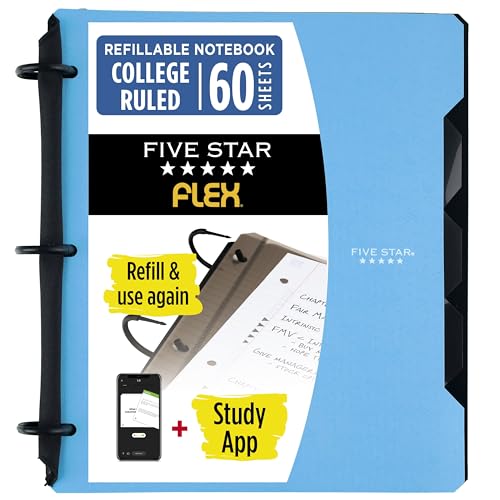
- TechLock rings hold up to 200 sheets
- Includes pockets, tabs, and dividers
- Lies flat like a notebook with a fold-back cover
Best For: Students who want a refillable binder notebook for organized classes
Portable Reusable Planner

- Small 6 x 8.8 format for easy carrying
- 7 reusable templates for planning and notes
- Scans to cloud apps with the Rocketbook app
Best For: Students who want a compact reusable planner for on-the-go use
Smart Pen Note System

- Syncs handwritten notes to phone in real time
- Searchable notes and OCR text conversion
- Includes audio recording and offline storage
Best For: Students who want handwriting plus instant digital backups
Reusable Class Notebook
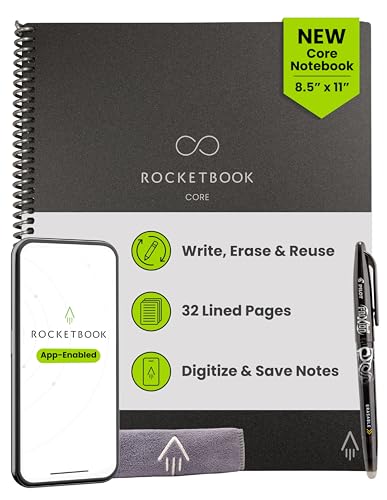
- Write, scan, erase, and reuse pages
- Smart Titles and Smart Tags help organize notes
- Letter size is roomy for classes and projects
Best For: Students who want a reusable notebook with cloud storage
Hybrid Planner Notebook
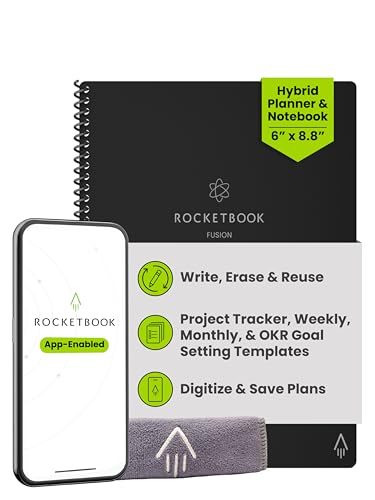
- Seven templates cover planning and note-taking
- Scans to cloud services like Drive and OneNote
- Reusable pages with a compact, portable design
Best For: Students who want a planner and notebook in one
Multi-Subject Reusable Organizer
Rocketbook Multi-Subject Reusable Smart Notebook

- 4 adjustable dividers create up to 5 sections.
- Reusable pages wipe clean for repeated use.
- App scanning and Smart Titles help organize notes.
Best For: Students juggling multiple classes and projects
Portable Dot-Grid Digital Notebook
Rocketbook Core Executive Dot Grid Notebook

- Compact 6 x 8.8 size is easy to carry.
- Dot-grid pages support notes and creative work.
- Smart Titles, Smart Tags, and app upload keep files organized.
Best For: Students who need a portable reusable notebook
Letter-Size Lined Study Notebook
Rocketbook Core College Ruled Notebook

- 8.5 x 11 college-ruled pages suit lecture notes.
- Reusable pages wipe clean for repeated use.
- Smart Titles, Smart Tags, and cloud uploads aid organization.
Best For: Students who like a traditional lined notebook with digital saving
Paper-First Smart Notebook – XPPen Note Plus for Students
If you want one of the more versatile digital notebooks for college students, the XPPen Note Plus focuses on natural handwriting with automatic phone sync instead of a full-screen tablet feel. It lets you write on real A5 paper, digitize notes through Bluetooth 5.3, and keep lecture notes, sketches, and study ideas organized without scanning.
Best For: Students who want a paper-first notebook that syncs handwritten notes to a phone and supports both study and sketching.
Pros:
- Writes on real A5 paper with an exclusive ink pen for a familiar notebook feel.
- Bluetooth 5.3 and EMR technology capture handwriting for automatic phone sync.
- Supports offline writing, then auto-syncs when reconnected.
- Editing tools, tagging, and cloud backup make note management easier.
Cons:
- Requires the matching ink pen and compatible A5 paper core format.
- Works with Android 10.0+ and iOS 14.0+, so older devices may not be supported.
Overall, this is a strong pick if you want a hybrid notebook that stays close to traditional writing while still making your notes easy to store, search, and share.
Reusable Class Planner – Rocketbook Fusion Letter Size
For digital notebooks for college students who need an organized planner, the Rocketbook Fusion combines reusable pages with app-based scanning and cloud storage. It gives you monthly and weekly calendars, to-do lists, goal tracking, and note pages, so you can keep class planning and study tasks in one place.
Best For: Students who want a reusable planner for schedules, assignments, and organized note-taking.
Pros:
- Includes 7 page templates for planning, lists, goals, and notes.
- Reusable pages can be wiped clean and used again with a Pilot Frixion Pen.
- Rocketbook app uploads notes to cloud services like Google Drive and Dropbox.
- Letter size gives plenty of writing room for detailed schedules and study plans.
Cons:
- Requires a Pilot Frixion Pen for writing and erasing.
- Best suited to planning and note organization rather than freeform digital sketching.
This version makes sense if you want more workspace for class planning and a reusable system that helps cut down on paper clutter.
Refillable Study Binder – Five Star Flex Study System
If you want a more traditional option among digital notebooks for college students, the Five Star Flex keeps the notebook format while adding binder-style flexibility. It comes with college-ruled paper, removable rings, tabs, dividers, and pockets, making it a practical choice for managing class notes and handouts in one place.
Best For: Students who want a refillable, organized notebook for classes, handouts, and long-term note keeping.
Pros:
- TechLock rings hold up to 200 sheets and let you add or remove pages easily.
- Includes 60 college-ruled sheets, pockets, and dividers for organization.
- Plastic cover folds back and lies flat like a notebook.
- Clearview cover lets you customize the front with a photo or agenda.
Cons:
- Does not digitize notes on its own.
- Bulkier than a slim paper notebook due to the binder-style build.
It is a good fit if you want flexibility and structure more than app-based features, especially for classes with lots of printed materials.
Portable Reusable Planner – Rocketbook Fusion Executive
The Rocketbook Fusion in executive size is a compact option for digital notebooks for college students who want reusable planning without carrying a full-size pad. It includes the same 7 page templates, app-based digitizing, and wipe-clean pages, but in a smaller format that is easier to slip into a bag.
Best For: Students who want a portable reusable planner for quick class notes, schedules, and daily tasks.
Pros:
- Compact 6 x 8.8 size is easier to carry than a letter-size planner.
- Includes monthly, weekly, to-do, goal, idea, lined, and dotted pages.
- App scans notes to cloud platforms like Google Drive, Dropbox, and OneNote.
- Reusable pages wipe clean for repeated use.
Cons:
- Smaller writing area may feel tight for detailed notes.
- Still requires a Pilot Frixion Pen for proper use.
This is the better pick if portability matters most and you want a reusable planner that stays lightweight while still supporting digital organization.
Smart Pen Note System – Real-Time Notes with OCR
If you’re looking for digital notebooks for college students that bridge handwritten notes and instant digital storage, this smart pen set is built for fast capture and easy review. You still write on paper, but your notes sync to the Ophaya Pro+ app, can be searched, converted to editable text, and shared as files.
Best For: Students who want handwritten note-taking with instant phone syncing, searchable text, and audio support.
Pros:
- Writes on paper while capturing notes digitally in real time
- Handwriting can be searched and converted into editable text
- Audio recording syncs to your notes for later review
- Offline storage helps preserve notes until your phone reconnects
Cons:
- Requires the companion app for syncing and digitizing features
- Depends on battery power for smart functions
- More specialized than a simple paper notebook
This is a flexible option if you want the feel of pen-on-paper with stronger digital organization than a standard notebook can offer. The included notebook, board, and refills make it practical for class notes, then review later on your phone or as a Word file.
Reusable Class Notebook – Letter Size School Notes
This is one of the more practical digital notebooks for college students if you want a traditional writing experience with cloud backup. The Rocketbook Core lets you write, scan, upload to services like Google Drive or OneNote, then erase and reuse the pages when you’re done.
Best For: College note-takers who want a reusable paper notebook with easy cloud scanning and a full-size page layout.
Pros:
- Reusable pages reduce paper waste and let you start fresh
- App-enabled scanning sends notes to cloud platforms
- College-ruled pages include Smart Titles and Smart Tags for organization
- Letter size offers plenty of room for class notes and diagrams
Cons:
- Requires Pilot Frixion ink for proper erase-and-reuse use
- Needs scanning to digitize notes before erasing
- Less compact than smaller notebook formats
If you want a notebook that feels familiar but still fits a digital workflow, this one is a strong fit. It works well for students who prefer writing by hand yet want their class notes stored and organized online.
Hybrid Planner Notebook – Goals, Tasks, and Notes
For college students who need planning as much as note-taking, this hybrid Rocketbook is a smart pick among digital notebooks for college students. It combines reusable pages with monthly and weekly calendars, task lists, goal tracking, and dotted or lined notes pages, all of which can be scanned and uploaded to the cloud.
Best For: Students who want one compact notebook for scheduling, goal setting, and class notes.
Pros:
- Includes seven page styles for planning and note-taking
- Reusable pages can be digitized and wiped clean
- Cloud integration supports Google Drive, Dropbox, and OneNote
- Compact size is easy to carry in a backpack
Cons:
- Smaller executive size offers less writing space per page
- Requires scanning before erasing content
- More planner-focused than a dedicated full-size notebook
This option makes sense if your school workflow mixes assignments, deadlines, and lecture notes in one place. The layout variety adds flexibility, while the reusable design keeps it efficient for repeated use throughout the semester.
Multi-Subject Reusable Organizer – Rocketbook Multi-Subject Reusable Smart Notebook
If you want digital notebooks for college students that also keep multiple classes organized, this Rocketbook is built for exactly that workflow. Its 4 adjustable dividers create up to 5 sections, while the 8.5″ x 11″ lined pages and app-based scanning make it easy to write by hand, digitize notes, and keep everything sorted for school, work, or projects.
Best For: Students who need one reusable notebook for several classes and want easy digital filing.
Pros:
- Reusable pages can be wiped clean and used again with the included microfiber cloth.
- 4 dividers let you organize up to 5 sections for different subjects or projects.
- Smart Titles help turn handwritten pages into searchable files for easier review.
- Includes a Pilot FriXion pen and works with the Rocketbook app for scanning.
Cons:
- Requires app scanning to get the full digital organization benefit.
- Only 70 lined pages, so heavy note-takers may need to erase and reuse often.
This is a strong pick if you like the structure of a traditional binder-style notebook but want the flexibility of reusable pages and digital access. The larger letter size also gives you plenty of room for lecture notes, diagrams, and class planning.
Portable Dot-Grid Digital Notebook – Rocketbook Core Executive Dot Grid Notebook
For college students who want a smaller option among digital notebooks for college students, this Rocketbook Core Executive keeps note-taking portable without giving up scanning and cloud storage. The dot-grid pages, improved paper feel, Smart Titles, and Smart Tags make it practical for class notes, brainstorming, and creative work when you want a compact notebook that still digitizes easily.
Best For: Students who want a compact reusable notebook for classes, ideas, and on-the-go notes.
Pros:
- Compact 6 x 8.8 size fits easily in backpacks, purses, or briefcases.
- Reusable pages can be wiped clean and written on again.
- Smart Titles and Smart Tags help name and organize scanned files.
- Includes a Pilot FriXion Pen and towel, plus app upload to cloud services.
Cons:
- Smaller page size may feel tight for long lecture notes.
- Dot-grid ruling may not suit students who prefer lined pages for every class.
This model makes sense if portability matters more than maximum writing space. It is a flexible everyday notebook for students who want a reusable, app-enabled option they can carry anywhere.
Letter-Size Lined Study Notebook – Rocketbook Core College Ruled Notebook
If you prefer a classic lined layout in digital notebooks for college students, this Rocketbook Core gives you a familiar lecture-note format with reusable convenience. The letter-size pages, spiral binding, Smart Titles, and app-enabled scanning make it a practical choice for students who want to write naturally in class and store notes in cloud services afterward.
Best For: Students who want a standard notebook feel with reusable pages and digital syncing.
Pros:
- Letter-size 8.5 x 11 pages offer plenty of room for class notes.
- College-ruled lined pages suit traditional note-taking.
- Reusable design lets you wipe pages clean and start fresh.
- Smart Titles and Smart Tags help organize scanned notes in cloud apps.
Cons:
- Requires the Rocketbook app for the digital workflow features.
- Only 32 pages, so frequent erasing may be needed during busy terms.
This is the best fit if you want something that feels close to a regular class notebook but adds scan-and-save convenience. The larger format is especially useful for lecture-heavy schedules and detailed study notes.
How We Picked These Digital Notebooks for College Students
We focused on notebooks that support fast note-taking, easy organization, and a smoother study workflow. Priorities included reusable pages, app compatibility, page layouts that fit class notes or planning, portability, and features that help reduce paper waste without making the system hard to use.
Quick Comparison
Think in terms of use case first. Reusable smart notebooks are best if you want to scan and save notes digitally. Hybrid planner notebooks are a better fit if you balance assignments, deadlines, and weekly planning. Binder-style refillable notebooks work well for students who need sectioned organization, while pen-and-board sets appeal to those who want a more flexible writing setup.
Key Buying Factors for Digital Notebooks for College Students
Page Layout
Lined pages are usually best for lecture notes, while dot grid pages can be better for diagrams, math, and creative layouts. If you need both planning and note-taking, look for undated monthly and weekly sections.
Size and Portability
Letter-size notebooks offer more writing space for classes, but smaller executive sizes are easier to carry in a backpack. Choose based on whether you prioritize desk use or all-day portability.
Digital Workflow
Some Digital Notebooks for College Students rely on app-based scanning and cloud syncing, while others are designed for reusable note capture. Make sure the transfer process is simple enough that you will actually use it between classes.
Organization Features
Tabs, dividers, pockets, and refillable rings can help separate subjects and keep handouts together. For students taking multiple classes, these features may matter as much as the writing surface itself.
Who Should Buy Which Digital Notebooks for College Students?
If you want the most streamlined class-note system, choose a reusable smart notebook with app syncing. If you need one notebook to handle classes plus planning, go with a hybrid planner. If you prefer a traditional paper feel with stronger organization, a refillable binder notebook is the most practical choice. Students who sketch, diagram, or prefer flexible layouts should look closely at dot grid and multi-subject options.
For most buyers, the best choice depends on how you study day to day: capture and digitize, plan and track, or keep every subject separated in one place. Pick the format that fits your habits, not just the one with the most features.