Choosing the right keyboard can make long study sessions feel easier, quieter, and less tiring. The best options balance comfortable typing, low noise, and layouts that support fast note-taking and everyday schoolwork.
Below, we focus on mechanical keyboards for studying that are practical for dorms, libraries, and home desks alike, with picks that fit different budgets, switch preferences, and workspace sizes.
Best 10 Mechanical Keyboards for Studying Picks for 2026
Budget-Friendly 75% Pick
Kisnt KN85 Wireless Mechanical Keyboard

- 75% layout keeps F-keys and arrows while saving desk space.
- Tri-mode connectivity works over USB-C, 2.4GHz, or Bluetooth.
- Hot-swappable switches and foam damping suit study typing.
Best For: Students who want a compact wireless mechanical keyboard for everyday studying
Quiet Office Choice
Cherry KC 200 MX Silent Red Keyboard

- Silent Red switches keep typing smooth and quiet.
- Full-size wired layout includes N-key rollover and anti-ghosting.
- Aluminum plate and durable keycaps are made for long use.
Best For: Students in shared spaces who want a quiet full-size mechanical keyboard
Premium Low-Profile Option
Logitech MX Mechanical Graphite Keyboard

- Tactile Quiet switches give feedback with less noise.
- Low-profile full-size layout is designed for comfort.
- Supports up to 3 devices and smart auto-adjust backlight.
Best For: Students who want a premium multi-device keyboard for study sessions
Full-Size Value Pick
Redragon K668 Hot-Swap RGB Keyboard

- 108-key layout adds extra hotkeys for everyday shortcuts.
- Hot-swap sockets support 3-pin and 5-pin switches.
- Noise dampening and pro software boost study-friendly customization.
Best For: Students who want a full-size customizable mechanical keyboard with extra shortcut keys
Retro Office Typing
Perixx PERIBOARD-108M Brown Tactile Full-Size USB Keyboard

- Gateron brown tactile switches for tactile typing feedback
- Full-size 104-key layout with number pad
- SA spherical keycaps and removable design for easier cleaning
Best For: Students who want a wired full-size board with a classic look
Compact Custom Wireless
AULA F75 Pro Tri-Mode Hot-Swappable 75% Keyboard

- Tri-mode connection with Bluetooth, 2.4GHz, and USB wired
- Hot-swappable 3-pin/5-pin support for easy customization
- 75% compact layout with arrow keys and multi-function knob
Best For: Students who want a flexible, space-saving wireless board
Reliable Full-Size Pick
Keychron C2 Wired Retro Brown Switch Keyboard
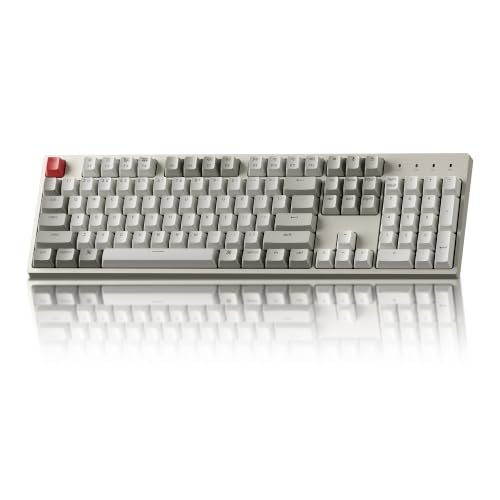
- 104-key full-size layout with number pad
- Mac and Windows compatibility with extra keycaps included
- USB-C wired connection and adjustable typing angles
Best For: Students who want a dependable wired keyboard for Mac or Windows
Study-Friendly Wireless Flex
AULA F99 for Multi-Device Typing

- Tri-mode BT5.0, 2.4GHz, and USB-C
- Hot-swappable 99-key compact layout
- 8000mAh battery with pre-lubed linear switches
Best For: Students who want one keyboard for multiple devices and a clutter-free desk
Desk-Stable Typing Pick
Redragon K556 for Long Study Sessions

- Aluminum board keeps typing steady
- Hot-swap support for 3-pin and 5-pin switches
- Brown tactile switches suit long writing sessions
Best For: Students who want a sturdy wired keyboard for a dedicated study desk
Budget Backlit Study Board
Redragon K671 for Everyday Coursework

- Hot-swappable linear red switches
- 11 backlit modes with adjustable brightness
- Macro editing and full anti-ghosting
Best For: Students who want a practical wired keyboard with customizable shortcuts
Budget-Friendly 75% Pick – Kisnt KN85 Wireless Mechanical Keyboard
If you’re shopping for mechanical keyboards for studying, the Kisnt KN85 is a compact choice that keeps your desk uncluttered while still giving you the keys most students actually use. Its 75% layout preserves F-keys, arrows, and shortcuts, and the wireless tri-mode connection makes it easy to move between a laptop, tablet, or desktop setup.
Best For: Students who want a smaller, quieter-feeling mechanical keyboard with wireless flexibility and room-saving design.
Pros:
- 75% layout saves about 25% of desk space while keeping essentials like F1–F12 and arrows.
- Tri-mode connectivity supports USB-C, 2.4GHz, and Bluetooth 5.0 with multi-device switching.
- Hot-swappable 3/5-pin support makes it easy to change switches without soldering.
- Gasket-mounted build with foam damping is tuned for a deeper, less distracting sound.
Cons:
- RGB features and animated lighting can drain battery faster if left on.
- Full customization software is Windows-only in wired/2.4G mode.
- No dedicated numpad, so data entry users may want the separate numpad or a larger board.
Overall, the KN85 is a smart study desk pick if you want a compact mechanical keyboard with wireless convenience and a softer typing sound. It leans more toward flexibility and space savings than full-size productivity features.
Quiet Office Choice – Cherry KC 200 MX Silent Red Keyboard
For mechanical keyboards for studying in shared rooms, the Cherry KC 200 MX is built around a quieter office-first experience. Its MX2A Silent Red switches are designed for smooth, low-noise typing, while the full-size wired layout keeps the desk setup simple and dependable.
Best For: Students who want a quiet, durable wired mechanical keyboard for long typing sessions and a full-size layout.
Pros:
- MX2A Silent Red switches provide smooth, quiet linear typing.
- Full-size 104-key layout includes N-key rollover and anti-ghosting.
- Aluminum top plate and laser-etched keycaps are built for long-term durability.
- Handy extra keys offer quick access to calculator and volume controls.
Cons:
- Wired USB-A connection means no Bluetooth or 2.4GHz wireless use.
- Full-size design takes more desk space than compact study keyboards.
- Windows-focused compatibility may not fit every setup.
This is a practical buy if you want a sturdy, quiet mechanical keyboard for studying and office-style productivity. It favors reliability and low noise over portability and wireless convenience.
Premium Low-Profile Option – Logitech MX Mechanical Graphite Keyboard
The Logitech MX Mechanical is a strong premium pick for mechanical keyboards for studying if you want comfort, quiet tactile feedback, and easy multi-device switching. Its low-profile full-size design is meant for efficient typing, and the smart backlight automatically adjusts to your surroundings.
Best For: Students who study across multiple devices and want a comfortable, low-noise mechanical keyboard with smart lighting.
Pros:
- Tactile Quiet switches offer a satisfying bump with reduced noise.
- Low-profile full-size design aims for better comfort and ergonomic typing.
- Pairs with up to 3 devices via Bluetooth Low Energy or Logi Bolt receiver.
- Smart backlighting turns on automatically and adjusts to lighting conditions.
Cons:
- Premium feature set likely puts it above budget study keyboards.
- Full-size layout takes more space than compact options.
- Advanced customization depends on Logi Options+ software.
For students who split time between laptop, desktop, and other devices, the MX Mechanical offers a polished study workflow. It stands out most when you value comfort, quiet tactility, and intelligent backlighting.
Full-Size Value Pick – Redragon K668 Hot-Swap RGB Keyboard
If you want mechanical keyboards for studying with a full-size layout and customization, the Redragon K668 offers a lot for the price. It includes 108 keys, extra shortcut hotkeys, hot-swappable sockets, and cushioned noise dampening that helps keep typing from sounding too sharp in shared spaces.
Best For: Students who want a feature-packed full-size wired keyboard with hot-swap support and shortcut keys.
Pros:
- 108-key full-size layout includes dedicated hotkeys for mute, calculator, screen lock, and desktop.
- Hot-swappable switch sockets support 3-pin and 5-pin switches without soldering.
- Noise dampening is designed to create a creamier, thockier sound profile.
- Pro software lets you remap hotkeys, create macros, and customize lighting.
Cons:
- Wired-only design may not suit students who want wireless use.
- RGB-heavy styling may feel less subdued for a study desk.
- Full-size footprint is larger than compact boards.
The K668 is a strong value option if you want a study keyboard that also leaves room for gaming-style customization. It is especially appealing if you like shortcuts, hot-swap flexibility, and a full-size layout.
Retro Office Typing – Perixx PERIBOARD-108M Brown Tactile Full-Size USB Keyboard
If you want mechanical keyboards for studying that feel familiar and easy to live with, the Perixx PERIBOARD-108M is a straightforward full-size option. Its Gateron brown tactile switches, long key travel, and classic gray/white design make it a practical pick for focused typing sessions at a desk.
Best For: Students who want a full-size wired keyboard with tactile feedback and a retro look.
Pros:
- Gateron brown tactile switches provide clear feedback without being overly flashy.
- Full-size 104-key layout includes a number pad for spreadsheets and coursework.
- SA spherical keycaps and removable keys are designed for comfortable typing and easy cleaning.
- Simple wired USB setup works with Windows 7 through 11.
Cons:
- No wireless option, so it is best suited to a fixed desk setup.
- Retro full-size footprint takes up more space than compact boards.
Overall, this keyboard makes sense if you value a traditional layout and a tactile feel more than extra features. It is a solid study board for anyone who wants dependable everyday typing with a clean, classic aesthetic.
Compact Custom Wireless – AULA F75 Pro Tri-Mode Hot-Swappable 75% Keyboard
For mechanical keyboards for studying that can also handle a busy multi-device setup, the AULA F75 Pro offers a compact 75% layout with tri-mode connectivity. It combines hot-swappable switches, a large battery, and a multi-function knob, so it can move between study, work, and entertainment without much hassle.
Best For: Students who want a compact, customizable wireless keyboard with multi-device support.
Pros:
- Bluetooth 5.0, 2.4GHz wireless, and USB wired modes support up to five devices.
- Hot-swappable base supports 3-pin and 5-pin switches for easy customization.
- Five layers of sound-dampening fill are designed to reduce cavity noise.
- 75% layout saves desk space while keeping arrow keys and a control knob.
Cons:
- Compact layout leaves out the number pad.
- RGB lighting and gaming styling may be more than some study setups need.
The F75 Pro stands out if you want one keyboard that can switch between school devices and still feel premium to type on. Its mix of quieting materials, hot-swap support, and flexible connectivity makes it a versatile study companion.
Reliable Full-Size Pick – Keychron C2 Wired Retro Brown Switch Keyboard
If you are comparing mechanical keyboards for studying and want a simple wired model with a full-size layout, the Keychron C2 is an easy one to understand. It is built for Mac and Windows use, includes tactile brown switches, and keeps the focus on comfortable everyday typing rather than extra extras.
Best For: Students who need a dependable full-size wired keyboard for Mac or Windows.
Pros:
- Full-size 104-key layout with number pad supports productivity work.
- Compatible with both Mac and Windows, with extra keycaps included.
- USB-C wired connection provides constant power and stable use.
- Two adjustable typing angles can make long study sessions more comfortable.
Cons:
- Non-backlight version may not appeal if you want illuminated keys.
- Wired-only design is less flexible than wireless options.
The C2 is a practical study keyboard for anyone who wants dependable typing, a familiar layout, and broad OS compatibility. It keeps the focus on comfort and consistency, which is exactly what many students need.
Study-Friendly Wireless Flex – AULA F99 for Multi-Device Typing
If you want mechanical keyboards for studying with extra flexibility, the AULA F99 is built to handle a desk full of devices without feeling cramped. Its tri-mode connection, compact 99-key layout, and pre-lubed linear switches make it a practical pick for note-taking, assignments, and switching between classwork devices.
Best For: Students who move between laptop, tablet, and other devices and want a compact mechanical board with a smooth typing feel.
Pros:
- Tri-mode connectivity: BT5.0, 2.4GHz, and USB-C wired
- Can connect to up to five devices and switch with key combos
- Hot-swappable design supports 3-pin and 5-pin switches without soldering
- 8000mAh battery and compact 96%/99-key layout help reduce desk clutter
Cons:
- RGB lighting and macro features may be more than some study setups need
- Linear switches are smooth, but not everyone prefers that feel for typing
Overall, the F99 is a strong all-around choice if your study setup benefits from wireless convenience and customization. It balances everyday typing comfort with enough features to grow into, while still saving space on a busy desk.
Desk-Stable Typing Pick – Redragon K556 for Long Study Sessions
For mechanical keyboards for studying, the Redragon K556 stands out if you care more about a stable, comfortable typing base than wireless extras. The aluminum frame, hot-swap support, and tactile Brown switches make it a solid wired option for long writing sessions, classwork, and everyday productivity.
Best For: Students who want a sturdy wired keyboard with a tactile feel for long typing sessions.
Pros:
- Brushed aluminum build adds stability and reduces wobble
- Hot-swappable socket supports most 3-pin and 5-pin switches
- Brown switches offer a soft tactile bump for comfortable typing
- 20 RGB lighting modes with software support for macros and effects
Cons:
- Wired-only design limits desk placement flexibility
- Larger 104-key layout takes more desk space than compact boards
If you want a dependable study keyboard that feels solid under fast typing, the K556 is easy to recommend. It leans into durability and comfort rather than portability, which can be exactly what a dedicated homework desk needs.
Budget Backlit Study Board – Redragon K671 for Everyday Coursework
The Redragon K671 is a straightforward wired option for anyone comparing mechanical keyboards for studying on a budget. It keeps things practical with hot-swappable linear red switches, programmable functions, and adjustable backlighting that can help in late-night study sessions.
Best For: Students who want a simple wired keyboard with macro options and easy-to-use lighting.
Pros:
- Hot-swappable linear red switches feel light and smooth
- 11 backlit modes with adjustable brightness and speed
- Macro editing lets you remap keys and set shortcuts
- Full anti-ghosting supports reliable multi-key input
Cons:
- Backlight color cannot be changed according to the notes
- ABS keycaps are less premium than PBT keycaps
- Wired-only design may not suit every desk setup
For study use, the K671 gives you the essentials without overcomplicating the experience. It is best viewed as a practical typing tool with a bit of customization rather than a premium enthusiast board.
How We Picked These Mechanical Keyboards for Studying
We focused on models that make sense for real study use: comfortable key feel, manageable noise levels, reliable connectivity, and layouts that won’t slow you down during writing, research, or spreadsheets. We also favored keyboards with useful extras like hot-swap support, multi-device pairing, and shortcut keys that improve everyday productivity.
Quick Comparison
If you want a compact board for a tight desk, a 75% layout is a strong choice. If you use numeric entry, data work, or lots of shortcuts, a full-size keyboard will be easier to live with. Wireless models are best for flexible setups, while wired boards are often the simplest, most dependable option for a dedicated study desk.
Compact Vs. Full-Size
Compact keyboards save space and can improve mouse positioning, which helps with comfort during long sessions. Full-size keyboards are better if you regularly type numbers, manage homework in spreadsheets, or prefer a traditional layout.
Quiet Vs. Tactile Switches
For shared spaces, quieter linear or silent switches are usually the better fit. If you want more typing feedback without a loud click, brown-style tactile switches are a good middle ground.
Key Buying Factors for Mechanical Keyboards for Studying
Noise: In libraries, apartments, and late-night study environments, switch sound matters. Look for silent, damped, or smoother linear switches if you need a quieter experience.
Typing comfort: A stable case, sensible key spacing, and a comfortable actuation feel matter more than flashy lighting. If you write a lot, prioritize a board that feels consistent over long periods.
Layout: Choose a layout based on your workload. Students who need arrows, function keys, and shortcuts often do well with 75% or 80% boards, while full-size users may prefer the added numpad.
Connectivity: Wireless keyboards can reduce desk clutter and make it easier to move between laptop, tablet, and desktop. Wired keyboards remain a strong choice if you want zero charging concerns.
Customization: Hot-swappable switches, programmable keys, and multi-device pairing are useful if you want to tailor the keyboard to different classes, devices, or study habits.
Who Should Buy Which Mechanical Keyboards for Studying?
If you study in a quiet shared space, choose a low-noise model with a comfortable, restrained typing feel. If your coursework involves lots of writing, note-taking, or coding, a well-balanced tactile board may be the best fit. If you need maximum desk flexibility, pick a wireless option; if you want a simple plug-and-go setup, a wired keyboard is likely the better choice.
For most buyers, the best Mechanical Keyboards for Studying are the ones that reduce distractions and support long, productive sessions without taking over your desk or your budget.