Optical drives remain useful for installing legacy software, playing CDs and DVDs, creating physical backups, and accessing media that never moved to the cloud. The best options under $100 range from slim USB models for laptops to internal SATA burners for desktop towers.
This roundup compares 10 affordable drives by connection type, portability, disc compatibility, operating-system support, and practical features such as USB-C connectivity and M-Disc support.
Best 10 Optical Disc Drives Under 100 Picks for 2026
Best Portable DVD Writer

- Slim 14mm portable design
- 8x DVD and 24x CD writing
- M-DISC and Mac/Windows support
Best For: Portable DVD/CD burning and M-DISC archiving
Best Feature-Rich Slim Drive
ASUS ZenDrive External DVD Burner

- Ultra-slim 13mm design
- USB 2.0 and Type-C cables included
- Encryption and Android backup features
Best For: Compact Mac/Windows DVD burning with flexible connectivity
Best Internal DVD Burner

- Internal SATA connection
- 24x CD write and 48x CD read speeds
- M-DISC support
Best For: Desktop PCs with an available SATA optical-drive bay
Best USB 3.0 External Drive
- USB 3.0 with USB 2.0 compatibility
- USB-powered plug-and-play design
- 24x CD and 8x DVD speeds
Best For: Portable CD/DVD use across Windows, Mac, and Linux computers
Best Internal Drive

- Internal 5.25-inch SATA design
- DVD burning up to 24x
- Includes installation accessories
Best For: Desktop towers with an available 5.25-inch bay
Best Slim Portable Option
LG Ultra-Slim External DVD Rewriter

- Compact external DVD/CD rewriter
- USB 2.0 connectivity
- M-DISC support included
Best For: Portable use with compatible laptops and desktops
Best USB-C Compatibility

- USB-A and USB-C connectors built in
- Reads and burns CDs and DVDs
- Two-year warranty and portable design
Best For: Windows, Mac, and Linux computers needing flexible external connectivity
Most Versatile

- Reads and writes CDs and DVDs
- Adds USB-C, SD, and TF card support
- Portable plug-and-play design
Best For: Users needing disc and memory-card transfers
Slimmest Design
- Ultra-slim 13mm, 0.2kg construction
- USB-A and USB-C connectivity
- Includes storage bag and power cable
Best For: Portable use with modern and older laptops
Best Basic Performer

- USB 3.0 and USB-C connectivity
- Reads and writes common CD/DVD media
- Slim, plug-and-play design
Best For: Everyday disc playback, burning, and backups
Best Portable DVD Writer – LG GP65NS60
For shoppers comparing optical disc drives under 100, the LG GP65NS60 is a slim external DVD writer designed for straightforward use with PCs and Macs. Its USB connection, M-DISC support, and compact silver enclosure make it a practical option for reading, writing, and archiving compatible discs.
Best For: Portable DVD/CD burning, M-DISC archiving, and everyday use with Windows or Mac computers.
Pros:
- Ultra-slim 14mm design is easy to carry.
- Supports DVD writing up to 8x and CD writing up to 24x.
- Includes M-DISC support, Silent Play, and Jamless Play.
- Works with Windows and Mac systems, including stated Windows 10 and macOS compatibility.
Cons:
- Uses USB 2.0 rather than a native USB 3.0 interface.
- Limited to DVD and CD media, not Blu-ray discs.
The GP65NS60 is a sensible choice when portability and broad computer compatibility matter more than high-speed disc writing. Its slim profile and archival-media support give it useful flexibility for home, office, and travel setups.
Best Feature-Rich Slim Drive – ASUS ZenDrive External DVD Burner
Among optical disc drives under 100, the ASUS ZenDrive stands out for its ultra-slim build and included connectivity options. It supports Mac and Windows computers, comes with USB 2.0 and Type-C cables, and adds disc-encryption and Android backup features.
Best For: Mac and Windows users who want a compact DVD burner with Type-C connectivity and added backup features.
Pros:
- Thin 13mm design is light and travel-friendly.
- Includes both USB 2.0 and Type-C cables.
- Supports DVD writing up to 8x and CD speeds up to 24x.
- Offers M-DISC support, DISC Encryption II, and Nero BackItUp for Android devices.
Cons:
- USB interface is specified as USB 2.0.
- Maximum DVD write speed is 8x.
- It is designed for CDs and DVDs rather than Blu-ray media.
The ZenDrive is a strong fit for users who value a slim enclosure and flexible cable compatibility. Its extra software-oriented features make it more versatile than a basic external DVD reader/burner.
Best Internal DVD Burner – LG GH24NSB0B
For buyers seeking optical disc drives under 100 for a desktop upgrade, the LG GH24NSB0B is an internal SATA DVD/CD drive. It offers fast rated read and write speeds, M-DISC support, and compatibility with computers that have an internal drive bay.
Best For: Desktop users replacing or adding an internal SATA DVD/CD drive.
Pros:
- Internal SATA interface suits compatible desktop systems.
- Writes CDs at up to 24x and reads CDs at up to 48x.
- Supports M-DISC media.
- Provides a 0.5MB buffer memory.
Cons:
- Requires an available internal drive bay and SATA connection.
- Not a portable external drive.
- Supplied operating-system notes list Windows XP through Windows 8.
The GH24NSB0B makes sense when you need an economical replacement for a desktop’s aging optical drive. Confirm that your computer has the required internal bay and SATA connection before ordering.
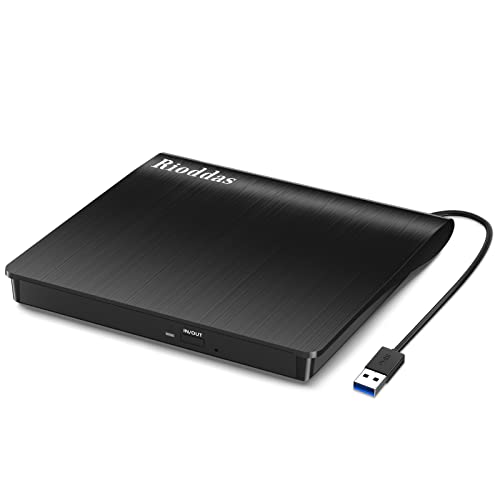
Best USB 3.0 External Drive – Rioddas Portable CD/DVD Drive
The Rioddas portable drive is a practical contender among optical disc drives under 100 for users who want USB 3.0 connectivity and broad computer support. It reads and writes CDs and DVDs, draws power through USB, and includes a built-in cable for easier transport.
Best For: Laptop, desktop, Mac, Linux, and Windows users needing a portable USB CD/DVD reader and burner.
Pros:
- USB 3.0 supports transfer rates up to 5Gbps and is backward compatible with USB 2.0.
- Powered through USB without a separate power adapter.
- Supports up to 24x CD and 8x DVD reading and writing.
- Includes a physical eject button and embedded cable storage.
Cons:
- Not compatible with ChromeOS, smartphones, tablets, TVs, projectors, or vehicles.
- Does not support Blu-ray or 4K discs.
- Desktop users may need to connect it directly to a high-power rear USB port.
Choose the Rioddas if fast USB connectivity and easy plug-and-play operation are priorities. Its compatibility limitations are important, so verify your device and operating system before purchase.
Best Internal Drive – 24x SATA DVD/CD Burner
For desktop builders seeking optical disc drives under 100, this internal 5.25-inch SATA burner offers a practical way to read and write CDs, DVDs, and VCDs. It supports DVD burning up to 24x, dual-layer discs up to 8.5 GB, and plug-and-play compatibility with Windows, macOS, and Linux.
Best For: Desktop PC owners with an available 5.25-inch bay who want an internal CD/DVD burner for backups, installation discs, music, or home video playback.
Pros:
- Reads and writes common CD, DVD, and VCD formats.
- Supports up to 24x DVD burning and 52x CD burning.
- Includes a SATA cable, mounting screws, screwdriver, and disc sleeves.
- Designed for quieter operation during reading and writing.
Cons:
- Requires a desktop with an available 5.25-inch bay and SATA power.
- Does not support Blu-ray discs.
This is a well-equipped choice when you specifically need an internal optical drive rather than a portable accessory. Confirm your tower has the correct bay and connections before ordering.
Best Slim Portable Option – LG Ultra-Slim External DVD Rewriter
This LG external drive is a straightforward pick among optical disc drives under 100 for laptops, desktops, and compatible Mac systems. Its slim USB-connected design handles DVD and CD reading and writing while taking up minimal desk or bag space.
Best For: Laptop and desktop users who want a compact external DVD rewriter with M-DISC support and broad Windows or Mac compatibility.
Pros:
- Ultra-slim, lightweight external form factor.
- Supports DVD and CD reading and writing.
- Compatible with Windows and Mac OS systems listed by the manufacturer.
- Supports M-DISC media for compatible long-term storage needs.
Cons:
- Uses a USB 2.0 interface rather than USB 3.0.
- Listed write and read speeds reach 24x for CDs; DVD model information lists 8x operation.
The GP60NB50 prioritizes portability and familiar plug-in use over the fastest interface. It is a sensible match for computers without an internal optical bay, provided your system supports the stated USB and operating-system requirements.
Best USB-C Compatibility – ROOFULL External CD/DVD Drive
For users comparing optical disc drives under 100, the ROOFULL RF868 offers convenient USB-A and USB-C connectivity in one portable unit. It reads, burns, and digitizes common CDs and DVDs at speeds up to 8x for DVDs and 24x for CDs, without requiring separate drivers or a power supply.
Best For: Laptop, Mac, and compatible desktop users who want a portable external drive with built-in USB-A and USB-C connectors.
Pros:
- Built-in USB-A and USB-C connectors reduce the need for adapters.
- Plug-and-play operation with no additional driver or power supply required.
- Supports common CD and DVD formats, including reading, burning, and digitizing.
- Ultra-slim design and a two-year warranty support portable use.
Cons:
- Does not support Blu-ray or 4K discs.
- Not compatible with Chromebooks, smartphones, tablets, gaming consoles, and several other listed devices.
- Desktop towers may need a rear USB port for stable power.
The RF868 is particularly convenient for newer laptops that use USB-C as well as computers with traditional USB-A ports. Check the compatibility exclusions carefully, especially if you plan to use it with ChromeOS or non-computer devices.
Most Versatile – 7-in-1 USB 3.0 Optical Drive
For shoppers comparing optical disc drives under 100, this Wbacon model stands out for its built-in connectivity. Alongside CD/DVD reading and writing, it supports USB 3.0, USB-C, SD, and TF card transfers, making it useful for more than disc playback.
Best For: Users who want a portable disc drive with memory-card and USB transfer options.
Pros:
- 7-in-1 design supports CD/DVD reading and writing plus USB, USB-C, SD, and TF card transfers.
- Offers up to 8x DVD-R writing and 24x CD writing speeds.
- Plug-and-play operation works with Windows and Mac systems without additional drivers.
- Compact, lightweight design is convenient for travel or occasional home use.
Cons:
- SD and TF cards cannot be used simultaneously.
- Its listed operating-system compatibility is broad, but the supplied details specifically identify Windows 10 for the operating system field.
This is a flexible choice when card access matters as much as disc burning. If you only need basic CD/DVD functionality, a simpler drive may be a better fit.
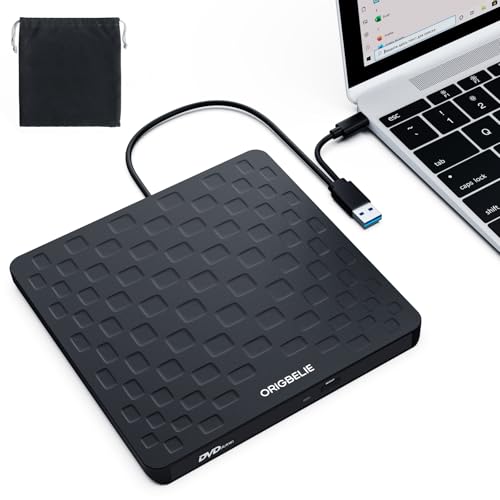
Slimmest Design – 13mm USB-A/USB-C DVD Drive
Among optical disc drives under 100, the ORIGBELIE model is appealing for its 13mm-thin, 0.2kg design and dual USB-A/USB-C connectivity. It reads and writes common CD and DVD formats, while the included charging cable can provide extra power if a computer’s USB port is insufficient.
Best For: Travelers and laptop owners who prioritize a very slim drive with both USB-A and USB-C connections.
Pros:
- Supports up to 8x DVD and 24x CD read/write speeds.
- USB 3.0 is backward compatible with USB 2.0 and 1.1.
- Works with listed Windows, Mac, and Linux systems and supports multiple CD/DVD formats.
- Includes an integrated data cable, storage bag, and supplemental charging cable.
Cons:
- Not compatible with Blu-ray discs, phones, tablets, game consoles, TVs, cars, or several other listed devices.
- Some computers may require the included charging cable or an external 5V power source.
- The warranty period is 90 days.
The compact build and included accessories make this a practical mobile option. Check your device compatibility and USB power availability before buying.
Best Basic Performer – Dual-Connection CD/DVD Burner
For a straightforward option among optical disc drives under 100, this BRIGHTSHOW external drive combines USB 3.0 and USB-C connections with plug-and-play operation. It supports common CD and DVD media for playback, burning, software installation, and backups.
Best For: Laptop and desktop users seeking a simple dual-connection drive for everyday CD/DVD tasks.
Pros:
- USB 3.0 and USB-C connectivity supports up to 5 Gbps transfer speeds and older USB standards.
- Supports up to 8x DVD and 24x CD reading and writing.
- Plug-and-play setup requires no additional drivers.
- Slim design, integrated cable, error correction, and a non-slip base support convenient use.
Cons:
- Does not support Blu-ray, 3D/4K discs, Chrome OS, iPads, phones, TVs, cars, projectors, or game consoles.
- Windows 11 requires a media player for playback.
- The listed warranty is six months.
This model keeps the feature set focused on common CD/DVD jobs while offering flexible USB connections. It is a sensible pick if you do not need memory-card slots or Blu-ray support.
How We Picked the Best Optical Disc Drives Under 100
We focused on drives that offer dependable CD and DVD reading or writing, broad computer compatibility, and useful features at an accessible price. The selection includes portable external models, internal 5.25-inch SATA drives, and options with USB 3.0, USB-C, or both. We also considered slim designs, advertised write speeds, M-Disc support, included software, and whether a drive is better suited to Windows, macOS, Linux, or a desktop tower.
Because optical-drive performance can vary by disc, computer, and software, specifications should be treated as a guide rather than a guarantee. Always verify current compatibility and included accessories before purchasing.
Quick Comparison
- Best for most laptop users: A slim external USB DVD writer with broad Windows and Mac support.
- Best for USB-C laptops: A model with a native USB-C connection or a clearly included adapter.
- Best for desktop upgrades: An internal 5.25-inch SATA DVD/CD burner.
- Best for archival discs: A drive that explicitly supports M-Disc writing.
- Best for occasional use: A compact, bus-powered external drive that stores easily in a bag or drawer.
Key Buying Factors for Optical Disc Drives Under $100
External or Internal Design
External drives connect over USB and are the easiest choice for modern laptops, compact desktops, and shared use. They usually draw power from the computer, although some systems may need a second USB connection or powered hub. Internal SATA drives are a better fit for desktop towers with an available 5.25-inch bay and SATA power and data connections.
Disc Formats and Writing Needs
Check whether the drive reads and writes both CDs and DVDs, including DVD±R, DVD±RW, and dual-layer media if those formats matter to you. A DVD writer is more versatile than a read-only drive. If long-term archival storage is important, look for explicit M-Disc support and use compatible archival media.
Ports, Cables, and Operating Systems
USB 3.0 is generally preferable for faster transfers, while USB-C compatibility can eliminate the need for an adapter. Confirm the cable type and included accessories, especially for thin laptops with only USB-C ports. Most basic drives work through standard operating-system drivers, but bundled burning or backup software may have narrower compatibility.
Size, Noise, and Practical Speed
Slim drives are convenient but can feel less robust than desktop models. Advertised speeds describe maximum rates, not guaranteed real-world performance. For music, movies, software installation, or occasional backups, connection stability and disc quality often matter more than the highest stated speed.
Who Should Buy Which Optical Disc Drives Under 100?
Choose a slim external drive if you use a laptop, need occasional access to discs, or want a portable backup and playback tool. Choose a USB-C model if your computer lacks traditional USB-A ports and you want the simplest setup.
Choose an internal SATA burner for a desktop tower that has an open drive bay and a reliable SATA connection. It is less portable but can provide a clean permanent installation. Choose an M-Disc-compatible model when your priority is creating physical archives rather than simply reading or burning ordinary CDs and DVDs.