The right WiFi adapter can give a desktop or older laptop a faster, more dependable connection without running Ethernet through your home. This roundup compares compact dongles, antenna-equipped models, and newer WiFi 6 and WiFi 6E options.
We focus on wireless standard, advertised speed, band support, antenna design, compatibility, and practical setup considerations so you can choose an adapter that fits your network and PC.
Best 10 Wifi Adapters Picks for 2026
Best Value WiFi Adapters

- Dual-band AC1300 connectivity
- USB 3.0 compact design
- Windows and select Mac support
Best For: Affordable everyday Wi-Fi upgrades
Best WiFi 6E Upgrade

- Tri-band Wi-Fi 6E support
- Speeds up to 3Gbps
- Adjustable external antenna
Best For: Demanding Windows 10 or 11 users
Best Long-Range WiFi Adapters

- Two 5dBi high-gain antennas
- Dual-band AC1300 performance
- USB 3.0 for Windows PCs
Best For: Windows users needing stronger reception
Best Antenna Design
Tenda AX900 WiFi 6 USB Adapter

- 6dBi omnidirectional antenna
- Wi-Fi 6 dual-band support
- Built-in driver for Windows
Best For: Windows setups needing high-gain reception
Long-Range Pick
TP-Link AC600 USB WiFi Adapter

- Dual-band AC600 connectivity
- Adjustable 5dBi high-gain antenna
- Supports Windows 11 through XP
Best For: Windows users seeking adjustable antenna positioning
Budget Mini Pick
DWS AC600 Dual-Band USB WiFi Adapter
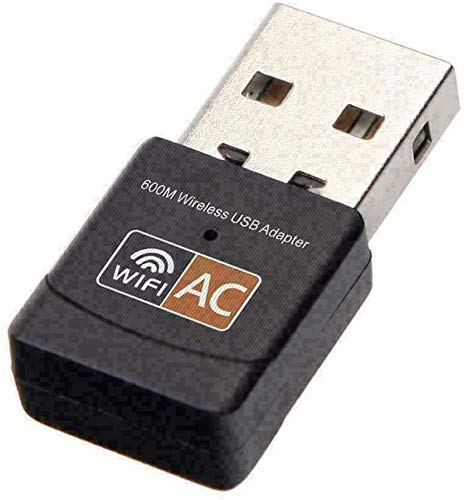
- Dual-band 2.4/5 GHz support
- Advertised speeds up to 600 Mbps
- Lightweight 3-gram mini design
Best For: Basic wireless upgrades on compatible computers
Best WiFi 6 Upgrade
TP-Link AX1800 USB WiFi Adapter

- WiFi 6 AX1800 dual-band performance
- 5 dBi antenna with 1-meter USB 3.0 cable
- Windows 10/11, WPA3, MU-MIMO, and OFDMA support
Best For: Windows users wanting faster speeds and improved range
Best Compact Pick
TP-Link AC600 Nano WiFi Adapter

- Tiny plug-and-leave USB design
- Dual-band AC600 connectivity
- Supports Windows and select older macOS versions
Best For: Travelers and compact computers needing everyday Wi-Fi
Best AC1300 Range
TP-Link USB WiFi Adapter with Antenna

- AC1300 dual-band speeds
- Adjustable high-gain external antenna
- Broad Windows and older macOS compatibility
Best For: Desktop users prioritizing reception and compatibility
Best Value WiFi Adapters – TP-Link AC1300 USB Adapter
The TP-Link Archer T3U is a compact, practical choice among wifi adapters for adding dual-band connectivity to a Windows PC or compatible Mac. Its USB 3.0 interface and AC1300 rating suit everyday browsing, streaming, and general home networking.
Best For: Users who want a small, affordable dual-band adapter for a desktop or laptop.
Pros:
- Supports 2.4GHz and 5GHz Wi-Fi with speeds up to AC1300.
- USB 3.0 helps support faster data transfer than USB 2.0.
- Compact design, MU-MIMO support, and compatibility with Windows 7 through 11 and Mac OS X 10.9–10.14.
Cons:
- Mac compatibility is limited to OS X 10.9–10.14.
- It does not include an external high-gain antenna for repositioning reception.
The Archer T3U is a sensible pick when you need reliable dual-band Wi-Fi in a portable USB form without moving to newer Wi-Fi 6E hardware.
Best WiFi 6E Upgrade – NETGEAR Nighthawk A8000
The NETGEAR Nighthawk A8000 is a premium option among wifi adapters, adding tri-band Wi-Fi 6E to a Windows 10 or 11 computer through USB 3.0. It is designed for demanding use such as 4K streaming, gaming, and video calls, especially with a compatible 6GHz router.
Best For: Windows users seeking a high-end Wi-Fi 6E connection with flexible antenna positioning.
Pros:
- Tri-band 2.4GHz, 5GHz, and 6GHz support with AXE3000 speeds up to 3Gbps.
- Flippable high-gain antenna and included cradle help optimize reception.
- Supports WPA3 and works with Wi-Fi 6E, Wi-Fi 6, Wi-Fi 5, routers, and mesh systems.
Cons:
- Limited to Windows 10 and 11.
- 6GHz benefits require a Wi-Fi 6E router.
- USB 3.0 is required for the stated performance advantage over USB 2.0.
The A8000 makes the most sense for a newer Windows setup where Wi-Fi 6E hardware and a compatible router can take advantage of its cleaner 6GHz band.
Best Long-Range WiFi Adapters – Nineplus AC1300 USB Adapter
The Nineplus AC1300 is one of the more reception-focused wifi adapters, pairing dual-band connectivity with two 5dBi high-gain antennas. It is aimed at Windows desktop and laptop users who need a stronger signal over distance or want an inexpensive wireless upgrade.
Best For: Windows users who prioritize antenna gain and long-range dual-band reception.
Pros:
- Offers dual-band speeds up to 867Mbps on 5GHz and 400Mbps on 2.4GHz.
- Two 5dBi antennas are designed to improve signal reception and coverage.
- USB 3.0 support, Windows 7–11 compatibility, and two-year support.
Cons:
- Does not support Mac, Chromebook, or Linux.
- Windows 7 may require manual driver installation.
- The external antennas make it less compact than mini USB adapters.
Choose the Nineplus when signal reach matters more than a low-profile design, particularly for a Windows desktop positioned far from the router.
Best Antenna Design – Tenda AX900 WiFi 6 USB Adapter
The Tenda U11 Pro is a Windows-focused option among wifi adapters, combining Wi-Fi 6 connectivity with a large 6dBi omnidirectional antenna. Its built-in driver and hotspot capability make it convenient for compatible desktop and laptop setups.
Best For: Windows users who want a high-gain antenna and straightforward installation.
Pros:
- Wi-Fi 6 AX900 performance with 2.4GHz and 5GHz support.
- 6dBi omnidirectional antenna is designed to improve signal reception in interference-prone areas.
- Built-in driver, MU-MIMO, and 5GHz AP mode for sharing a connection with up to eight devices.
Cons:
- Compatibility is limited to Windows 7, 10, and 11.
- Uses USB 2.0 rather than USB 3.0.
- The tall antenna design is less convenient for compact setups.
The U11 Pro is a practical choice when antenna reach and easy Windows setup are priorities, but its USB 2.0 interface and Windows-only support limit its flexibility.
Long-Range Pick – TP-Link AC600 USB WiFi Adapter
For shoppers comparing wifi adapters for a desktop or laptop, the TP-Link Archer T2U Plus emphasizes flexible dual-band connectivity and improved reception. Its adjustable 5dBi high-gain antenna and support for up to 600 Mbps make it a practical upgrade for browsing, streaming, and gaming, subject to distance and obstacles.
Best For: Windows users who want an adjustable antenna and dual-band performance.
Pros:
- Dual-band speeds up to 200 Mbps on 2.4 GHz and 433 Mbps on 5 GHz.
- Adjustable 5dBi high-gain antenna can be aimed toward the router.
- Supports Windows 11, 10, 8.1, 8, 7, and XP.
- Includes WEP, WPA/WPA2, and WPA-PSK/WPA2-PSK security support.
Cons:
- Listed Windows compatibility is more specific than the broader macOS mention in the specifications.
- Performance varies with distance, walls, and other conditions.
- Driver download may be required during setup.
The Archer T2U Plus is a sensible choice when signal positioning matters more than the smallest possible form factor. Its external, rotatable antenna gives it a practical advantage for desktops or rooms where the router is not nearby.
Modern Feature Pick – TP-Link AX900 WiFi 6 Bluetooth Adapter
Among wifi adapters, the TP-Link Archer TX10UB Nano stands out by combining Wi-Fi 6 connectivity with Bluetooth 5.3 in a compact USB 2.0 design. It offers up to 900 Mbps total bandwidth, WPA3 security, and a nearly invisible form factor for compatible Windows desktops and laptops.
Best For: Windows 10 and 11 PCs that need both Wi-Fi 6 and Bluetooth connectivity.
Pros:
- Combines a Wi-Fi adapter with Bluetooth 5.3 in one device.
- Offers up to 287 Mbps on 2.4 GHz and 600 Mbps on 5 GHz.
- Supports WPA3, OFDMA, and MU-MIMO features.
- Compact design can remain plugged in with minimal clutter.
Cons:
- Compatible with Windows 10 and 11 only.
- Bluetooth is for PC use and is not directly supported on Xbox, PlayStation, or Switch.
- Existing internal Wi-Fi or Bluetooth may need to be disabled to avoid conflicts.
The TX10UB Nano is the most versatile option here for a modern Windows setup, especially if you also need Bluetooth for headphones, keyboards, mice, or compatible controllers. Check your PC configuration before installation because internal wireless functions may require adjustment.
Budget Mini Pick – DWS AC600 Dual-Band USB WiFi Adapter
This compact DWS adapter is one of the simpler wifi adapters for adding dual-band wireless networking to a desktop or laptop. It supports advertised speeds up to 600 Mbps and works with several Windows, Mac, Linux, and ChromeOS configurations, although users may need to download drivers manually.
Best For: Buyers seeking a lightweight, basic dual-band USB adapter for a compatible computer.
Pros:
- Supports both 2.4 GHz and 5 GHz wireless bands.
- Advertised data transfer rate reaches up to 600 Mbps.
- Small 3-gram design is easy to carry and leaves little clutter.
- Driver resources are provided for Mac, Linux, and Windows.
Cons:
- Driver installation may require a manual download if no CD-ROM drive is available.
- Compatibility depends on the specific operating system version.
- Uses the IEEE 802.11n protocol according to the supplied specifications.
The DWS AC600 is a straightforward pick for basic wireless access when a small, inexpensive adapter is the priority. Confirm your operating system and plan for manual driver installation before choosing it.
Best WiFi 6 Upgrade – TP-Link AX1800 USB WiFi Adapter
For shoppers seeking fast wifi adapters for a Windows desktop or laptop, the TP-Link Archer TX20U Plus combines WiFi 6, dual-band connectivity, and a high-gain antenna. Its AX1800 rating supports up to 1,201 Mbps on 5 GHz and 574 Mbps on 2.4 GHz, although actual speeds depend on your router.
Best For: Windows 10 and 11 users who want a high-performance adapter for gaming, streaming, downloads, or congested home networks.
Pros:
- WiFi 6 AX1800 speeds with 2.4 GHz and 5 GHz support
- 5 dBi high-gain antenna and adjustable desktop placement
- Supports WPA3, MU-MIMO, and OFDMA
- Includes a flexible 1-meter USB 3.0 cable
Cons:
- Compatible with Windows 10 and 11 only
- Best performance requires a WiFi 6 or newer router
- Not compatible with macOS or Linux
The Archer TX20U Plus is a strong choice when speed, range, and newer wireless features matter more than broad operating-system compatibility. Its external antenna and cable make positioning easier than with a compact nano adapter.
Best Compact Pick – TP-Link AC600 Nano WiFi Adapter
The TP-Link Archer T2U Nano is one of the most discreet wifi adapters for upgrading a desktop or laptop. Its tiny USB design can remain plugged in, while dual-band AC600 connectivity provides up to 433 Mbps on 5 GHz and 200 Mbps on 2.4 GHz.
Best For: Travelers, compact PCs, and users who want a low-profile adapter for everyday browsing and general wireless access.
Pros:
- Ultra-small nano design that can stay plugged in
- Dual-band 2.4 GHz and 5 GHz wireless support
- Compatible with multiple Windows versions and older macOS versions
- Includes a two-year warranty and 24/7 technical support
Cons:
- Lower maximum speed than the larger WiFi 6 and AC1300 options
- Driver installation may be required
- Listed macOS support ends at version 10.14
The Archer T2U Nano favors portability and convenience over maximum throughput. It is a practical choice for basic connectivity, especially when you do not want an external antenna or a larger adapter occupying desk space.
Best AC1300 Range – TP-Link USB WiFi Adapter with Antenna
The TP-Link Archer T3U Plus is a useful middle ground among wifi adapters, pairing AC1300 dual-band performance with an adjustable high-gain external antenna. It supports up to 867 Mbps on 5 GHz and 400 Mbps on 2.4 GHz, with flexible positioning to help improve reception.
Best For: Desktop users who need stronger wireless reception and broad Windows or older macOS compatibility without moving to a WiFi 6 adapter.
Pros:
- AC1300 dual-band speeds for flexible connectivity
- High-gain, multi-directional antenna can be rotated toward the router
- Supports MU-MIMO for improved network efficiency
- Works with Windows 7 through 11 and macOS 10.9 through 10.15
Cons:
- Does not offer WiFi 6 features
- Large external antenna is less discreet than a nano adapter
- Actual speeds depend on the connected router
The Archer T3U Plus is well suited to desktops where signal strength and compatibility are priorities. Its adjustable antenna provides more placement flexibility than small USB dongles, while AC1300 speeds cover common streaming, browsing, and download needs.
How We Picked the Best Wifi Adapters
We organized these Wifi Adapters around the features that most affect everyday performance: wireless generation, dual-band or tri-band support, advertised throughput, antenna configuration, USB design, operating-system compatibility, and ease of installation. WiFi 6 and WiFi 6E models can be worthwhile for newer routers and crowded networks, while AC600 and AC1300 adapters remain practical choices for basic browsing, streaming, and older hardware.
Advertised speeds are theoretical maximums, not guaranteed internet speeds. Real-world results depend on your router, internet plan, distance, walls, interference, USB port, drivers, and network traffic.
Quick Comparison
- Best for most desktop PCs: A dual-band AC1300 or AX1800 adapter with an external antenna offers a useful balance of speed, range, and value.
- Best for newer routers: WiFi 6 models can improve efficiency and capacity on compatible networks.
- Best for cutting-edge performance: The NETGEAR WiFi 6E adapter is designed for compatible 6GHz networks and high-throughput connections.
- Best for small spaces: Nano adapters fit discreetly and are convenient for laptops or crowded USB ports.
- Best budget option: AC600 models are suitable for routine web use, video calls, and moderate streaming.
Key Buying Factors for Wifi Adapters
Wireless Standard and Speed
Match the adapter to your router. WiFi 6 and WiFi 6E are better long-term choices when your router supports them, but an AC adapter may deliver strong value with an older WiFi 5 router. Higher advertised numbers do not automatically mean faster internet.
Frequency Bands
Dual-band adapters use 2.4GHz and 5GHz. The 2.4GHz band generally travels farther, while 5GHz is often faster with less congestion nearby. WiFi 6E adds 6GHz, but both the router and client must support it, and 6GHz usually has shorter range through walls.
Antennas and Placement
External antennas can improve reception and allow better positioning, especially for desktop PCs under a desk or far from the router. Nano designs are more portable but may sacrifice some range compared with larger antenna-equipped adapters.
Compatibility and Setup
Check support for your Windows version, available USB port, driver requirements, and whether the adapter supports your computer’s architecture. A USB 3.0 port is preferable for faster adapters, and some models may require downloading drivers before connecting to WiFi.
Who Should Buy Which Wifi Adapters?
Choose an AC600 adapter for light browsing, email, and standard streaming. Move to AC1300 when you want a stronger all-purpose option for video calls, HD streaming, and general desktop use. Choose an AX900 or AX1800 WiFi 6 model if you have a modern router, multiple connected devices, or a busy wireless environment. Pick the WiFi 6E option only when your router and nearby devices support 6GHz and you want maximum current-generation capability. For laptops, travel, or a clean low-profile installation, a nano adapter is usually the most convenient choice; for distant desktop PCs, prioritize a model with adjustable external antennas.